
Vape Battery Blinks: What It Means


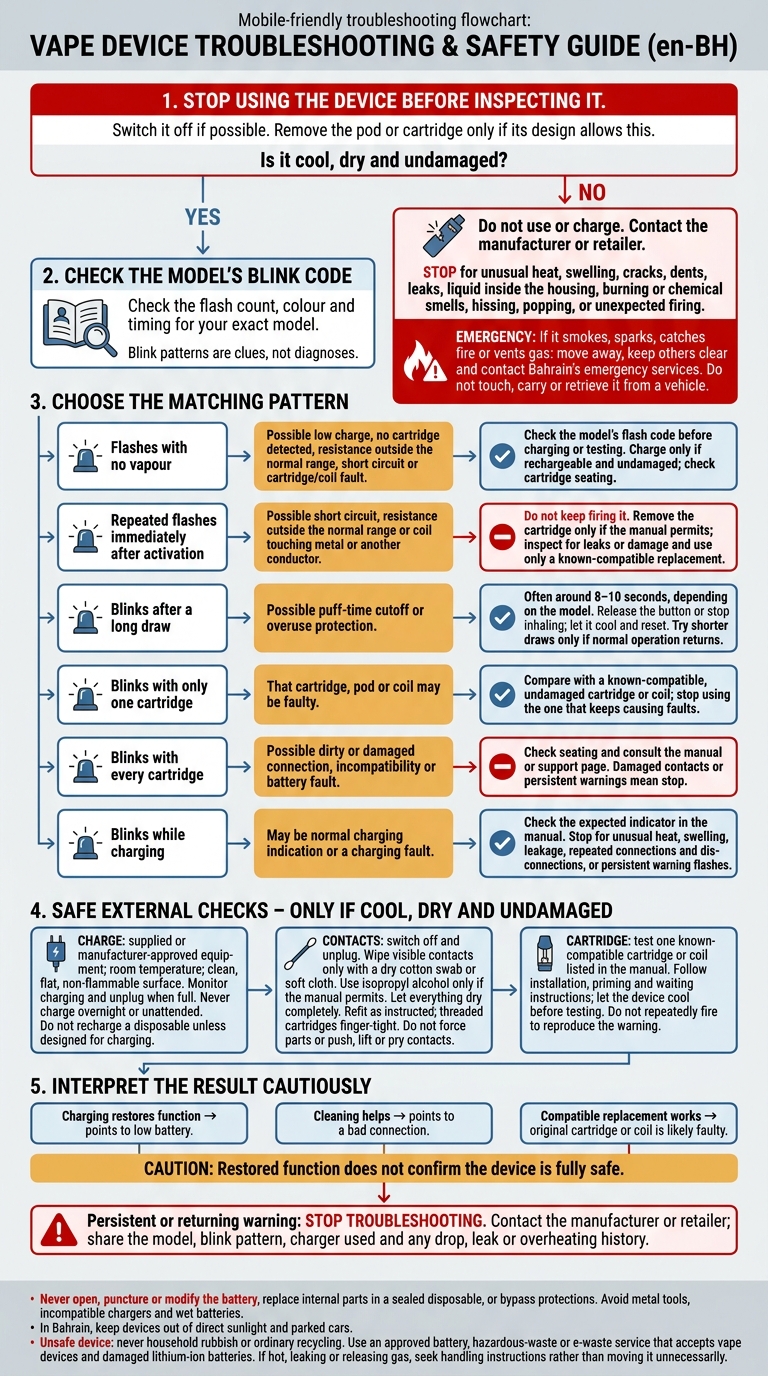
A blinking vape usually points to low charge, a poor connection, a cartridge fault or a safety cutoff. I’d check your model’s manual first: the flash count, colour and timing matter more than the light alone.
Here’s how I’d narrow it down:
- No vapour: Check the blink code before charging or testing a known-compatible cartridge, as outlined in our guide for first-time users.
- After a long draw: It may be a puff cutoff – often around 8–10 seconds, depending on the model. Let it cool.
- With one cartridge only: That cartridge or coil may be faulty. With every cartridge, the connection or battery may be the problem.
- While charging: Check whether the light is normal for your model. Use approved charging equipment and never leave it unattended.
I’d only check charge, clean visible contacts or refit a cartridge if the device is cool, dry and undamaged. In Bahrain, keep it out of direct sunlight and parked cars.
<u>Heat, swelling, leaks, burning smells or unexpected firing mean stop using and charging it.</u> If the fault persists, contact the manufacturer or retailer – not the battery’s internal parts. Use an approved disposal service for an unsafe device, never household rubbish.
Vape Battery Blinking: Safe Checks and Stop Signs
How can I fix my vape pen when it blinks when I hit it?
sbb-itb-837e7ad
Common Blink Patterns and Their Possible Causes
Blink patterns are clues, not diagnoses.
| Observed pattern | Possible cause | What to try | When to stop |
|---|---|---|---|
| Flashes with no vapour | Low charge, no cartridge detected, resistance outside the normal range, short circuit or cartridge/coil fault | Check the model’s flash code; charge only if the device is rechargeable and undamaged; check cartridge seating | Repeated fault flashes, unusual heat, leakage or visible damage |
| Repeated flashes immediately after activation | Short circuit, resistance outside the normal range or a coil touching metal or another conductor | Remove the cartridge if the manual permits, inspect for leaks or damaged parts, and test with a known-compatible cartridge or coil | Do not keep firing it; stop if the warning persists or there is heat, a burning odour or visible damage |
| Blinks after a long draw | Puff-time cutoff or overuse protection | Release the button or stop inhaling, then let the device cool and reset | Continued blinking, unusual heat, automatic firing or a burning smell |
| Blinks with only one cartridge attached | Faulty cartridge, pod or coil | Compare it with a known-compatible, undamaged cartridge or coil | Stop using the cartridge or coil that keeps causing faults |
| Blinks with every cartridge | Dirty or damaged connection, incompatibility or battery fault | Check seating; consult the manual or support page | Damaged contacts or a warning that does not clear after safe checks |
| Blinks while charging | Normal charging indication or charging fault | Check the expected indicator in the manual and use the approved charging setup on a stable, non-flammable surface | Unusual heat, swelling, leakage, repeated connections and disconnections or persistent warning flashes |
Use the pattern to decide what to check next: charge, contacts, cartridge or cable.
Blinking With No Vapour
If the battery lights up but produces no vapour, start with the flash code. Low charge, a short circuit or a cartridge/coil fault may be the cause. Pressing it again will not clear the fault, so check the code before testing again.
Blinking After a Long Draw
Many devices cut power after about 8–10 seconds, but check your model’s limit. Let the device cool and reset. Try shorter draws only if it starts working normally again, and stop using it if the blinking continues.
Blinking Only With a Cartridge Attached
Gently wipe accessible contacts with a dry cotton bud. If the centre contact is recessed or damaged, contact support rather than trying to adjust it with tools. If a different known-compatible cartridge clears the blinking, the original cartridge or coil is likely at fault rather than the battery.
Blinking During Charging
Check the manual for the full-charge signal, monitor charging and unplug the device when it is full. Never charge overnight or leave it charging unattended. Do not recharge a disposable unless its manufacturer designed it for charging. Stop charging immediately if the device repeatedly connects and disconnects.
Next, check the charge, contacts and cartridge fit.
How to Check Charge, Contacts and Cartridges
Check the charge first, then the contacts, then the cartridge.
Check for Damage Before Charging
Stop using the device before inspecting it. Switch it off if possible, and remove the pod or cartridge only if its design allows this.
Check the body, battery area, contacts, port, cable, cartridge and seals for moisture, corrosion, cracks, dents or swelling. Do not charge a wet, damaged or unusually hot device. Stop immediately if it smokes, sparks, smells unusual or makes unusual noises.
If the device is dry and intact, use the supplied or manufacturer-approved charger. Charge at room temperature on a clean, flat, non-flammable surface. In Bahrain, keep it out of direct sunlight and parked vehicles.
Clean Contacts and Refit the Cartridge
With the device switched off and unplugged, safely clean your vape contacts using a dry cotton swab or soft cloth to remove residue. Use isopropyl alcohol only if the manual permits it. Never pour liquid into the device.
Let everything dry completely before refitting the cartridge. Seat the pod fully as shown in the manual, or screw in a threaded cartridge finger-tight. Do not force parts or push, lift or pry the contacts.
Check With a Compatible Cartridge or Coil
Test one cartridge or coil that you know is compatible and that is listed in the manual. Follow all installation, priming and waiting instructions, and let the device cool before testing again.
Do not repeatedly fire the device to reproduce the warning. Never replace internal parts in a sealed disposable.
What the Check Results May Mean
If the device starts working again, that points to the likely fault – it does not confirm that the device is fully safe:
- If charging restores function, the battery was low.
- If cleaning helps, the issue was a bad connection.
- If a known-compatible replacement works, the original cartridge or coil is faulty.
Some models blink when no cartridge is attached, so check the manual first. Do not use metal tools, incompatible chargers or wet batteries. Never open, puncture or modify the battery, or bypass its protections.
If the warning remains after these checks, stop using the device and contact the manufacturer or retailer for support.
When to Stop Using Your Vape
If the blinking returns after you’ve checked the charge, contacts, and cartridges, stop troubleshooting. Stop using the vape immediately if you see swelling, cracks, dents, leaks, or liquid inside the housing. The same applies if you notice unusual heat, burning or chemical smells, hissing, or popping. Stop if the charger, cable, plug, or charging port is damaged, loose, or incompatible.
Unexpected firing is an immediate hazard. If the vape activates by itself or produces vapour unexpectedly, keep it out of pockets and bags, and away from clothing, bedding, and paper. Use its lock function only if you can do so without touching a hot or damaged device. If it smokes, sparks, catches fire, or vents gas, move away, keep others clear, and contact Bahrain’s emergency services. Do not touch it, carry it, or retrieve it from a vehicle.
If none of these warning signs appear but the fault keeps returning, contact the manufacturer or retailer. Share the model, blink pattern, and charger used, and explain whether the problem started after a drop, leak, or overheating.
While waiting for advice, keep a damaged device that is not smoking or heating away from children, pets, moisture, and combustible materials. Follow the manufacturer’s storage limits, and keep it out of parked cars and direct sunlight in Bahrain. If it is leaking, hot, or releasing gas, seek handling instructions rather than moving it unnecessarily.
If the device is unsafe to keep or repair, never put it in household rubbish or ordinary recycling. Take it only to an approved battery, hazardous-waste, or e-waste service that accepts vape devices and damaged lithium-ion batteries.
Conclusion: Check the Blink Code and Act Safely
Start with the blink code – it’s the fastest clue. Check the flash count, colour, and timing for your exact model. Follow the charging, contact, and cartridge checks above only if the device is cool and undamaged.
If the warning clears with one known-compatible pod or cartridge, the original pod or coil is likely faulty. If it doesn’t, the connector, battery, or internal circuit may be responsible.
Don’t bypass the warning or keep testing. If the blinking continues, or you notice unusual heat, swelling, leaking, or a burnt smell, stop using the device and contact the manufacturer or retailer for support.
FAQs
How can I distinguish low charge from a short circuit?
A low battery usually causes blinking – often fast – weak vapour or no heating. These symptoms tend to improve after about 30 minutes of charging with a compatible cable and adaptor. If blinking comes with a burnt plastic or ozone smell, or the device overheats, it may have a short circuit. Stop using it immediately.
If you’re unsure, don’t keep trying to use it. Clean the charging and pod connections first, then charge it. If it still blinks after a full charge, a low battery is less likely to be the cause.
What if my vape’s blink code isn’t in the manual?
Stop using the device immediately to avoid potential safety risks. A blinking light usually points to a low charge, a short circuit, a poor connection or an internal fault.
Clean the contacts with a dry cotton swab, make sure the pod or tank is fully seated, and check the charging port for debris.
If the device still doesn’t respond or keeps blinking, it may have reached the end of its life. Contact VapeShop.bh via WhatsApp: +973 66324432.
Can Bahrain’s heat trigger my vape’s safety cutoff?
Yes. Bahrain’s heat can trigger a device’s safety features or cause it to fail. Thermal protection typically stops the device from firing when its internal temperature reaches 80°C–100°C. Direct sunlight or heat inside a parked car can thin e-liquid, causing leaks that damage sensors and lead to device failure or auto-firing.
If your device feels unusually hot, looks swollen or leaks, stop using it immediately. For help, contact VapeShop.bh via WhatsApp at +973 66324432.
Related Blog Posts
- Why Build Quality Matters in Vaping
- How to Maintain Vape Mods for Peak Performance
- 7 Tips to Extend Vape Battery Life
- Battery Thermal Runaway: Study Summary For Vapers
{“@context”:”https://schema.org”,”@type”:”FAQPage”,”mainEntity”:[{“@type”:”Question”,”name”:”How can I distinguish low charge from a short circuit?”,”acceptedAnswer”:{“@type”:”Answer”,”text”:”A low battery usually causes blinking – often fast – weak vapour or no heating. These symptoms tend to improve after about 30 minutes of charging with a compatible cable and adaptor. If blinking comes with a burnt plastic or ozone smell, or the device overheats, it may have a short circuit. Stop using it immediately. If you’re unsure, don’t keep trying to use it. Clean the charging and pod connections first, then charge it. If it still blinks after a full charge, a low battery is less likely to be the cause.”}},{“@type”:”Question”,”name”:”What if my vape’s blink code isn’t in the manual?”,”acceptedAnswer”:{“@type”:”Answer”,”text”:”Stop using the device immediately to avoid potential safety risks. A blinking light usually points to a low charge, a short circuit, a poor connection or an internal fault. Clean the contacts with a dry cotton swab, make sure the pod or tank is fully seated, and check the charging port for debris. If the device still doesn’t respond or keeps blinking, it may have reached the end of its life. Contact VapeShop.bh via WhatsApp: +973 66324432.”}},{“@type”:”Question”,”name”:”Can Bahrain’s heat trigger my vape’s safety cutoff?”,”acceptedAnswer”:{“@type”:”Answer”,”text”:”Yes. Bahrain’s heat can trigger a device’s safety features or cause it to fail. Thermal protection typically stops the device from firing when its internal temperature reaches 80°C–100°C. Direct sunlight or heat inside a parked car can thin e-liquid, causing leaks that damage sensors and lead to device failure or auto-firing. If your device feels unusually hot, looks swollen or leaks, stop using it immediately. For help, contact VapeShop.bh via WhatsApp at +973 66324432.”}}]}
Frequently Asked Questions
A blinking vape battery can indicate low charge, a cartridge fault, a poor connection or a safety cutoff. Check the model manual for the correct blink code, then inspect the cartridge connection only when the device is cool, dry and undamaged.
Blink codes vary by model, so the number of flashes, colour and timing matter more than the light alone. Use the device manual to identify the meaning before charging or testing a known-compatible cartridge.
Start by checking the blink code, then charge the device according to its manual or test a known-compatible cartridge. If the vape works with no cartridge, the original cartridge or coil may be faulty; if every cartridge causes the same issue, the connection or battery may be affected.
Blinking alone does not identify a specific fault, but heat, swelling, leaks, burning smells or unexpected firing are stop signs. Stop using and charging the device, avoid opening the battery, and use an approved disposal service rather than household rubbish.
If the blinking happens with only one cartridge, that cartridge or its coil may be faulty. Refit or inspect the cartridge only when the device is cool, dry and undamaged, and do not force the connection.
A blinking charging indicator may be normal for the model, so check the manufacturer’s instructions for the expected light behaviour. Use approved charging equipment and never leave the device unattended while charging.
The device may have activated its puff cutoff after a long draw, often around 8–10 seconds depending on the model. Let it cool and try a shorter draw rather than continuing to use it while the device is warm.