

WhatsApp Reviews vs Email Surveys in Vape Sales

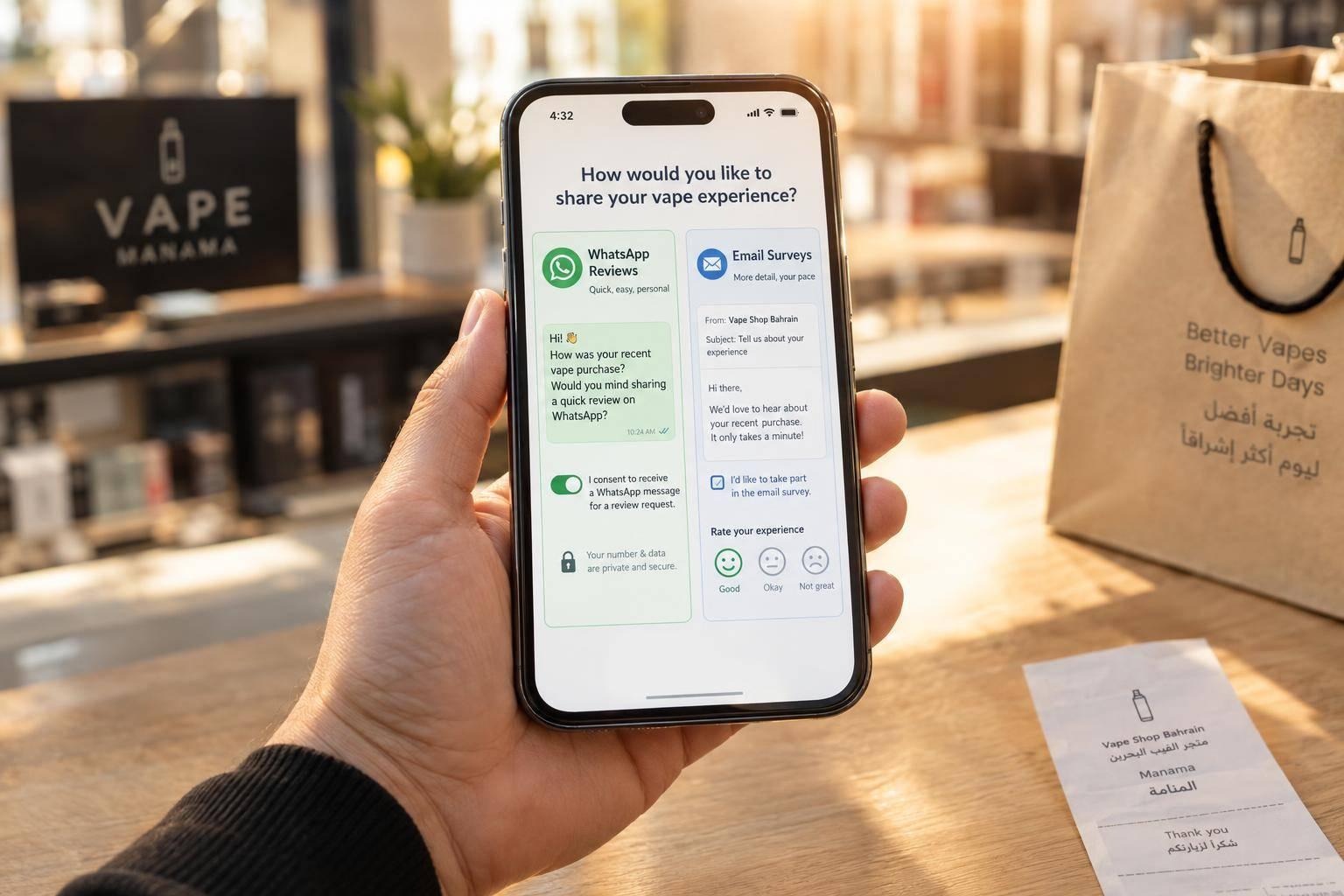
WhatsApp suits a 1–5 service rating and a short comment; email suits longer, structured surveys. For Adult vape customers in Bahrain, use the customer’s chosen channel, get permission before sending and keep requests focused on delivery, order accuracy, packaging and support – not promotions.
Neither channel is proven to get more replies in Bahrain’s vape sector. Compare reply rates, completion, customer effort, comfort, privacy, staff workload and support times – not just response totals.
Quick Comparison
| Criterion | ||
|---|---|---|
| Feedback length | One to three short questions | Longer, structured questionnaires |
| Customer effort | Reply in the chat | Answer in the email or open a form |
| Data quality | Fixed ratings help organise free-text replies | Standard questions make answers easier to compare |
| Comfort and privacy | Personal messages may feel intrusive | More distance, but linked surveys can still identify customers |
| Support speed and workload | Same-thread follow-up needs staff monitoring | Issues need routing to a monitored inbox |
| Reply and completion rates | Depend on timing, consent and question design | Depend on the same factors, plus form steps |
| Repeat-purchase tracking | Use a fixed window, such as 30 days | Use the same window and permission rules |
Keep participation optional, make opting out easy and explain how responses are stored and used. Later orders can show a link with feedback activity, but they do not prove either channel caused another purchase.
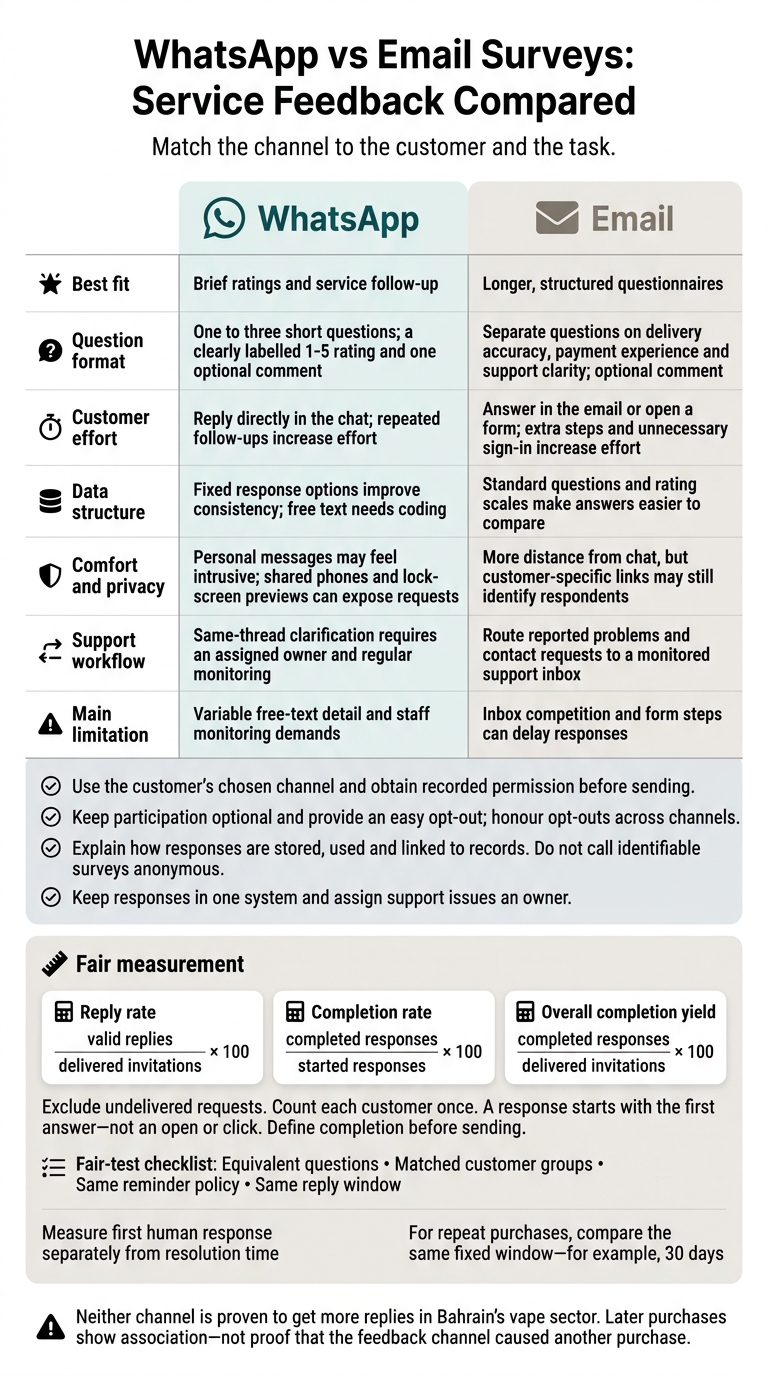
WhatsApp vs Email Surveys: Service Feedback Compared
WhatsApp Reviews vs Email Surveys: Key Differences
For post-delivery vape orders in Bahrain, compare the workflow, not just the channel. Consent, timing and question design all affect the results.
The table below shows how these factors shape response quality in practice.
| Measure | WhatsApp request | Email survey |
|---|---|---|
| Reply and completion rates | Direct replies remove steps, but longer exchanges can lead customers to drop out. | Embedding the first question reduces effort; linked forms add steps. |
| Time to first customer reply | Customers can answer in the chat; notifications and availability affect timing. | Timing depends on inbox habits, filtering and any link or form steps. |
| Customer effort | Low for a rating or short answer; higher with repeated follow-ups. | Low for one question; higher with multi-step forms or logins. |
| Suitable length | One to three quick questions. | Short, structured surveys. |
| Data structure | Free text needs coding; fixed response options improve consistency. | Forms can standardise scales, categories and required fields. |
| Staff workload | Conversations need an assigned owner and regular monitoring. | Staff can process responses in batches, but support issues still need attention. |
| Customer comfort | Familiar for opted-in customers, though messages can be muted or missed. | Gives customers more distance and time to reflect, but emails can land in spam. |
| Support speed | Staff can clarify issues in the same thread when available. | Clear routing helps prevent support issues from being missed in survey results. |
Use the same definitions for both channels before comparing results.
Measuring Reply and Completion Rates
Start with delivered requests, excluding bounced emails and undelivered WhatsApp messages. Count each customer once. A survey starts with the first answer – not an email open or link click. Agree in advance which answers make a response complete.
| Metric | WhatsApp calculation | Email calculation |
|---|---|---|
| Reply rate | Valid replies ÷ delivered requests × 100 | Valid replies ÷ delivered emails × 100 |
| Completion rate | Completed responses ÷ started surveys × 100 | Completed responses ÷ started surveys × 100 |
| Overall completion yield | Completed responses ÷ delivered requests × 100 | Completed responses ÷ delivered emails × 100 |
For a fair test, use equivalent questions, matched customer groups, the same reminder policy and the same reply window. Send requests at a consistent point, such as 24–48 hours after confirmed delivery.
Record disposable vape categories, language and existing support issues alongside sample size. Do not present benchmark figures as Bahrain vape-sector averages.
Track reply quality and completion alongside later orders to see which channel works best for follow-up.
Strengths and Limits of Each Channel
| Area | ||
|---|---|---|
| Main strength | Quick, conversational replies. | Standardised responses that staff can review. |
| Main limit | Contact through a personal channel can feel intrusive; free-text detail varies. | Inbox competition and form steps can delay responses. |
| Setup that matters | Fixed rating options, assigned staff and clear handover rules. | Mobile-friendly forms, an obvious survey link and monitored support routing. |
These differences affect how quickly staff handle support and how clearly the business can track repeat purchases.
Measure staff acknowledgement time separately from resolution time. A receipt does not mean an issue is resolved.
For repeat-purchase analysis, link feedback to a privacy-conscious order identifier. Track later orders over a fixed period, such as 30, 60 or 90 days. This shows an association – not proof that the channel caused another purchase.
Get separate permission before publishing any quote, rating, name or image.
sbb-itb-837e7ad
WhatsApp: Brief Ratings and Service Follow-Up
For same-day Bahrain orders, use WhatsApp for a one-tap rating and prompt service follow-up, not a long form. Ask only after the customer opts in, and record the date, channel and scope of permission. Keep feedback requests separate from delivery and payment messages. Leave out offers and product recommendations.
Simple Questions and Chat Privacy
Ask for one number on a clearly labelled 1–5 scale, followed by one optional comment. Use plain English or the customer’s preferred language. Make participation voluntary and include a simple opt-out instruction:
Reply STOP to opt out.
Honour opt-outs across channels without asking for a reason.
Keep messages discreet. Leave out product names, nicotine strengths, addresses and payment details. On a shared phone or lock-screen preview, even a short request could make a customer uncomfortable. Respect any preference not to discuss orders in chat, and verify the customer before sharing order information.
Handling Issues and Keeping Records
Send delivery or BenefitPay problems reported through WhatsApp feedback to support rather than handling them in the survey. Acknowledge receipt, assign an owner and explain the next step. Never ask for passwords, verification codes or payment details. Keep a support route open even if the customer declines to give feedback.
Store the rating, comment, issue type, order reference and owner in one record. Use Bahrain-time timestamps for the automated acknowledgement, first human reply and resolution. Restrict access, set retention rules and keep chats off personal devices.
Use email when the same feedback needs more structure and clearer comparison.
Email: Detailed Surveys and Structured Feedback
WhatsApp suits quick replies; email works better for structured answers. Use a post-purchase email to collect feedback outside chat, with one clear button linking to a rating page or questionnaire. Tell customers whether their responses are linked to their order or customer record. A customer-specific link can identify an order even without sign-in. Explain that this helps staff investigate issues and follow up. Do not call the survey anonymous if staff can identify the customer.
Survey Length and Ease of Use
Keep the questionnaire mobile-friendly, with a single-column layout, large answer controls and no unnecessary sign-in. Ask separate questions about delivery accuracy, payment experience and support clarity, then offer an optional comment field. Use pilot testing to give customers a realistic completion time.
Require only the answers you need. Questions that do not apply to the customer’s order should be optional. Extra mandatory fields can lead customers to abandon the survey or guess answers, reducing data quality.
Timing and participation also affect results. Delayed invitations can make details harder to recall, while very satisfied or very dissatisfied customers may be more likely to reply. Report response counts and rates alongside scores, rather than presenting the results as the views of every customer in Bahrain.
Routing Support Requests and Checking Data
Email surveys help teams review service when reported issues reach the right staff. Route low ratings, reported problems and contact requests to a monitored support inbox. Set a one-business-day acknowledgement target, and make clear that this is not a deadline for resolving the issue. Add a direct support route to the confirmation page so customers with urgent issues do not have to wait for survey processing.
Use the same rating scales and problem types across WhatsApp and email. Before comparing results, check skipped answers and completion rates: differences in question length and customer groups can affect scores.
Avoid collecting unnecessary demographic details, health information or nicotine-use history. Keep service feedback separate from marketing consent. Link responses to order records only when customers have been informed and the link is needed.
Setting Up Feedback in Bahrain
Before sending a service feedback request in Bahrain, require confirmed delivery, age verification where needed and recorded consent. Once the customer chooses a channel, the workflow determines whether the feedback is usable.
Record the consent date, source, wording and channel. An order contact number is not permission to request feedback. Keep feedback consent separate from marketing consent.
The privacy notice should state what data you collect, its service-only purpose, which staff can access it and how long you keep it. Give support staff the case details they need and analysts pseudonymised records. Restrict exports and control access through individual logins.
Set a deadline for deletion or anonymisation based on the data’s purpose. Document any exceptions for unresolved complaints or legal duties.
Timing Requests and Respecting Preferences
Send one invitation through the customer’s chosen channel within 24 hours of confirmed delivery, during daytime hours. Adjust for prayer times, Ramadan and public holidays without assuming the customer is available.
Create one feedback record per order. Store the order ID, delivery timestamp, channel, request status and opt-out status. Check this record before every send, and use an order-ID plus campaign-ID key to block duplicates.
Offer a STOP reply option or an email unsubscribe route. When requested, promptly stop requests across both channels. Keep only the minimum record needed to prevent further contact.
Tracking Service Results and Repeat Purchases
Apply the same reporting window, permission rules and measure definitions to both channels before comparing results. Explain that channel preferences and customers’ tendency to reply can skew the findings. Track repeat purchases only with appropriate permission.
| Measure | Definition for both channels | Comparison safeguard |
|---|---|---|
| Delivered invitations | Invitations confirmed as delivered | Exclude failures; delivery does not prove reading |
| Reply rate | Distinct respondents ÷ delivered invitations × 100 | Count replies or submissions, not opens or clicks |
| Completion rate | Completed responses ÷ started responses × 100 | A response starts with the first answer; define completion before sending |
| Median first human response | Time from support request to staff reply | Exclude automated acknowledgements |
| Median resolution time | Time from issue opening to documented closure | Use identical business-hour rules; report unresolved cases |
| Opt-outs | Count and rate per delivered invitation | Record channel-specific suppression and suppression across channels |
| Feedback-related complaints | Count and rate per delivered invitation | Apply the same complaint categories |
| Repeat purchases | Eligible customers ordering again within 30 days | Report the same 30-day window for both groups and note selection bias |
Conclusion: Match the Channel to the Customer and Task
WhatsApp works best for brief feedback; email suits detailed questionnaires. Start with the customer’s preference, then match the channel to the task. More replies don’t automatically mean better data, faster resolution or more repeat purchases.
Use this rule of thumb:
| Task | Better fit | Best use |
|---|---|---|
| Short ratings | Ask for a 1–5 rating, with an optional comment. | |
| Detailed surveys | Use structured questions and say how long completion takes. | |
| Issue handling | WhatsApp for acknowledgement; email for formal detail | Assign one owner and log the outcome. A quick reply does not mean the issue is resolved. |
| Shared records | Both channels | Keep all responses in one system. |
| Repeat purchases | Either | Use the same follow-up window and compare like with like. |
FAQs
How many responses make a channel comparison reliable?
There’s no single threshold for statistical significance, but a handful of responses gives only a limited view. Hundreds of responses, such as the 600-plus reviews referenced for VapeShop.bh, offer a broader, more reliable picture across order sizes, delivery locations and customer needs. A larger pool makes it easier to spot consistent day-to-day trends rather than isolated experiences or short-term spikes in feedback.
How can I compare results without ignoring customer preferences?
Use WhatsApp Business labels to group customers by purchase behaviour or product type. This keeps feedback requests relevant to their interests. Collect satisfaction ratings with quick-reply buttons, and use voice notes for more detailed feedback.
Tag responses by theme, such as delivery speed or flavour issues, to spot recurring patterns across customer groups. Give each person’s feedback due care, and keep requests conversational without being pushy.
How can I test whether feedback improves repeat purchases?
Use WhatsApp labels to group new customers, repeat buyers and feedback providers. Connect feedback to purchase history in your CRM, then compare repeat purchase rates between customers who gave feedback and those who didn’t.
Aim to resolve 90% of feedback tickets within 24–48 hours. Tell customers what you’ve improved based on their feedback, and review repeat purchase rates and Net Promoter Scores (NPS) weekly or fortnightly.
Related Blog Posts
- How to Use WhatsApp for Customer Feedback
- Gender Gaps in Bahrain Vaping Habits
- How WhatsApp Cuts Vape Order Mistakes
- Late Night Vape Orders on WhatsApp
{“@context”:”https://schema.org”,”@type”:”FAQPage”,”mainEntity”:[{“@type”:”Question”,”name”:”How many responses make a channel comparison reliable?”,”acceptedAnswer”:{“@type”:”Answer”,”text”:”There’s no single threshold for statistical significance, but a handful of responses gives only a limited view. Hundreds of responses, such as the 600-plus reviews referenced for VapeShop.bh, offer a broader, more reliable picture across order sizes, delivery locations and customer needs. A larger pool makes it easier to spot consistent day-to-day trends rather than isolated experiences or short-term spikes in feedback.”}},{“@type”:”Question”,”name”:”How can I compare results without ignoring customer preferences?”,”acceptedAnswer”:{“@type”:”Answer”,”text”:”Use WhatsApp Business labels to group customers by purchase behaviour or product type. This keeps feedback requests relevant to their interests. Collect satisfaction ratings with quick-reply buttons, and use voice notes for more detailed feedback. Tag responses by theme, such as delivery speed or flavour issues, to spot recurring patterns across customer groups. Give each person’s feedback due care, and keep requests conversational without being pushy.”}},{“@type”:”Question”,”name”:”How can I test whether feedback improves repeat purchases?”,”acceptedAnswer”:{“@type”:”Answer”,”text”:”Use WhatsApp labels to group new customers, repeat buyers and feedback providers. Connect feedback to purchase history in your CRM, then compare repeat purchase rates between customers who gave feedback and those who didn’t. Aim to resolve 90% of feedback tickets within 24–48 hours. Tell customers what you’ve improved based on their feedback, and review repeat purchase rates and Net Promoter Scores (NPS) weekly or fortnightly.”}}]}
Frequently Asked Questions
WhatsApp suits a 1–5 service rating and one short comment, while email works better for longer, structured questionnaires. Neither channel is proven to receive more replies in Bahrain’s vape sector, so compare reply rates, completion, customer effort, privacy and staff workload.
Keep the request focused on delivery, order accuracy, packaging and support rather than promotions. Questions should remain short and participation should be optional, with an easy way to opt out.
WhatsApp lets customers reply directly in the chat, making it suitable for one to three short questions or a service rating. A same-thread follow-up still requires staff monitoring so support issues are handled promptly.
Email is suited to longer, structured surveys where standard questions make responses easier to compare. Customers may need to answer within the email or open a form, which adds more effort than replying in a chat.
Reply and completion rates depend on timing, customer consent and question design, not only the channel. For Bahrain vape feedback, measure both channels using the same criteria instead of assuming WhatsApp or email will perform better.
Use the customer’s chosen channel and get permission before sending a survey request. Explain how responses are stored and used, keep participation optional, and make opting out straightforward.
WhatsApp replies can stay in the conversation, but they need a monitored support workflow for follow-up. Email survey issues should route to a monitored inbox, with the same 30-day window and permission rules used when comparing repeat purchases.