
7 Signs Vape Battery Needs Replacement


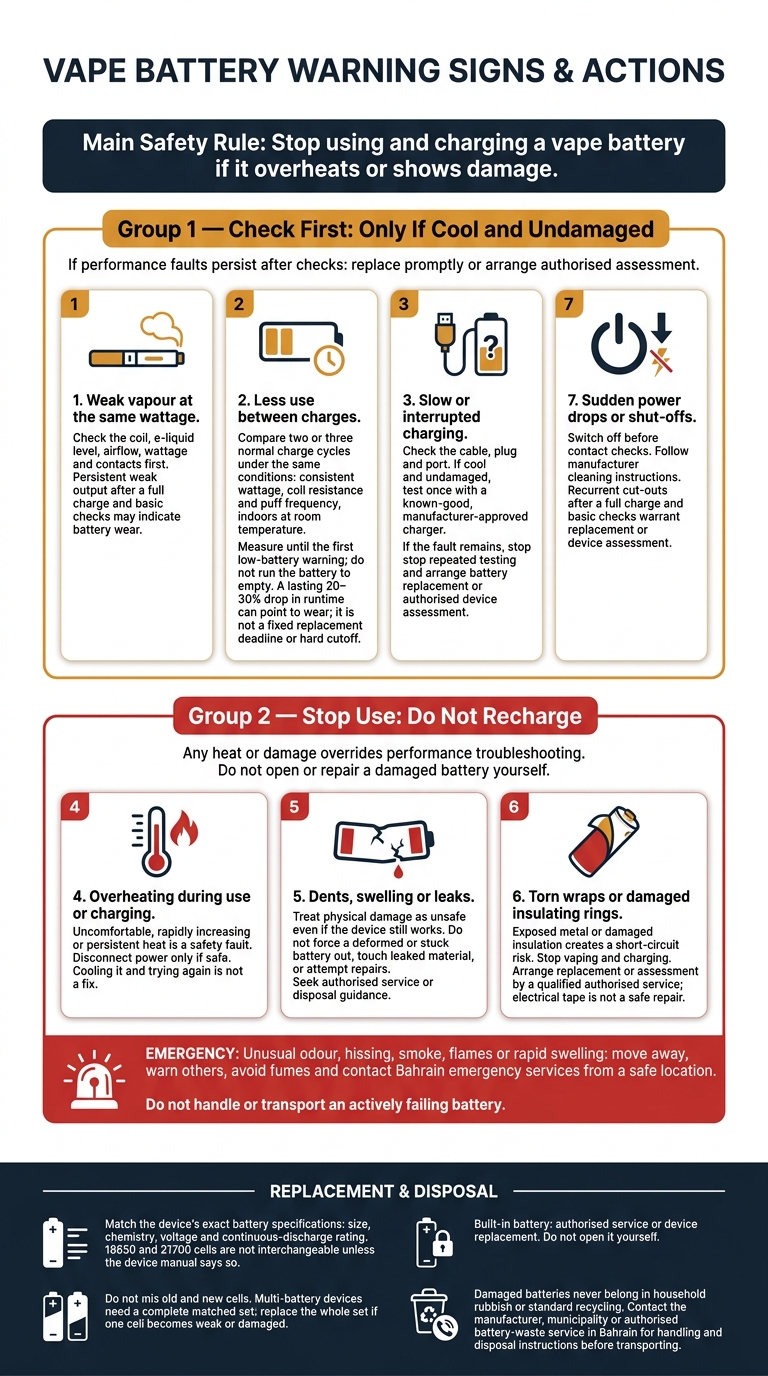
My first rule: stop using and charging a vape battery if it overheats or shows damage. For weak output or charging trouble, I check the coil, settings, contacts and approved charger or follow an essential maintenance guide before replacing it.
These are the 7 signs I watch for:
- Weak vapour at the same wattage.
- Less use between charges.
- Slow or interrupted charging.
- Overheating during use or charging.
- Dents, swelling or leaks.
- Torn wraps or damaged insulating rings.
- Sudden power drops or shut-offs.
A lasting 20–30% drop in runtime under the same conditions can point to wear – not a fixed replacement deadline. But heat, swelling, leaks or damaged insulation mean <u>stop use, not more testing</u>.
In Bahrain, I keep batteries out of direct sunlight and parked cars. If replacement is needed, I match the device’s exact battery specifications, use authorised service for built-in batteries, and seek local battery-waste guidance. Damaged batteries never belong in household rubbish.
7 Vape Battery Warning Signs: Check or Stop?
Check Your Device Before Replacing the Battery
Weak vapour doesn’t always mean the battery needs replacing. If the battery isn’t hot and has no physical damage, check the coil, e-liquid level, airflow and wattage first. Look for a burnt coil, heavy residue or blocked airflow. Make sure the wattage stays within the manufacturer’s recommended range. If output remains weak, the signs below may point to battery wear.
For charging problems, check the cable, plug and port. Use only manufacturer-approved charging equipment and replace anything loose or damaged. Clean dirty connections only as the manufacturer allows.
Turn off and disconnect the device before checking battery contacts. If the manufacturer permits cleaning, use a dry, lint-free cloth.
For removable cells, match the exact type, size, polarity and rating specified by the manufacturer. Don’t mix old and new cells or cells with different capacities. Keep spare cells in a battery case for safety.
In Bahrain, keep the device out of direct sunlight and never leave it in a parked vehicle. If it has become hot, let it cool indoors before checking it.
If the problem remains after these checks, look for the battery-wear warning signs below.
sbb-itb-837e7ad
1. Weak Vapour at the Same Wattage
Symptoms to Watch
Watch for repeated weak vapour at your usual wattage, slower ramp-up, less dense vapour or inconsistent firing. A single weak puff doesn’t confirm a battery problem. But if it keeps happening, especially just after a full charge, it deserves attention.
Possible Battery Cause
If those checks show no other issue, persistent weakness may point to voltage sag: a drop in battery voltage under load. A worn cell may struggle to supply steady power, even when the charge indicator looks normal.
Safe Checks
If the battery is cool and physically sound, fully charge it. Then test again at your usual wattage with a known-good coil or pod. If vapour returns to normal, low charge may have been the cause.
When Replacement Makes Sense
Replace the battery if weak output returns after a full charge, or if it comes with rapid discharge, misfires or shut-offs. If your device has an internal battery, contact the manufacturer or an authorised service provider. Don’t open the device yourself.
2. Less Use Between Charges
If vapour stays normal but the battery runs out sooner, the cell may be losing capacity.
Symptoms to Watch
Earlier recharges, fewer puffs or a battery gauge that drops faster than usual can point to capacity loss, rather than a single short session.
Possible Battery Cause
Lithium-ion cells lose capacity over time, and heat speeds up that loss. First, rule out higher wattage, a lower-resistance coil or heavier use. Cold can temporarily shorten runtime, while heat in a parked car in Bahrain speeds up battery wear.
Safe Checks
If the battery is undamaged and cool, compare two or three normal charge cycles under the same conditions. Keep wattage, coil resistance and puff frequency consistent.
Test indoors at room temperature. Record the time or puff count from a full charge to the first low-battery warning – do not run the battery to empty. Use the manufacturer-approved charger and monitor charging and follow vape safety tips to prevent incidents.
When Replacement Makes Sense
A persistent 20–30% drop in runtime under the same conditions is a strong sign that replacement makes sense, not a hard cutoff. Stop using and charging the battery immediately if shorter runtime comes with swelling, leakage, unusual heat or other physical damage. For a built-in battery, use manufacturer-approved service or replace the device.
If runtime is fine but charging becomes erratic, move to the next warning sign.
3. Slow or Interrupted Charging
If vapour remains normal but charging becomes erratic, the fault is usually in the battery or charging path.
Symptoms to Watch
Charging may take longer, cut in and out, or stop before the battery is full. Compare it with your device’s normal behaviour, as charging times vary by model.
Possible Causes
Battery wear increases resistance. A loose cable, incorrect adapter or damaged port can also disrupt charging. A worn battery cell and a damaged charging path can show the same symptoms.
If charging only works when the cable sits at a certain angle, the connection is likely damaged. Stop using that charger.
Safe Checks
If the battery is cool and undamaged, test it once with a known-good, manufacturer-approved charger.
Some warmth is normal; increasing heat is not. If the device gets hotter, stop charging, disconnect the power if safe, and place it on a non-flammable surface. Do not charge in direct sunlight or a hot vehicle, and never leave it charging unattended.
When Replacement Makes Sense
If the fault remains after that one safe check, stop repeated testing. Replace a degraded removable battery, or arrange an authorised repair for a faulty port or charging circuit. Any replacement battery must match the manufacturer’s specifications.
For a built-in battery, arrange authorised service or replace the device. Do not open it yourself.
If charging also causes unusual heat, move to the overheating warning sign.
4. Overheating During Use or Charging
If the battery gets hot during use or charging, treat it as a safety fault, not normal wear.
Symptoms to Watch
Mild warmth is normal. Heat that feels uncomfortable, builds quickly, or stays after use is not. Stop testing the battery if you notice swelling, odour, hissing, smoke, leaks, or repeated shut-offs.
This heat usually points to damage, a charging problem, or overload.
Possible Causes
A damaged cell, internal short, torn wrap, faulty charger or cable, blocked vents, overcharging, or sustained high wattage can all cause overheating. In Bahrain’s heat, keep the device somewhere cool and dry, away from sunlight, and within the manufacturer’s temperature limits.
Safe Action
Stop using or charging it immediately. If it overheats while charging, disconnect it only if you can do so safely. Switch it off if possible, without touching a dangerously hot unit. Do not open, shake, or puncture it.
If it smokes, swells quickly, makes loud noises, or shows fire, leave the area and contact Bahrain emergency services.
When Replacement Makes Sense
Stop using the battery if it overheats during normal use, overheats repeatedly, or gets hot alongside visible damage. For a removable battery, use a replacement with the exact compatible type and specification. For a built-in battery, arrange authorised service or replace the device.
Cooling it and trying again is not a fix. Cooling can hide the fault. The next use or charge could trigger thermal runaway – a self-heating chain reaction that can cause fire.
If you also notice dents, swelling, or leaks, move to the physical-damage warning next.
5. Dents, Swelling or Leaks
Symptoms to Watch
Dents, cracks, bulges, liquid residue, corrosion and unusual discolouration are signs of damage, not normal ageing. A back cover that no longer sits flush, or a battery that becomes harder to remove, may also point to swelling. Unlike shorter runtime or weaker vapour, these signs call for immediate action. Treat the battery as unsafe, even if the vape still works.
Possible Causes
A hard drop or crushing force can damage the cell’s separator or internal layers and cause an internal short. Swelling means gas has built up as chemicals break down, creating a fire hazard. Liquid exposure can also leave corrosion, staining or residue.
Safe Action
Physical damage is a safety fault, not a performance problem. Stop using and charging the battery immediately: its casing or cell is already damaged. Disconnect it only if you can do so safely. Do not touch leaked material with bare hands or try to wipe, wash or scrape it off.
Do not puncture, open, crush, bend or attempt to repair the battery. Never force a deformed battery into or out of the device, or use metal tools to pry it out.
If it is stuck, leave it in place and contact the manufacturer or a battery-waste service.
When Replacement Makes Sense
Replace the battery immediately if you notice dents, swelling, leaks, corrosion or structural damage. Do not charge it again. Use only the battery type and specifications approved for your vape. If the battery is built in, use an authorised service or replace the whole vape mod. Do not open the casing yourself.
Do not put a damaged battery in household rubbish or standard recycling bins. In Bahrain, contact your municipality, an authorised hazardous-waste or battery-recycling service, or the manufacturer for current disposal instructions.
6. Torn Wraps or Damaged Insulating Rings
Symptoms to Watch
A battery can look free of dents or swelling and still be unsafe if its insulation is damaged. Before using removable cells, check for nicks, peeling wrap or exposed metal. Check the insulating ring around the positive terminal too: it must not be cracked, loose, displaced or missing. Stop using the battery immediately if you find any tear.
Possible Causes
Friction when inserting or removing a battery, rough handling, and contact with keys or coins can damage the wrap. This damage can expose metal and create a short-circuit risk.
Safe Action
Stop vaping and charging immediately. Remove the cell only if it is cool, stable and slides out without force. Store it on its own in a rigid, non-conductive vape battery case, away from metal objects. If it is hot, swollen, smoking or hissing, do not handle it.
When Replacement Makes Sense
Replace the battery before using the vape again if the wrap is torn or the insulating ring is damaged. Electrical tape is not a safe repair. Replace the battery, or have it rewrapped only through a qualified service authorised to do so. Match the approved size, chemistry, voltage and continuous-discharge rating.
If the battery still cuts out after a visual check, the next warning sign is sudden power loss.
7. Sudden Power Drops or Shut-Offs
Symptoms to Watch
Look for sharp drops in the battery gauge, pulsing vapour or low-battery warnings soon after charging. A single cut-out may be down to a loose connection or an inaccurate gauge. Repeated shut-offs during a draw need checking.
Possible Causes
A battery can look fine but still struggle under load. A worn cell may suffer a voltage drop that triggers a protection cut-off. Dirty contacts or a loose battery door can also interrupt power.
Safe Checks
Switch the device off. Only remove a user-replaceable battery if it is cool and undamaged. Check for dirt, e-liquid residue, loose contacts and a loose battery door. Follow the manufacturer’s cleaning instructions.
If safe, test with a manufacturer-approved charger and a known-good battery of the correct type and rating. Do not mix old and new cells in multi-battery devices. If the cut-outs continue after these checks, replacement is more likely to be needed than further use.
When Replacement Makes Sense
Replace the battery if cut-outs recur after a full charge and basic contact checks. Match the size, chemistry and discharge rating to your device – not just the capacity.
Stop use and charging immediately if the interruptions come with excessive heat or visible damage. Do not test with another battery. Seek authorised service or disposal guidance.
When to Check and When to Stop Use
If the earlier checks did not fix the problem, use this section to decide whether the battery is still safe to use.
Performance problems may need checking. Heat, swelling, leaks or exposed metal mean stop using the battery.
| Warning sign | Likely meaning | Immediate action | Action |
|---|---|---|---|
| Weak vapour or shorter runtime | Battery wear or contact issue | Pause use and complete the earlier device checks | Check first |
| Slow charging or occasional power drops | Battery, cable, port or charger fault | Check only if cool and undamaged, using approved charging equipment | Check first |
| Performance faults persist after checks | Battery wear or device fault | Stop repeated testing; arrange replacement or a device assessment | Replace promptly |
| Excessive heat during use or charging | Internal damage | Disconnect power only if safe | Stop use. Do not recharge. |
| Swelling, dents or leaks | Physical damage | Seek authorised service or disposal guidance | Stop use. Do not recharge. |
| Torn wrap, damaged insulating ring or exposed metal | Insulation failure | Arrange replacement or an authorised assessment | Stop use. Do not recharge. |
| Unusual odour, hissing, smoke or flames | Possible venting or battery fire | Move away, warn others and call emergency services | Emergency – do not reuse |
These warning signs matter more than the battery gauge or remaining charge. Do not open, remove or repair a damaged battery yourself. Move a cool, stable device away from flammable materials only if you can do so without touching or disturbing the damaged cell. Keep it away from children and pets.
Do not touch a battery that is actively failing or try to cool it with water, sand or a freezer. If it smokes or catches fire, move away, warn others and avoid the fumes. Contact Bahrain emergency services from a safe location. Do not try to extinguish it yourself: a lithium-ion battery can reignite after the fire appears to be out.
In Bahrain, keep batteries out of parked cars and direct sunlight. Charge in a cool, dry, well-ventilated place on a clear surface – not a bed or sofa. Do not charge below 0°C or above 40°C, and follow any stricter limits set by the manufacturer. Before replacing or disposing of a damaged battery, get handling instructions from the manufacturer, an authorised service provider or a hazardous-waste provider.
If the battery needs replacing rather than further checks, match the new battery to the device specification in the next section.
Choosing a Replacement Battery in Bahrain
When it’s time to replace the battery, match it to your device’s exact requirements. Check the device model in the manual or on the manufacturer’s website, then confirm the cell size, terminal type, chemistry, voltage range and charging method. 18650 and 21700 cells are not interchangeable unless the device manual says so. Never force a cell into the compartment. Use an adapter only if the manufacturer approves it.
Choose a battery with a verified continuous discharge rating (A) that meets your device’s needs. Ignore pulse or maximum claims unless the continuous rating is also listed. A higher mAh rating doesn’t make a battery safer or better suited to high-wattage use. Ask the supplier for the cell’s exact brand, model and specifications – don’t choose by wrapper colour.
Multi-battery mods need cells that age together. Buy a complete matched set with the same brand, model, capacity and age. Label them as a set, and don’t mix them with other cells. If one cell becomes weaker or damaged, replace the whole set to keep wear balanced.
For a built-in battery, check whether the device supports authorised battery replacement. Use an authorised service provider, or replace the device.
Before ordering from VapeShop.bh, send staff your exact device model by WhatsApp. They can confirm battery compatibility, charger type and current pricing – don’t guess from appearance.
Disposing of Damaged Batteries Safely
Stop using a battery if it is swollen, leaking, hot or otherwise damaged, and arrange safe disposal. Never put it in household rubbish or standard recycling. Crushing a damaged lithium-ion battery can cause a short circuit or fire. Even an ‘empty’ cell can still hold enough charge to cause harm.
Contact an authorised battery-recycling or hazardous-waste service in Bahrain before transporting it. Your municipality or vape device manufacturer may help you find one. Describe any visible damage or warning signs, check that the service accepts damaged lithium-ion batteries, and ask about collection, drop-off and packaging requirements. Ordinary battery bins may not accept damaged cells.
Do not use or charge the battery while you wait. If it is cool and stable, leave it isolated and untouched, away from children, pets, sunlight, flammable materials and metal objects. Follow the service’s packaging instructions. Do not improvise packaging for a swollen, leaking, hot or unstable cell, or open, puncture, crush or try to discharge it.
Do not transport a hot, smoking, hissing, heavily leaking or unstable battery. Move people away, avoid the fumes and call Bahrain emergency services. Tell responders that a lithium-ion vape battery is involved.
Conclusion
Persistent weak vapour, shorter runtime, slow charging or power drops warrant replacement only if troubleshooting fails to fix them.
If you notice overheating, swelling, dents, leaks, torn wraps or damaged insulating rings, stop using and charging the battery immediately.
Match the replacement to the device’s exact battery type, size, voltage and discharge rating. Do not mix old and new cells. Built-in batteries need authorised service.
Dispose of the old battery through an authorised battery-recycling or hazardous-waste route in Bahrain. Replace an unsafe battery now.
FAQs
How long should my vape battery last in Bahrain’s heat?
In Bahrain’s heat above 40°C, your battery discharges 22% faster than in cooler conditions. Heat increases internal resistance and can trigger safety cut-offs or cause permanent damage, including swelling or venting.
Keep your device in a cool, air-conditioned space – not in a parked car or direct sunlight. If it feels unusually hot or shows signs of deterioration, it’s time to get a replacement from VapeShop.bh.
Can a full battery indicator hide battery wear?
Yes. A full-charge reading doesn’t rule out battery wear. Even if the screen or LED shows a full charge, weak vapour, thinner clouds or a burnt taste may point to a worn battery. It may no longer hold the voltage needed to heat the coil efficiently.
If cloud density or performance stays low despite a full charge, that’s a reliable sign that the battery or device needs replacing.
Should I replace my battery after dropping my vape?
Yes – if you notice safety warning signs such as unusual heat, swelling, cracks, dents, leaks, or a burnt or chemical smell, stop using it immediately. Don’t charge it if it seems damaged.
If it only feels weak and blinks, let it cool down first. Then try recharging it properly or cleaning the charging contacts. If the problem continues after these safe checks, don’t keep testing it.
Related Blog Posts
- Why Build Quality Matters in Vaping
- Vape Battery Storage Guide: Heat, Charge, Cases
- Battery Thermal Runaway: Study Summary For Vapers
- Vape Battery Blinks: What It Means
Frequently Asked Questions
Signs include weak vapour at the same wattage, shorter use between charges, slow or interrupted charging, sudden power drops and unexpected shut-offs. A lasting 20–30% runtime decrease under the same conditions can indicate wear, but weak vapour may also come from the coil, e-liquid level, airflow or wattage.
Stop using and charging the battery immediately if it overheats, swells, leaks or has physical damage. Dents, torn wraps and damaged insulating rings are safety warnings, not issues to test further.
Battery overheating during use or charging is one of the signs that the battery may be unsafe. Stop using and charging it, keep it away from direct sunlight and parked cars, and seek local battery-waste guidance if it is damaged.
Weak vapour does not always mean the battery needs replacement. If the battery is cool and undamaged, check the coil, e-liquid level, airflow, wattage, contacts and approved charger before replacing it.
Look for torn wraps or damaged insulating rings around the battery. Damaged insulation means stop using and charging the battery rather than continuing to test it.
A damaged lithium-ion battery should not be placed in household rubbish. Keep using local battery-waste guidance, and stop using or charging the battery if it is hot, swollen, leaking or physically damaged.
Damaged batteries never belong in household rubbish, so seek local battery-waste guidance for disposal. If a replacement is needed, match the device’s exact battery specifications, and use authorised service for built-in batteries.