Pod Coil Connection Errors: Ultimate Guide


A “No Atomizer” warning does not always mean the coil needs replacing. Switch off the device, let it cool, then check that the pod and coil match the model, fit correctly and have clean, dry contacts.
- Check the warning: “Atomizer Low” can mean unsupported resistance; “Atomizer Short” means stop firing and leave the device unused until checked.
- Clean before replacing: Wipe accessible contacts with a dry, lint-free cloth. Do not force pins or use metal tools.
- Test only when safe: If the device is cool, dry and undamaged, try 1 known-compatible coil or pod. A failed built-in coil means replacing the cartridge.
- Know when to stop: Repeated errors, unstable resistance, unusual heat, damaged contacts or suspected liquid inside the device call for manufacturer or retailer support – not more firing tests.
To help prevent repeat faults, address leaks, avoid overfilling and keep the device out of hot cars in Bahrain. Check the exact pod generation, coil series and resistance before ordering replacement parts.
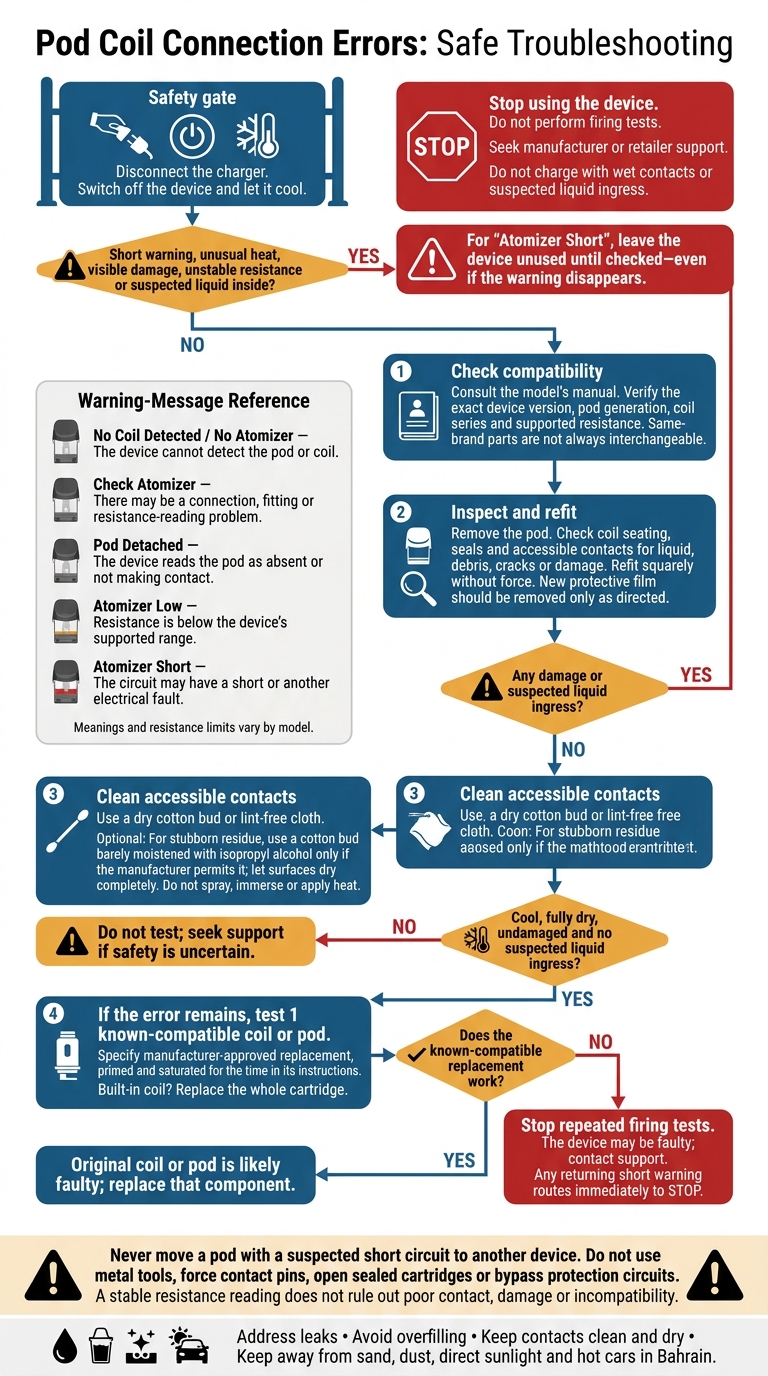
Pod Coil Connection Errors: Safe Troubleshooting Flowchart
Coil Connection Warnings and Causes
Pod warnings usually mean the device cannot read the coil correctly. It sends a small test current through the coil contacts and measures resistance in ohms (Ω). A stable reading shows that the device detects the coil, but does not rule out poor contact, damage or incompatibility.
What Coil Warning Messages Mean
Start with the exact warning message and your model’s manual. Check the model and its approved coil range before matching the warning to a likely fault. This is a critical step in any guide for first-time vaping setup. Resistance limits and protection behaviour vary between devices.
| Warning | Likely meaning | First safe check |
|---|---|---|
| No Coil Detected / No Atomizer | The device cannot detect the pod or coil. | Switch off the device, reseat the pod or coil, and inspect the contacts. |
| Check Atomizer | There may be a connection, fitting or resistance-reading problem. | Switch off the device and check the contacts for liquid or debris. |
| Pod Detached | The device reads the pod as absent or not making contact. | Remove and refit the pod without forcing it. |
| Atomizer Short | The circuit may have a short or another electrical fault. | Stop firing immediately, remove the pod, and check for liquid, damage or an incorrect coil. |
| Atomizer Low | Resistance is below the device’s supported range. | Check coil compatibility and performance and use a resistance supported by the manufacturer. |
After an “Atomizer Short” warning, leave the device unused until it has been checked. Do not keep firing it.
If the warning suggests dirt, moisture or a loose fit, check and clean the contacts before replacing parts.
Symptoms and Possible Faults
When the error appears – and whether it repeats – can help you decide what to check. These patterns are not a diagnosis: each symptom can have more than one cause.
| Symptom | Possible causes to investigate |
|---|---|
| Error immediately after installation | Incorrect coil type, incomplete seating, a protective sticker left on the base, incompatible resistance or dirty contacts. |
| Recognition returns briefly after reseating | Loose pod fit, residue, worn pod contacts or a recessed contact pin. |
| Resistance fluctuates while stationary | Loose coil, cracked pod base, liquid contamination, damaged pin or a faulty coil. Stop use until checked. |
| Flashing without firing | Coil-recognition error, low battery, puff-limit protection or another model-specific warning. Check the manual’s flash code. |
| Liquid around contacts | Condensation, overfilling, damaged seals or a cracked cartridge. Address the leak before further testing. |
If the error returns after refitting, check the contacts next.
If several dry, correctly fitted pods known to be compatible trigger the same error, the device pins or electronics may be at fault. Seek support rather than forcing the pins.
sbb-itb-837e7ad
Safe Checks and Contact Cleaning
If refitting does not clear the error, carefully check the contacts.
Stop using the device immediately if you notice unusual heat, visible damage or repeated short-circuit warnings. Do not charge it with wet contacts or suspected liquid ingress. If liquid may have entered the body or charging port, stop use and contact support. A dry surface does not mean the inside is safe.
Switch Off, Inspect and Refit
Disconnect the charger, then switch the device off or use its lock function if available, following beginner’s safety guide protocols. Remove the pod.
Check the pod base, coil seating, O-rings, fill seals, airflow area and visible metal contacts. Look for e-liquid, condensation, lint, corrosion, cracks or changes in shape.
Confirm the exact device, pod and coil series in the manufacturer’s manual. Remove protective film from new contacts only as directed. Refit the coil or pod squarely, without force or overtightening, and avoid shorting the contacts. Do not use metal tools, lift spring-loaded pins or force a stuck pod.
Clean and Dry the Contacts
With the pod removed, gently wipe the accessible pod contacts, coil base, device pins, pod bay and any threads with a dry cotton bud or lint-free cloth.
For stubborn residue, use a cotton bud barely moistened with isopropyl alcohol, but only if the manufacturer permits it. Let every surface dry completely before testing.
Do not spray cleaner into openings, soak coils or immerse the device. Do not use heat to speed up drying. Once everything is dry, retest before replacing parts.
Test a Compatible Coil or Pod
Only test a primed, manufacturer-approved replacement coil or pod when the contacts are fully dry, there is no damage and you do not suspect liquid ingress. Let the coil saturate for the time stated in its instructions. If the coil is built in, replace the whole cartridge.
Insert the replacement and check for a stable reading. If a known-good replacement works, replace the original pod or coil. If the warning returns with a known-good pod, the device may be at fault.
Never move a pod with a suspected short circuit to another device. Stop testing if a short-circuit warning returns.
Prevent Leaks and Contact Build-Up
Wipe away condensation regularly, fill only to the marked level and secure the fill plug. Use the e-liquid the pod is designed for.
If leaking returns, inspect the seals rather than repeatedly wiping up liquid. Keep the device upright and away from sand, dust, direct sunlight and the heat inside cars in Bahrain.
When to Replace Parts or Stop Use
If cleaning and reseating don’t solve the problem, match the fault to the table below. A persistent short-circuit warning, damaged device contacts or unusual heat means stop – not another firing test. Check the manufacturer’s manual for model-specific warnings and resistance limits.
| Finding | Action | Escalation |
|---|---|---|
| Light residue on dry, accessible contacts | Follow the cleaning steps above, provided there’s no visible damage | If the device still doesn’t recognise the part, test one known-compatible replacement only when the device is cool and undamaged |
| Pod or coil is loose | Refit it according to the manual, without force | Continued misreading points to a component or device fault |
| Replaceable coil is burnt, damaged or still unrecognised | Replace it with the exact compatible coil series and resistance | If the warning returns, stop repeated firing tests and assess the pod or device |
| Pod is cracked, deformed, leaking or has damaged contacts | Replace the whole pod or cartridge; do not open a sealed cartridge | If a new pod still leaks or produces errors, contact the retailer or manufacturer |
| Short-circuit warning persists, pins are damaged or the device overheats | Stop using and charging the device; place it on a non-flammable surface away from heat | Do not keep firing or bypass protection; contact the manufacturer, retailer or a qualified service provider |
Replace a Faulty Coil or Pod
If flooding caused the fault, correct the fill level, seating and seals. Don’t try to clear it by repeatedly firing. Replace a coil that stays flooded, or a pod that no longer holds its coil securely. Do not open a sealed cartridge to repair its internal coil.
Seek Help for Device Faults
If two known-compatible parts fail or resistance stays unstable, suspect a device fault. Give the manufacturer, retailer or qualified service provider the device model, coil or pod code, resistance, exact warning and checks you’ve completed. Do not open, repair or bypass internal wiring, batteries, contact pins or protection circuits.
Find Compatible Parts in Bahrain
Before ordering, check the exact device version, pod generation, coil series and resistance against the manufacturer’s compatibility information. Same-brand parts are not always interchangeable. For local orders, VapeShop.bh stocks replacement pods, coils and accessories, with WhatsApp ordering and same-day delivery across Bahrain.
Conclusion: Check Before Replacing Parts
If the warning returns after cleaning and reseating, check the warning, compatibility and fit before replacing parts. If the device is cool, dry and undamaged, clean the contacts and test one known-compatible replacement.
If the replacement works, the original part is likely faulty. If multiple compatible coils fail in the same pod, replace the pod. If the warning occurs with different pods, suspect a device fault.
A contact, coil or pod fit issue doesn’t mean you need to replace every part at once. If short warnings persist, contacts are damaged, liquid has entered the device or you notice unusual heat, stop using it and contact the manufacturer or retailer for support.
FAQs
Why does my pod work only when I press it down?
This is almost certainly a connection issue: the pod isn’t sitting properly against the battery contacts, so the circuit can’t complete.
Remove the pod and gently wipe its contacts and the contacts inside the battery bay with a dry cotton swab or tissue. Then reinsert the pod securely. If the problem continues, check the bay for debris and make sure the pod is the correct model for your device.
Can a low battery cause a false coil error?
Yes. A low battery may not supply enough power to heat the coil properly. This can trigger an error even when the coil still works. Many pod systems use the same blinking light patterns for low voltage, connection problems or coil failure.
Before assuming the coil is faulty, fully charge your device and check whether the error persists.
How can I distinguish condensation from a pod leak?
Wipe the pod base and device contacts with a tissue or cotton swab until they’re completely dry, then check the area after a short while. If no moisture returns, it was likely normal condensation.
If liquid pools quickly or keeps returning while the device stays upright, it’s likely a leak. Possible causes include overfilling, a damaged seal, a cracked pod or a loose coil.
Related Blog Posts
- How to Replace Coils in Pod Systems
- Pods vs. Coils: Compatibility Explained
- How to Prime Pod Coils and Avoid Mistakes
- How to Set Up Pod Vape for First Use
{“@context”:”https://schema.org”,”@type”:”FAQPage”,”mainEntity”:[{“@type”:”Question”,”name”:”Why does my pod work only when I press it down?”,”acceptedAnswer”:{“@type”:”Answer”,”text”:”This is almost certainly a connection issue: the pod isn’t sitting properly against the battery contacts, so the circuit can’t complete. Remove the pod and gently wipe its contacts and the contacts inside the battery bay with a dry cotton swab or tissue. Then reinsert the pod securely. If the problem continues, check the bay for debris and make sure the pod is the correct model for your device.”}},{“@type”:”Question”,”name”:”Can a low battery cause a false coil error?”,”acceptedAnswer”:{“@type”:”Answer”,”text”:”Yes. A low battery may not supply enough power to heat the coil properly. This can trigger an error even when the coil still works. Many pod systems use the same blinking light patterns for low voltage, connection problems or coil failure. Before assuming the coil is faulty, fully charge your device and check whether the error persists.”}},{“@type”:”Question”,”name”:”How can I distinguish condensation from a pod leak?”,”acceptedAnswer”:{“@type”:”Answer”,”text”:”Wipe the pod base and device contacts with a tissue or cotton swab until they’re completely dry, then check the area after a short while. If no moisture returns, it was likely normal condensation. If liquid pools quickly or keeps returning while the device stays upright, it’s likely a leak. Possible causes include overfilling, a damaged seal, a cracked pod or a loose coil.”}}]}
Frequently Asked Questions
Turn off the device and let it cool before checking whether the pod and coil match the model and fit correctly. Clean the accessible contacts with a dry, lint-free cloth, and do not force pins or use metal tools. If the warning continues, stop testing and contact support on WhatsApp at +973 66324432.
An Atomizer Short warning means the device should not be fired. Leave it unused until it has been checked, especially if there is unusual heat, liquid inside the device, or damaged contacts. Repeated errors require manufacturer or retailer support rather than more firing tests.
Switch off the device, allow it to cool, and check the pod, coil fit, coil series, and exact pod generation. Wipe clean, dry contacts using a lint-free cloth, then test only one known-compatible coil or pod if the device is cool, dry, and undamaged. Stop if the error repeats or resistance becomes unstable.
Use a dry, lint-free cloth to wipe accessible contacts on the pod and device. Keep the contacts dry and never force the pins or use metal tools. Suspected liquid inside the device or damaged contacts should be handled by manufacturer or retailer support.
Confirm the exact pod generation, coil series, and resistance before ordering replacement parts. The pod and coil must match the device model and fit correctly for the device to read them properly. A failed built-in coil requires replacement of the cartridge.
Leaks can contribute to connection problems, so address leaks and avoid overfilling the pod. If liquid is suspected inside the device, stop firing and do not continue testing it. Keep the device away from hot cars in Bahrain to help prevent repeat faults.
Stop troubleshooting after repeated warnings, unstable resistance, unusual heat, damaged contacts, or suspected liquid inside the device. Do not continue firing tests in these conditions. Contact the manufacturer or retailer for support through WhatsApp at +973 66324432.