
Temperature Control Vaping: Starter Guide


Temperature control can reduce overheating and dry hits, but it does not make vaping risk-free. My starting rule: match the right vape coils to the mod’s TC profile, confirm its resistance at room temperature and follow the maker’s limits.
For adults in Bahrain moving from pods or disposables to mods, I focus on four checks:
- Coil: Verify Ni200, titanium or the exact stainless steel grade – not just its resistance.
- Settings: If supported, start near 200 °C, use a low recommended wattage limit and adjust one setting at a time.
- Liquid and warnings: Keep the wick wet. Stop firing if vapour tastes burnt or a fault remains unexplained.
- Safety: <u>TC does not protect batteries.</u> Follow charging guidance, avoid parked-car heat and check current Bahrain age and public-use rules before buying.
I treat TC as a heat limit, not a fix for damaged coils, poor wicking or unsafe batteries.
TEMPERATURE CONTROL BASICS
sbb-itb-837e7ad
Choose Your Starting Temperature and Power Limit
With the correct coil profile set, start within the coil maker’s limits, then fine-tune for your mod, airflow, wick condition and liquid thickness. The coil maker’s limits and your mod manual take priority over general ranges. A 315 °C (600 °F) menu cap is a limit, not a target. Start low and increase only if the vape feels too cool.
Start at a Low Supported Temperature
If the coil maker permits it, begin near 200 °C (392 °F) and increase slowly.
| Temperature | Fahrenheit equivalent | Use as |
|---|---|---|
| 200 °C | 392 °F | Lower starting point, if supported |
| 250 °C | 482 °F | Upper boundary of the typical range, not a target |
Increase in 5 °C steps, changing one setting at a time. Stop at the first sign of harsh, dry or burnt vapour. Stop firing and check the liquid supply, wick saturation and coil installation instead of pushing the temperature higher.
If the temperature feels right but the coil heats up slowly, adjust the wattage to shorten the ramp-up time.
Set Wattage to Control Heat-Up Speed
Once you’ve chosen a temperature, use wattage to control heat-up speed. TC still limits the coil temperature. Start at the lower end of the coil maker’s recommended wattage, or use a suitable device default within those limits.
If heat-up is slow, check wick saturation and airflow before increasing power slightly. Too much power can use liquid faster than the wick can replace it.
More airflow generally cools the vapour, while a tighter draw can feel warmer. Thick liquid needs enough wicking capacity to keep up; thinner liquid may flood some tanks.
Set Up Your Mod and Use Its Menus
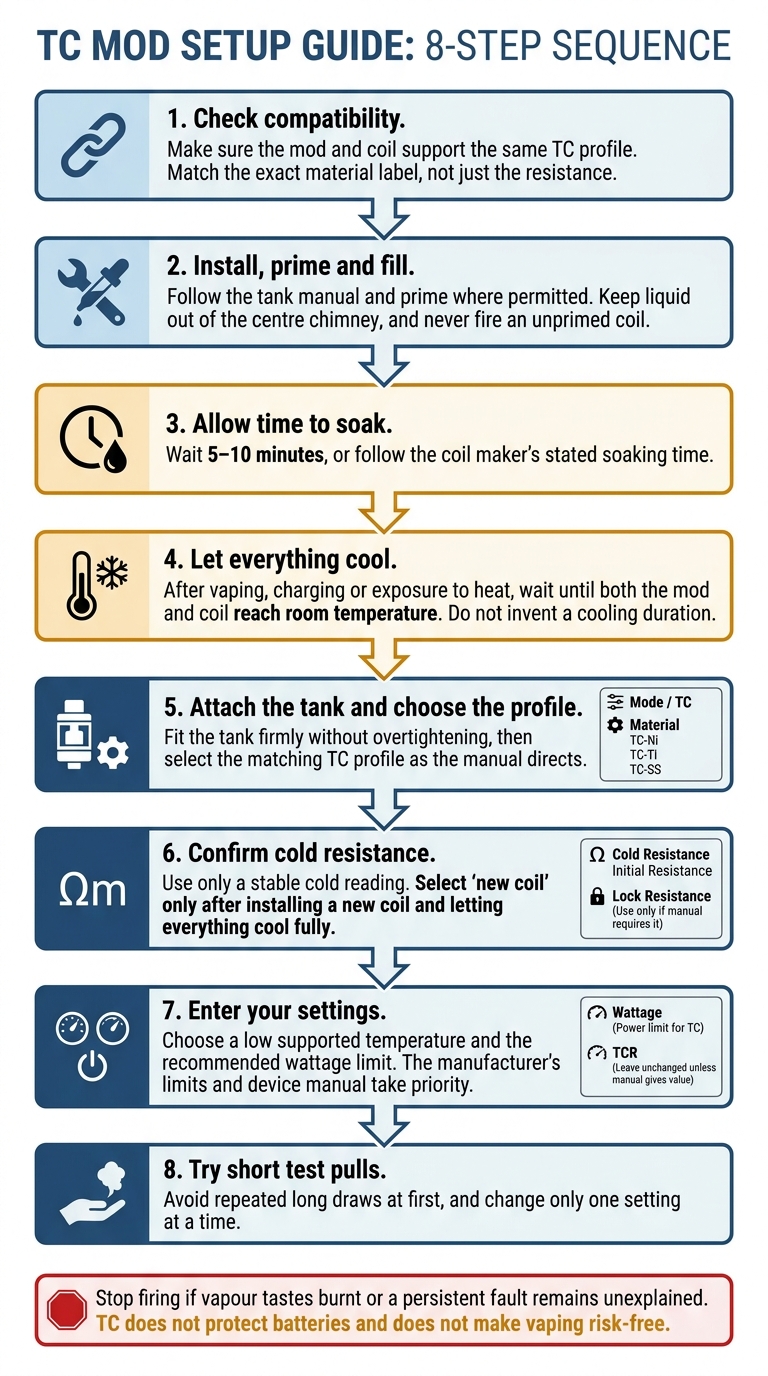
Temperature Control Vaping: 8 Setup Steps
Set Up the Mod
Use the coil profile and limits you’ve already chosen. Follow these steps in order.
- Check compatibility. Make sure the mod and coil support the same TC profile. Match the exact material label, not just the resistance.
- Install, prime and fill. Follow the tank manual and setup guide and prime where permitted. Keep liquid out of the centre chimney, and never fire an unprimed coil.
- Allow time to soak. Wait 5–10 minutes, or follow the coil maker’s stated soaking time.
- Let everything cool. After vaping, charging or exposure to heat, wait until both the mod and coil reach room temperature.
- Attach the tank and choose the profile. Fit the tank firmly without overtightening, then select the matching TC profile as the manual directs.
- Confirm cold resistance. Use only a stable cold reading. Select ‘new coil’ only after installing a new coil and letting everything cool fully.
- Enter your settings. Choose a low supported temperature and the recommended wattage limit.
- Try short test pulls. Avoid repeated long draws at first, and change only one setting at a time.
Understand TC Menu Labels
Menu labels vary, but here’s what each setting means:
- Mode / TC: Selects temperature control.
- Material / TC-Ni / TC-Ti / TC-SS: Sets the exact profile for your verified coil material.
- Cold Resistance (sometimes labelled Initial Resistance): Confirms the cold starting reading.
- Lock Resistance: Stores that reading. Use it only if the manual requires it; some devices calibrate automatically.
- Wattage: Sets the power limit for TC.
- TCR: Provides a custom setting. Leave it unchanged unless the manual gives a value.
Troubleshoot Warnings and Poor Vapour
| Issue | Immediate action |
|---|---|
| Incorrect material selection | Stop firing. Check the coil label and select the matching TC profile. |
| Unstable resistance | Let the coil cool. Clean and dry the connections, check that everything is seated correctly, then recalibrate cold. |
| Dry-coil warning | Refill, allow time for saturation and follow the manual’s reset procedure. |
| Weak vapour | Check the profile, liquid supply and airflow before changing one setting. |
| Burnt taste | Stop firing. Check saturation and replace the coil if the taste persists. |
| Temperature protection message | Check the manual: this may be normal TC operation. Stop use if a persistent fault remains unexplained. |
If the problem remains after these checks, inspect wick wetness, coil wear and battery condition next.
Reduce Dry Hits and Check Device Safety
If warnings continue after setup checks, inspect the wick, coil and battery. TC limits heat, but it cannot fix an empty tank, poor wicking, damaged coils or incorrect settings.
Keep the Wick Wet and Replace Worn Coils
Keep e-liquid above the wicking ports. Avoid repeated long pulls, especially when liquid is low.
Stop if vapour tastes dry or burnt. Check the liquid level and coil condition, then lower the temperature if needed. Replace the coil if the burnt flavour persists or the cotton looks damaged. More power will not repair damaged cotton.
Check Batteries and Mod Safety
TC does not protect batteries. Follow the manufacturer’s battery and charging requirements. Never use damaged cells or batteries with torn wraps, or mix batteries of different brands, ages or charge levels.
Carry spare cells in a protective case, not loose with keys or coins. Charge on a visible, non-flammable surface – not on a bed or sofa. If the device becomes unusually hot, stop using or charging it. Let it cool away from flammable materials.
In Bahrain, keep mods, batteries and e-liquids out of direct sunlight and parked cars. Store them away from children and pets.
Before buying a device, check that it supports the TC setup you plan to use.
Check TC Compatibility Before Buying in Bahrain
For first-time buyers, the safest choice starts with compatibility. Confirm the coil material, the mod’s TC profile and Bahrain’s current age and public-use rules before buying.
Conclusion: Check the Coil, Settings and Liquid
Match the verified coil material to its TC profile. Calibrate or lock resistance only when the coil is cool, and keep the tank filled.
Check for loose or damaged parts and stay within the manufacturer’s temperature and wattage limits. Start low and adjust gradually. Stop if harshness or warnings appear; fewer dry hits do not mean risk-free vaping.
FAQs
How does my mod measure coil temperature?
In temperature control (TC) mode, your mod estimates coil temperature by tracking changes in its electrical resistance. As TC-compatible wires – such as stainless steel (SS), Ni200 (nickel), or titanium – heat up, their resistance increases. The mod keeps adjusting power to hold the coil at or below your chosen temperature, helping prevent dry hits.
Can I use my pod coils in TC mode?
Only if the coil uses a supported wire material: stainless steel (SS316), nickel (Ni200), or titanium (Ti). Temperature control (TC) works by tracking the predictable changes in these materials’ resistance as they heat up.
Before switching to TC mode, check the coil’s laser-etched markings or packaging for SS316, Ni200, or Ti. Kanthal and NiChrome coils won’t work in TC mode.
Why does TC activate with a full tank?
Temperature control (TC) doesn’t activate just because the tank is full. It constantly monitors coil resistance to keep the coil within your set temperature limit, between 200°C and 250°C. A full tank with a properly saturated wick lets TC work normally.
If resistance spikes sharply because the coil is overheating or the wick is starting to dry out, TC adjusts or cuts power. This helps prevent dry hits.
Related Blog Posts
- Best Coils for Temperature Control Vaping
- How to Build Coils for Competitive Cloud Chasing
- Checklist for Cloud Chasing Competitions
- Voltage, Watts, Ohms: Vape Settings Explained
{“@context”:”https://schema.org”,”@type”:”FAQPage”,”mainEntity”:[{“@type”:”Question”,”name”:”How does my mod measure coil temperature?”,”acceptedAnswer”:{“@type”:”Answer”,”text”:”In temperature control (TC) mode, your mod estimates coil temperature by tracking changes in its electrical resistance. As TC-compatible wires – such as stainless steel (SS), Ni200 (nickel), or titanium – heat up, their resistance increases. The mod keeps adjusting power to hold the coil at or below your chosen temperature, helping prevent dry hits.”}},{“@type”:”Question”,”name”:”Can I use my pod coils in TC mode?”,”acceptedAnswer”:{“@type”:”Answer”,”text”:”Only if the coil uses a supported wire material: stainless steel (SS316), nickel (Ni200), or titanium (Ti). Temperature control (TC) works by tracking the predictable changes in these materials’ resistance as they heat up. Before switching to TC mode, check the coil’s laser-etched markings or packaging for SS316, Ni200, or Ti. Kanthal and NiChrome coils won’t work in TC mode.”}},{“@type”:”Question”,”name”:”Why does TC activate with a full tank?”,”acceptedAnswer”:{“@type”:”Answer”,”text”:”Temperature control (TC) doesn’t activate just because the tank is full. It constantly monitors coil resistance to keep the coil within your set temperature limit, between 200°C and 250°C. A full tank with a properly saturated wick lets TC work normally. If resistance spikes sharply because the coil is overheating or the wick is starting to dry out, TC adjusts or cuts power. This helps prevent dry hits.”}}]}
Frequently Asked Questions
Temperature control vaping limits coil heat when used with a compatible coil profile and mod. This can help reduce overheating and dry hits, but it does not make vaping risk-free or protect batteries.
Match the coil material to the mod’s supported TC profile before firing. Verify whether the coil is Ni200, titanium, or the exact stainless steel grade, rather than relying only on resistance.
If the coil maker permits it, a starting point near 200 °C can be used, followed by gradual adjustments. The coil maker’s limits and the mod manual take priority over general temperature ranges.
Keep the wick saturated with liquid and stop firing if the vapour tastes burnt. Temperature control is not a substitute for proper wicking, a suitable coil, or following the maker’s limits.
Start with a low recommended wattage limit when the mod supports that setting. Adjust one control at a time and stay within the coil maker’s limits while considering airflow, wick condition, and liquid thickness.
TC vaping may help limit overheating, but it does not make vaping risk-free. Stop using the device if a fault remains unexplained and follow the mod manual and current Bahrain age and public-use rules.
No. Temperature control does not protect batteries from unsafe conditions. Follow charging guidance and avoid exposing the device to parked-car heat.