
Late Night Vape Orders on WhatsApp


A late-night WhatsApp reply does not mean an order will arrive that night. For an existing VapeShop.bh order, adult customers can contact +973 6632 4432, giving the order number, the problem and the action requested. Listed hours are 9:00 a.m. to midnight daily; support, dispatch and delivery availability should be checked separately.
- For delays: request the order status and delivery window in Bahrain local time.
- For changes or cancellations: get written approval, including any fee or refund details.
- For missing, incorrect or damaged items: send photos, keep the packaging and stop using any item with a safety concern.
- For follow-up: agree on an exact update time and keep the chat and receipt. Never share a PIN, password, card security code or OTP.
Late-Night WhatsApp Order Support Checklist
1. Prepare Your Order Enquiry
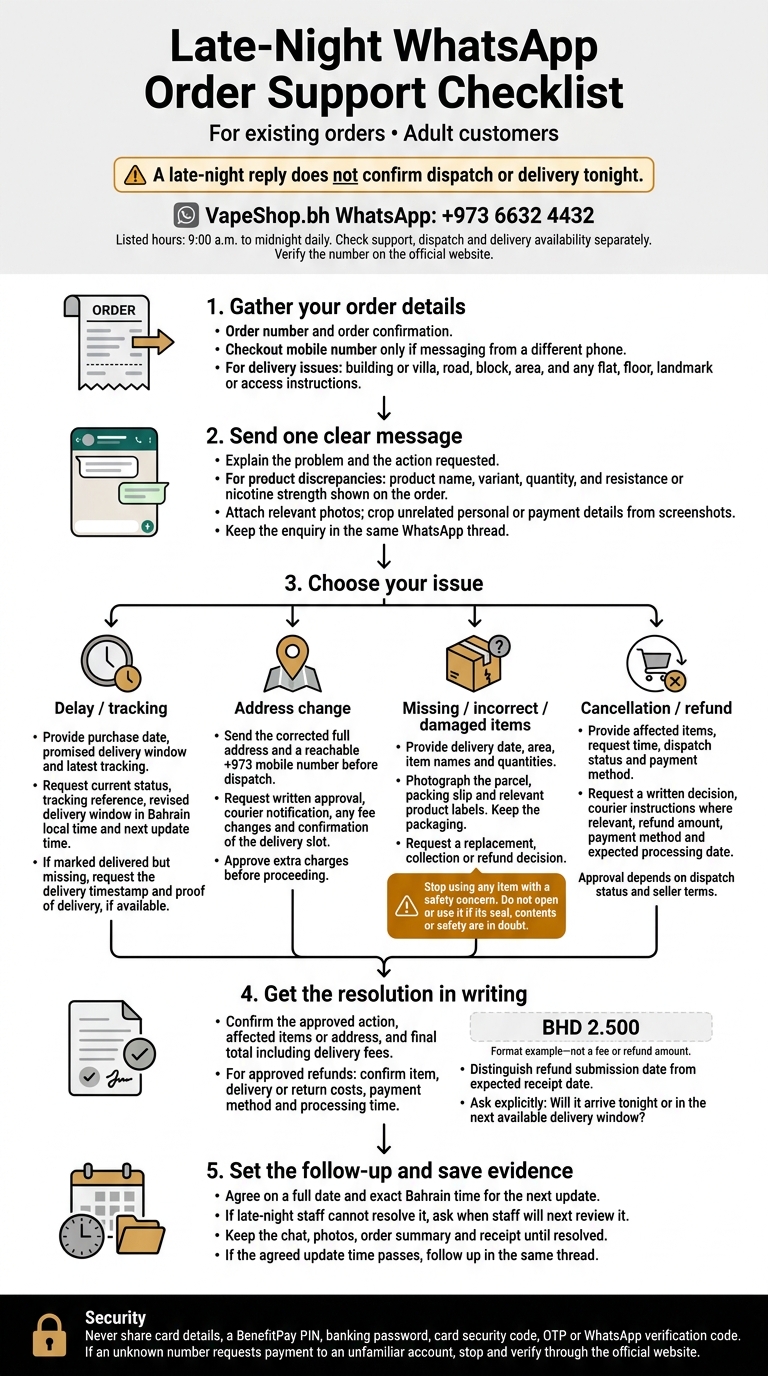
For urgent late-night orders, send support one clear message with enough detail to act straight away. Keep your order confirmation open so you can copy the details and avoid back-and-forth. Use the verified VapeShop.bh WhatsApp number listed on the website.
Include Your Order Number and Address
Include your order number. Add the mobile number used at checkout only if you’re messaging from a different phone.
For delivery issues, provide your full Bahrain address: building or villa number, road number or name, block and area. Include any flat number, floor, landmark or access instructions that could affect delivery.
Explain the Problem and What You Need
Explain exactly what went wrong and what you’d like support to do. For an incorrect pod, coil or disposable, include the product name, variant, quantity, and any resistance or nicotine strength shown on your order.
If you’re unsure about compatibility, attach a clear photo of the device or its existing packaging. Ask whether a correction or cancellation is still possible – don’t assume your request has been accepted.
Crop screenshots to remove unrelated personal or payment details. Support never needs your BenefitPay PIN, password, card security code, or OTP.
sbb-itb-837e7ad
2. Request Tracking or Order Changes
Use the same WhatsApp thread to check your order’s status or ask for a change. For a late-night pod, coil or disposable order, request the current status, tracking reference and delivery window in Bahrain local time. If tracking shows “delivered” but your order hasn’t arrived, ask for the delivery timestamp and proof of delivery, if available.
Changes and cancellations need written approval. They also depend on dispatch status and the seller’s terms. Ask support to confirm the approved action, affected items or address, and any fee change. For cancellations, request the refund amount, payment method and expected processing date.
Correct Your Address Before Dispatch
Before dispatch, send the corrected address in one message with a reachable +973 mobile number. Ask support to confirm that the courier has been notified and whether the fee has changed. Approve any extra charges before proceeding.
Check whether your original delivery slot still applies. If not, request a revised dispatch date and delivery window.
Use an Order Support Checklist
Keep your message short and complete with this checklist. Save the reply alongside your order confirmation and receipt.
| Enquiry type | Order reference | Supporting information | Requested outcome |
|---|---|---|---|
| Delay | Order number | Purchase date, promised window, latest tracking | Status, revised window, next update time |
| Address change | Order number | Corrected address and mobile number | Written approval, courier notification, fee or timing changes |
| Missing/incorrect items | Order number | Item names, quantities, parcel and packing slip photos | Replacement, collection or refund decision |
| Cancellation/refund | Order number | Affected items, request time, dispatch status, payment method | Written decision, courier instructions, refund amount and processing date |
3. Resolve Delivery and Item Issues
Check your parcel as soon as it arrives. If your late-night delivery is wrong, damaged or incomplete, report it immediately in the same support thread. Include your order number, delivery date, area and issue in one message. Keep the original packaging while support checks what happened.
Report Missing or Incorrect Items
Compare the delivery with your order confirmation. Point out any missing item or difference in model, flavour, nicotine strength or coil resistance. Attach clear photos of the parcel, packing slip and relevant product label.
If there’s a safety concern, stop using the item – don’t wait for a reply. Don’t open or use it if you have doubts about the seal, contents or safety, or if the device leaks or is damaged. Ask support whether to return the item or arrange collection, and what happens next. Bahrain consumer guidance allows defective or damaged items to be replaced or refunded at no extra cost, but support must confirm the process for your order.
Confirm Refund Details and Update Times
Once support confirms the fault, agree on a refund or replacement and get the next steps in writing. For an approved refund, ask for a written breakdown covering the item, delivery or return costs, payment method and processing time. Write amounts as BHD 2.500. Confirm both when the refund will be submitted and when it should reach you: these are separate steps.
Ask for the next update as a full date and exact Bahrain time, not a vague promise. If late-night staff cannot finish checking the issue, ask when staff will next be available to review it. Keep the chat, photos and receipt until the issue is closed. If the agreed update time passes, follow up in the same thread.
Conclusion: Get the Resolution in Writing
After asking for tracking, changes or item checks, get written confirmation before closing the chat. Ask the agent to confirm the agreed change and the final total, including delivery fees.
For late-night orders, check whether your parcel is still due for same-day vape delivery tonight. A reply does not confirm dispatch. Ask whether your order will arrive tonight or in the next available delivery window. Keep the written confirmation, order summary and payment receipt until everything is resolved.
Use only the payment method confirmed in chat. Never send card details, a PIN, banking password, OTP or WhatsApp verification code. If an unknown number requests payment to an unfamiliar account, stop and verify the request through the official website.
FAQs
What if WhatsApp support is unavailable at night?
VapeShop.bh is open daily from 9:00 am to midnight. If you send a WhatsApp message outside these hours, the support team will reply the following day.
Orders confirmed before the midnight cut-off qualify for same-day delivery. Orders confirmed after midnight are automatically booked for the next day’s first delivery run, starting at 9:00 am.
Can I change my order after dispatch?
No. You can only change your order before it’s dispatched. Once your WhatsApp order details are confirmed and dispatch is underway, changes to items or delivery information can delay preparation and dispatch.
If you need to make a change, send one clear WhatsApp message to +973 66324432 as soon as possible. This gives the team time to review your request before dispatch.
What if my approved refund is late?
If your approved refund is late, contact VapeShop.bh customer support via WhatsApp at +973 6632 4432. Your existing chat contains your order history, payment method and confirmation details, so our team can quickly check your refund status and resolve any delays. Please have your order details ready so we can give you an immediate update.
Related Blog Posts
- Ultimate Guide to Vape Delivery in Bahrain
- Best Practices for WhatsApp Vape Orders
- Vape Delivery FAQ: Bahrain Order Times
- How WhatsApp Cuts Vape Order Mistakes
Frequently Asked Questions
For an existing VapeShop.bh order, adult customers can contact WhatsApp at +973 66324432 between 9:00 a.m. and midnight daily.
Send the order number, the issue and the requested action to WhatsApp at +973 66324432. For a delay, request the current order status and delivery window in Bahrain local time, then agree on an exact update time.
Request an address change through WhatsApp at +973 66324432 and provide the full Bahrain address, including building or villa number, road, block, area, and any flat, floor, landmark or access details. Obtain written approval and confirm any fee or refund details before relying on the change.
Send photos and the order details to WhatsApp at +973 66324432, and keep the packaging for review. Do not use any item that raises a safety concern, and keep the chat and receipt for follow-up.
Contact WhatsApp at +973 66324432 with the order number and clearly state whether the request is for cancellation or a refund. Get written approval that confirms the action, including any applicable fee or refund details.
Never share a PIN, password, card security code or OTP in a WhatsApp chat. VapeShop.bh lists Cash on Delivery, BenefitPay and credit or debit card payment methods, while order support is available at +973 66324432.
No. The listed support hours are 9:00 a.m.Ask for the delivery window and keep the agreed update time in the chat.