
How to Use WhatsApp for Customer Feedback


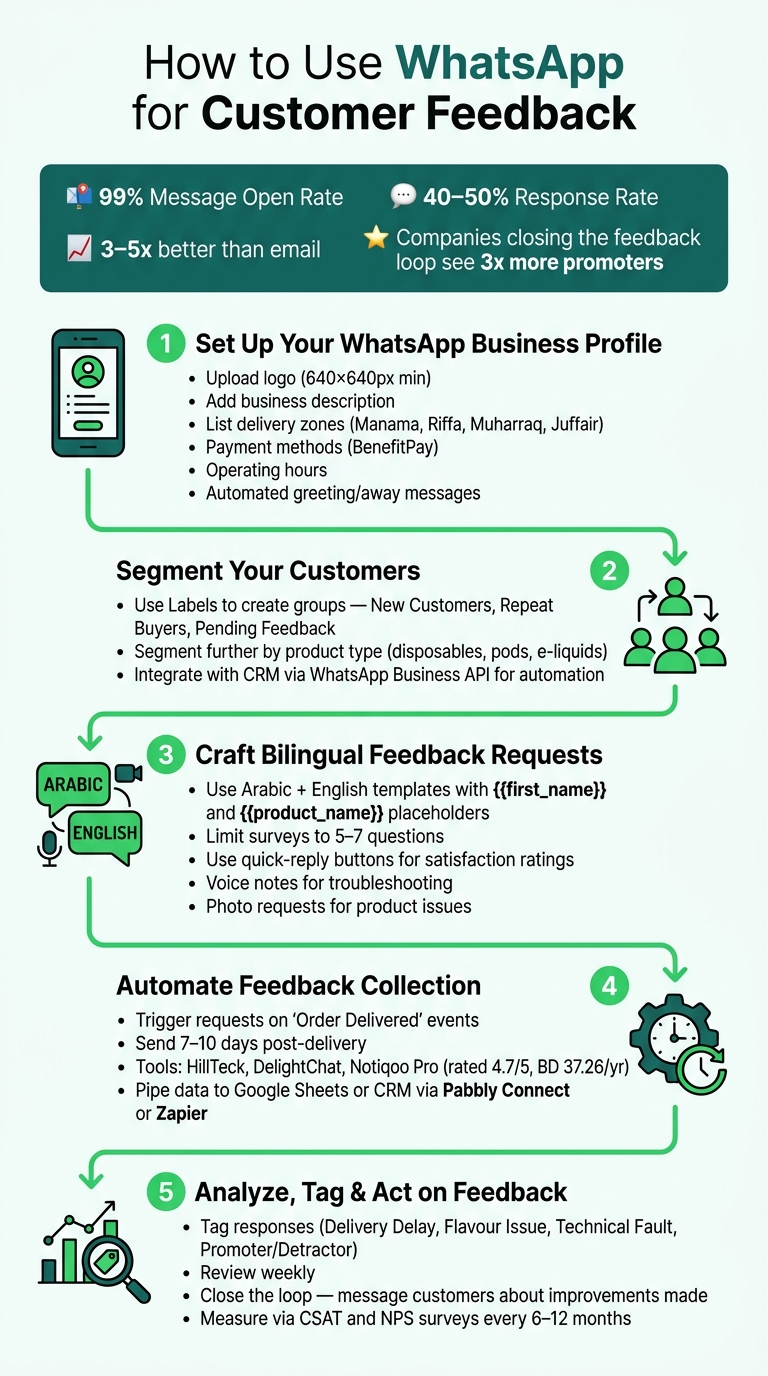
WhatsApp is a powerful tool for collecting customer feedback, especially in Bahrain’s fast-paced markets like vape retail. Here’s why and how you can use it effectively:
- Why WhatsApp?
- 99% message open rates and 40–50% response rates outperform email surveys.
- Customers find it easy to share feedback via text, voice notes, or photos.
- It feels conversational, not intrusive.
- Key Steps to Get Started:
- Set up a professional WhatsApp Business profile with local delivery info, payment methods (e.g., BenefitPay), and automated replies.
- Use bilingual (Arabic/English) message templates for personalized outreach.
- Segment customers (e.g., new buyers, repeat customers) to send relevant feedback requests.
- Automate feedback collection tied to events like "Order Delivered" using tools like HillTeck or Notiqoo Pro.
- Writing Feedback Requests That Work:
- Keep questions short and clear.
- Use quick-reply buttons for simple surveys or voice notes for detailed issues.
- Limit surveys to 5–7 questions and personalize messages with names or product details.
- Encouraging Responses:
- Offer small incentives like discounts or free delivery (e.g., 1.65 BHD).
- Using Feedback:
- Tag responses (e.g., "Delivery Delay", "Flavour Issue") to track trends.
- Analyze weekly to spot recurring issues and act quickly.
- Follow up with customers to show their feedback led to improvements.
WhatsApp makes feedback collection timely, efficient, and actionable. By integrating it into your workflow, you can improve customer satisfaction and loyalty while addressing issues proactively.
How to Use WhatsApp for Customer Feedback: 5-Step Process
Setting Up WhatsApp Business for Feedback Collection
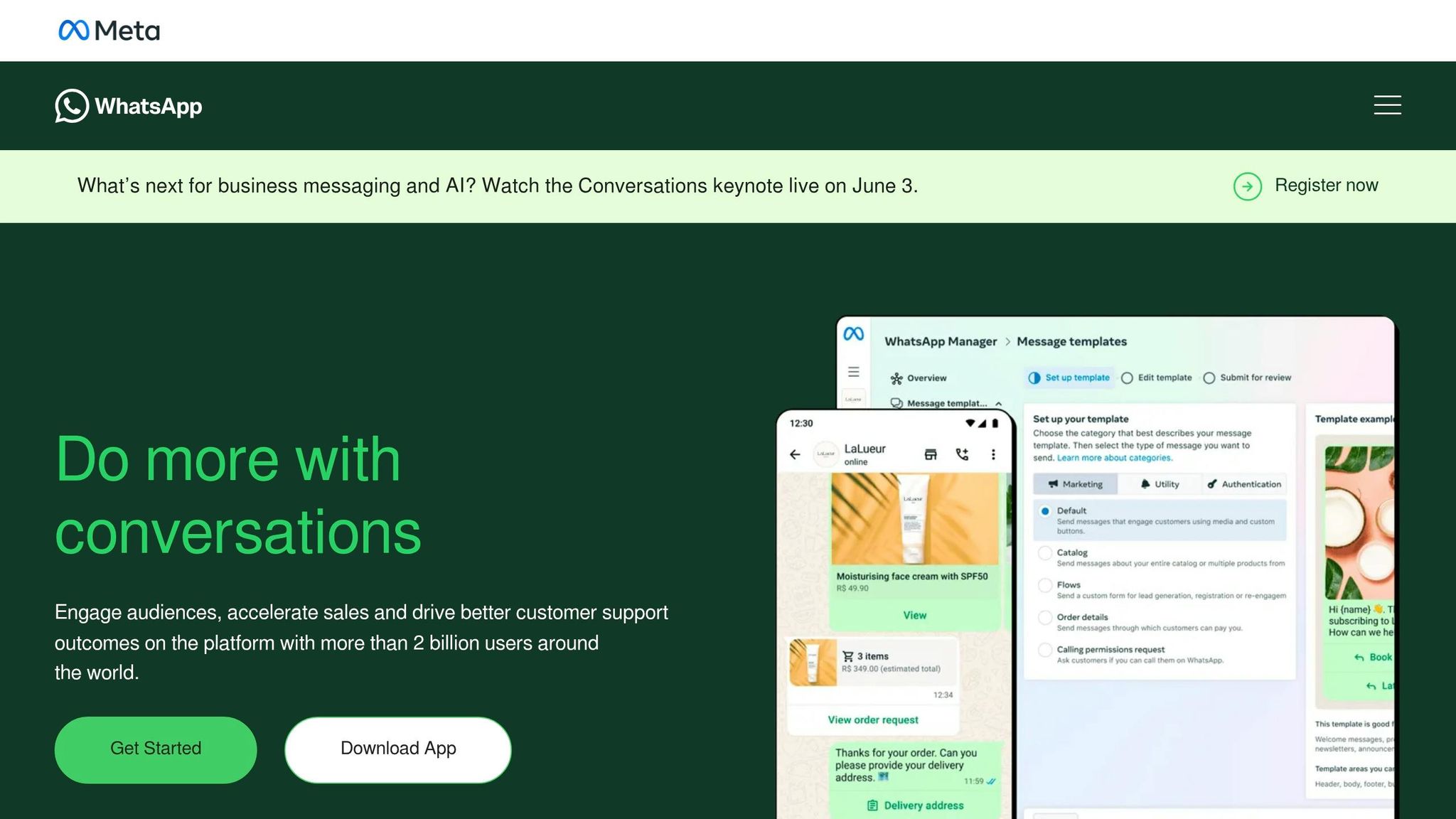
Having a complete and up-to-date WhatsApp Business profile is crucial for making a strong first impression. A well-prepared account not only saves time but also helps build trust with your customers.
Customising Your Business Profile
Your business profile is often the first thing customers notice, so it plays a big role in establishing credibility.
"A completed business profile helps even the smallest, newest business look more established to new customers." – WhatsApp for Business
Start by uploading a high-resolution logo (at least 640×640 pixels). Add a concise, 256-character description that highlights your business. Choose an appropriate category and include details that matter locally, like your delivery zones (e.g., Manama, Riffa, Muharraq, Juffair), accepted payment methods such as BenefitPay, and your operating hours. For instance, VapeShop.bh stays open until midnight to align with local shopping habits. Additionally, set up automated Greeting and Away Messages to handle new contacts and after-hours enquiries.
When your profile reflects professionalism and local relevance, it’s time to focus on crafting messages that resonate with different customer groups.
Creating Bilingual Message Templates
To connect with a diverse audience, prepare WhatsApp message templates in both Arabic and English. Use placeholders like {{first_name}} to personalise messages. For example, you could ask about a specific product experience, such as an e-liquid flavour or the performance of a pod device.
Organising Customers into Segments for Targeted Feedback
Once your messages are ready, organise your customers into segments to make your feedback collection more effective. First-time buyers, for instance, may provide feedback that differs from that of loyal customers. WhatsApp Business’s Labels feature allows you to categorise contacts into groups like New Customers, Repeat Buyers, or Pending Feedback. You can even segment further by product type, such as disposable vapes, pod systems, or coils, to ensure your questions are relevant.
For businesses with a larger customer base, integrating WhatsApp Business API with a CRM can take segmentation to the next level. This setup can automate the process by grouping customers based on purchase behaviour and sending feedback requests at the right time – like an hour after a delivery is confirmed.
sbb-itb-837e7ad
How to Write Feedback Requests That Get Responses
Crafting feedback requests that actually get responses requires thoughtful planning. WhatsApp surveys already come with a big advantage: they boast open rates of over 90% and response rates above 40%, which is three to five times better than email. But these impressive figures only hold up if your messages are well-written.
Choosing the Right Feedback Format
The format of your feedback request plays a big role in how easily customers can respond. Interactive formats tend to get more replies, while open-ended formats provide deeper insights.
| Feedback Type | Best Format | Example Question |
|---|---|---|
| Product satisfaction | Quick-reply buttons | "Rate the flavour of your disposable vape (1–5)." |
| Delivery experience | List message | "Was your delivery to Riffa on time? [Yes] [No] [Delayed]" |
| Customer service | Open-ended / voice note | "How did our support team handle your request? Send a voice note." |
| Product compatibility | Photo request | "If your pod isn’t fitting, please send a quick photo of the device and pod base." |
For most vape product feedback, quick-reply buttons are ideal for high-volume satisfaction surveys. On the other hand, voice notes or photo requests are better suited for troubleshooting specific issues like a burnt coil or a leaking tank.
Once you’ve selected the right format, the next step is to fine-tune your questions for maximum clarity.
Writing Clear and Focused Questions
"Customers often abandon surveys when they feel too long or demanding. You can create flows that offer customers one question at a time, to present the survey as an interaction and not as a task they must complete." – Infobip
Keep your questions clear and specific. For example, instead of asking a vague "How was your order?", try something more targeted like, "Did the nicotine strength in your SaltNic device meet your expectations?"
For Bahrain-based customers, you could tailor questions to their needs. For instance, ask about flavour accuracy for disposable vapes, battery life for devices like the Oxva Xlim, or whether a courier successfully delivered to areas like Juffair or Muharraq. This kind of detail resonates with customers who appreciate direct and concise communication.
Limit your survey to five to seven questions per interaction. If you’re running a multi-step survey, let customers track their progress with updates like "Question 2 of 4." This small addition can significantly reduce drop-offs. Personalising messages with variables like {{customer_name}} and {{product_name}} also makes the request feel more like a friendly conversation rather than a generic broadcast.
Finally, consider adding a little extra motivation to encourage responses.
Offering Incentives to Encourage Feedback
A small reward can go a long way in boosting response rates. For example, you could offer a discount or waive the 1.65 BHD delivery fee. The reward doesn’t need to be extravagant – just enough to make it worth the couple of minutes it takes to reply. Be upfront about the incentive in your message, and make sure it’s easy to redeem. Using familiar payment methods like BenefitPay can make the process seamless.
When done right, these strategies can turn your feedback requests into a valuable tool for understanding and improving your customer experience.
Automating Feedback Collection on WhatsApp
Automating feedback messages ensures timely and consistent customer insights. At VapeShop.bh, WhatsApp automation plays a key role in gathering customer feedback, allowing the business to respond promptly to customer needs across Bahrain.
Setting Up Automated Feedback Requests
The best way to request feedback is by tying it to specific events rather than relying on a fixed schedule. For example, in the vape retail business, triggers like "Order Delivered" or "Order Fulfilled" work well. Tools such as HillTeck and DelightChat enable automated in-chat NPS (Net Promoter Score) or CSAT (Customer Satisfaction) surveys upon delivery confirmation. If your store runs on WooCommerce, consider using Notiqoo Pro. This tool, rated 4.7/5 from 13 reviews and priced at BD 37.260 per year, offers multi-screen interactive flows to collect feedback directly, without redirecting customers to external links.
It’s ideal to send feedback requests 7–10 days after delivery. This gives customers enough time to evaluate their products and provide informed opinions.
"Product Reviews are essential to ecommerce brands, not only to collect feedback from your customers but also to highlight them in front of new and prospective customers." – DelightChat
Once feedback is collected, ensure it flows directly into your data systems for real-time analysis and actionable insights.
Connecting WhatsApp to Data Management Tools
To make the most of your segmentation strategies, automation ensures every piece of feedback reaches the right system quickly. Platforms like Pabbly Connect and Zapier can integrate WhatsApp with tools like Google Sheets or CRM systems, centralising all feedback for easier trend analysis across product categories.
If your team uses HubSpot, Flowella is a no-code solution that converts WhatsApp conversations into structured CRM records automatically.
"Every answer comes back as clean, structured data that triggers workflows in your CRM. No code. No middleware. No chasing." – Flowella
For smaller businesses, piping responses into a Google Sheet using waatee or Pabbly Connect is a simple and cost-effective way to start.
Using Tags to Organise Feedback
Once feedback is centralised, tagging responses can save time and make reviews more efficient. By categorising feedback, you can quickly filter and prioritise without needing to read each message in detail. For a vape retailer, a useful tagging system might look like this:
| Tag Category | Example Tags | Purpose |
|---|---|---|
| Feedback Status | Pending Feedback, Resolved | Track which conversations need further action |
| Vape Product Type | Disposables, Pods/Coils, E-liquids | Identify product lines generating the most feedback |
| Issue Theme | Delivery Delay, Flavour Issue, Technical Fault | Quickly identify recurring problems |
| Sentiment | Promoter, Passive, Detractor | Prioritise follow-ups with dissatisfied customers |
One particularly important tag is "Contact Support" for cases where customers express dissatisfaction. Highlighting these conversations early allows your team to address issues before they escalate into negative public reviews. As Victor, Growth Hacker at Review Collect, explains:
"A dissatisfied customer who sees ‘contact customer support’ clicks it before thinking about Trustpilot."
To maintain consistency, standardise your tag names. For example, always use "Delivery Delay" instead of alternating with terms like "Shipping Issue." This keeps your data clean and easy to analyse.
How to Analyze and Act on Customer Feedback
Once you’ve gathered feedback, the next step is to turn those insights into meaningful actions that drive improvement.
Spotting Trends in Customer Feedback
Regularly reviewing feedback – ideally on a weekly basis – helps you identify trends before they escalate into bigger problems. For instance, if there’s an uptick in "Delivery Delay" complaints, it might signal a scheduling issue that needs immediate attention.
For businesses like VapeShop.bh, monitoring feedback related to delivery speed and driver professionalism is crucial. Since same-day delivery across Bahrain is a key promise, even a handful of complaints in these areas could point to underlying issues that need quick resolution.
To make sense of the data, use structured tools like Reply Buttons and List Messages. Quantitative feedback can be grouped into NPS (Net Promoter Score) categories for easy tracking, while qualitative feedback from open-ended responses can be analyzed using keyword tagging. Tools like Google Sheets or Power BI are great for spotting recurring themes.
This structured approach lays the groundwork for informed decision-making.
Making Changes Based on Feedback
Once you’ve identified recurring issues, it’s time to take action. Persistent feedback about problems – like damaged e-liquid bottles or a confusing checkout process – signals where immediate improvements are necessary.
After implementing changes, follow up with customers to close the loop. A short WhatsApp message to those affected, explaining how their input led to improvements, can make a big difference. This simple gesture can turn dissatisfied customers into loyal advocates.
"Companies that close the feedback loop see three times more promoters." – askyazi
For example, promptly informing customers about resolved issues can help rebuild trust and strengthen relationships.
Measuring the Results of Changes Made
Closing the feedback loop isn’t just about making changes – it’s also about measuring their impact. Use tools like CSAT (Customer Satisfaction) surveys immediately after deliveries or support interactions to assess short-term improvements. Conduct NPS surveys every 6–12 months to evaluate overall brand health.
Keep an eye on key indicators like a drop in issue-related tags, an increase in repeat purchases, and better public reviews. For instance, the French retailer Du Bruit dans la Cuisine boosted its Trustpilot rating from 2.4 to 4.9 stars in just three months by acting on WhatsApp feedback and streamlining their review process.
To maintain focus, hold brief internal NPS huddles – 15–30 minute team meetings to review feedback data – on a weekly or bi-weekly basis. These sessions ensure everyone stays aligned on progress and areas that still need attention.
Conclusion: Using WhatsApp Feedback to Improve Customer Experience
WhatsApp provides a straightforward and effective way to gather real-time feedback from customers. With open rates hitting an impressive 99% and response rates ranging between 40–50%, it easily surpasses email and traditional survey methods. This makes it an excellent tool for collecting honest and timely customer insights.
By following the steps outlined earlier – setting up a WhatsApp Business profile, crafting personalised feedback requests, automating outreach, and leveraging the data – you can create a continuous feedback loop. Each part of this process builds upon the other, ensuring a consistent approach to improving customer experience.
For businesses like VapeShop.bh, which manages same-day deliveries across Bahrain and takes orders directly through WhatsApp, this feedback loop fits seamlessly into their workflow. Since customer interactions already happen on WhatsApp, requesting feedback feels like a natural continuation of the conversation.
"Customer feedback is the pulse of your business, and if you’re not listening, you could be losing ground." – Arjun Paul, Zoko
The true value of WhatsApp feedback lies in how businesses respond to it. Acting promptly on customer insights, closing the loop, and making visible improvements to your service can transform occasional shoppers into loyal, long-term customers.
FAQs
When should I ask for feedback on WhatsApp?
To gather feedback effectively, timing is everything. Reaching out soon after an interaction ensures the experience is still fresh in the customer’s mind. For VapeShop.bh, here are some ideal moments to request feedback:
- 5 minutes after delivery: This is perfect for capturing initial impressions while the experience is still top of mind.
- Right after a purchase or support interaction: This helps gauge satisfaction with the service provided.
- Following product use: A great opportunity to learn about the product’s performance and usability.
- Regular check-ins with long-term customers: These periodic updates can provide valuable insights to refine and enhance services over time.
How do I keep WhatsApp surveys from feeling spammy?
When creating WhatsApp surveys, the key is to keep them conversational and respectful. Start by ensuring you have explicit opt-in consent from customers – this can be done during checkout or other interactions. This step helps maintain trust and avoids your surveys coming across as intrusive.
Here are a few tips to make your surveys more effective:
- Keep it brief: Limit your surveys to 3-5 questions that can be completed in under 60 seconds. Simplicity encourages more responses.
- Make it easy: Use numbered responses or clickable buttons to make answering straightforward and quick.
- Add a personal touch: Address customers by their name and refer to specific recent interactions, like a delivery or support experience, to make the survey feel relevant.
- Timing is everything: Send surveys shortly after the customer’s experience to ensure the feedback is fresh and engagement is higher.
These small adjustments can make a big difference in how customers perceive and interact with your surveys.
How can I turn WhatsApp replies into trackable data?
With WhatsApp’s interactive tools, gathering feedback has never been easier. You can design in-chat forms tailored for various purposes like capturing leads, conducting post-purchase surveys, or running NPS (Net Promoter Score) questionnaires. The best part? Responses – whether they’re ratings or detailed, open-ended answers – are automatically synced to your CRM or feedback platform for seamless tracking.
The WhatsApp Business API takes things a step further by enabling automated surveys. These surveys can include rich media buttons, making the experience more engaging and user-friendly. Plus, all the data collected is stored in one central location, ready for analysis whenever you need it.
Related Blog Posts
- Customer Reviews of VapeShop.bh Delivery
- Ultimate Guide to Vape Delivery in Bahrain
- How to Use Feedback to Improve Vape Services
- Product Descriptions vs. Reviews: What Helps More?
Frequently Asked Questions
You can use WhatsApp feedback by setting up a WhatsApp Business profile, then sending short, clear survey messages right after an order is delivered. Customers can reply with text, voice notes, or photos, so it feels like a normal chat instead of a formal survey.
Tag common issues (like delivery or product quality), review them weekly, and adjust your service based on what you see.
On WhatsApp Business, create a professional profile that shows your delivery details, payment methods such as BenefitPay, COD, and cards, plus basic store info. Then add quick replies and simple templates so you can ask for customer feedback right after each purchase.
Over time, you can use labels and tags to track common complaints or compliments and respond faster.
You can run simple WhatsApp surveys by asking customers to rate their experience on a 1–5 or 0–10 scale, then follow up with one or two short questions. This works well for CSAT or NPS-style feedback without sending them to an external form.
Keeping it to a few questions increases completion rates and makes the data easier to review later.
Yes, you can connect tools like HillTeck or Notiqoo Pro to trigger automated WhatsApp feedback messages when an order status changes to “Delivered.” The customer receives a short, pre-written survey on WhatsApp without any manual work from your team.
This kind of automation helps you collect consistent CSAT-style feedback from every buyer, not just the ones who message you first.
Use customer segmentation by grouping people into new buyers, repeat customers, and high-value customers, then send each group slightly different feedback questions. For example, new buyers might get questions about first impressions, while regulars can be asked about long-term satisfaction.
This makes your WhatsApp messages feel more personal and usually increases response rates.
Keep your customer feedback questions short and specific, like asking how the delivery went or whether the product matched expectations. Limit it to 5–7 questions at most and use quick-reply buttons when possible so customers can answer in a few taps.
You can invite voice notes for more detailed issues, which many people find easier than typing long messages.
Tag each response with simple labels such as “Delivery Delay” or “Product Issue,” then review these tags once a week to spot patterns. When you fix a recurring problem, you can message affected customers on WhatsApp to let them know their feedback led to a change.
This approach turns everyday WhatsApp feedback into practical improvements for your store and shows customers you take their opinions seriously.