

How to Swap Vape Mod Panels Easily


Yes, I can swap vape mod panels at home in a few minutes – but only if I match the exact device model, power the mod off, remove the batteries, and use the right removal method.
If I get any of those parts wrong, the panel may not sit flat, buttons may stick, airflow may get blocked, or I may see errors like “Check Atomizer” or “Short Circuit”. The main thing is simple: check fit first, clean the mod, remove the old panel gently, then test the new one before vaping.
Here’s the short version:
- Panels are model-specific – even similar devices often use different panel sizes and cut-outs
- There are 3 common panel types: magnetic, screw-secured, and slide/latch
- I should turn the mod off first and remove any removable batteries before touching the panel
- Manual tools only for screw panels – no drill or electric screwdriver
- Dry-fit the new panel first to check the screen, buttons, USB port, and edges
- Heat matters in Bahrain – leaving a mod in a parked car can warp panels and damage finishes
- Price example: some replacement panel sets, such as Pulse AIO.5 acrylic panels, sit at around BHD 2.710 per set
A fast fit check can stop most problems before they start. If the panel does not sit flush, rattles, pinches the battery wrap, or blocks a button, I should stop and refit it before use.
That’s the full idea of the article: match the right panel, remove it with care, fit it cleanly, and check everything before taking a puff.
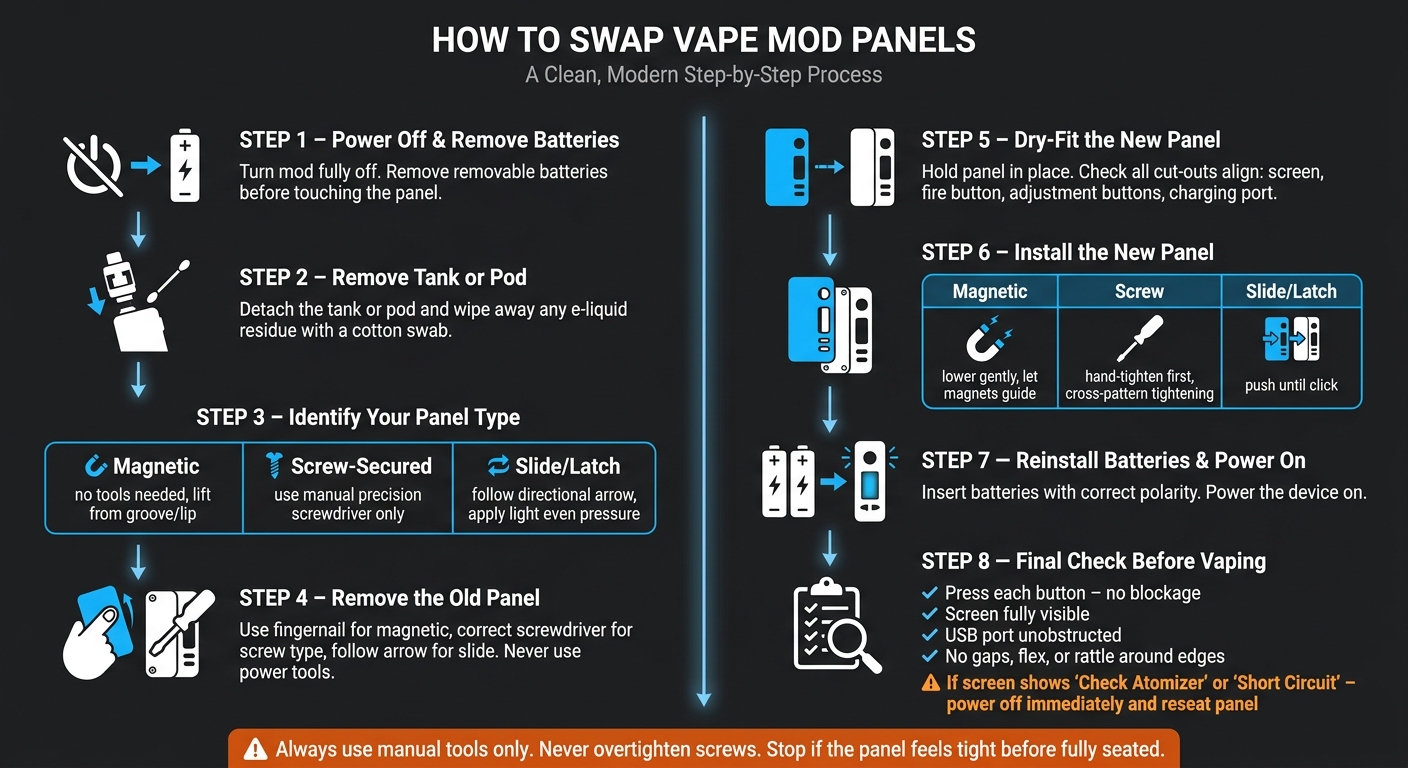
How to Swap Vape Mod Panels: Step-by-Step Guide
Custom Panel PULSE AIO V1/V2
sbb-itb-837e7ad
2. Check Your Panel Type, Material, and Compatibility First
Before you take anything off, check how the panel attaches and whether it matches your exact device model. This part matters more than it seems. Panels from the same brand line often don’t fit each other, so you need to match the exact model and revision listed by the maker before you buy. Section 2.2 explains why fitment matters.
2.1 Magnetic, Screw-Secured, and Slide Panels
The attachment type tells you how the panel comes off.
Magnetic panels use strong magnets, so you can swap them out without tools. Screw-secured panels stay in place with screws and usually feel more solid, especially on heavier-duty mods. Slide or latch panels click into a track on the frame, which you’ll see on some pod mods and compact devices.
Some panel sets are made for a specific position. So don’t mix up the front, back, left, or right pieces. That attachment style also sets up the removal method in the next step.
2.2 Why Fitment Matters on Specific Mod Models
A panel needs the right cut-outs for the screen, buttons, USB port, and airflow openings. If even one opening is a little off, the buttons may stick, airflow may get blocked, or the panel may not sit flush. That’s why panels from one mod family almost never carry over to another, even when two devices look close in size.
Material plays a part too. It affects grip and how much the panel bends when you remove it and fit it again. Here’s the quick breakdown:
- Acrylic/plastic: light and lower-cost
- Resin: decorative, with mid-level durability
- Wood: easy to grip, but it marks easily
- Metal: the toughest option, but heavier
- Carbon fibre: light and very durable
For a price reference, Vandy Vape Pulse AIO.5 acrylic/plastic replacement panels cost about BHD 2.710 per set. In most cases, it makes sense to choose based on grip, weight, and durability first.
Once fit and material are confirmed, gather your tools before removing the old panel.
3. Tools and Setup Before You Remove Anything
Get everything in place before you begin. If your panel is held by screws, keep a small precision screwdriver nearby. Put down a clean cloth or a dedicated mat too. It helps protect the device and catches any e-liquid. If the mod is wet or sticky, wear gloves while handling it.
Turn the mod off fully first. If it uses removable batteries, take them out before doing anything else. That helps avoid accidental firing or short circuits.
Next, remove the tank or pod. Then wipe away any pooled e-liquid around the base with a cotton swab or paper towel before you take off the panel.
Try to work indoors on a cool, dry surface. Heat and moisture can harm batteries and electronics. If you have spare panels, keep them in a cool, shaded spot so they don’t warp or fade.
Once the mod is powered off, dry, and clear of the tank or pod, you’re ready for panel removal.
4. How to Remove and Install Panels Step by Step
Install the panel based on how it attaches. Start by removing the old one the right way for your panel type.
4.1 How to Remove Magnetic, Screw, and Slide Panels Safely
Magnetic panels often have a small groove or lip along one edge. That’s the best place to start. Use your fingernail to lift it gently, working one corner at a time. Keep the pressure light. Don’t pry the panel straight outward, because that can crack the material or damage the magnets.
Screw-secured panels need the correct screwdriver size. The screws are fragile, so skip the drill, impact driver, or electric screwdriver. Power tools can snap the screw heads. Use manual tools only. As you remove each screw, place it in a small magnetic tray so nothing goes missing.
Slide or latch panels usually have a directional arrow moulded into the frame. Follow that direction and apply light, even pressure until the latch releases. If it doesn’t move easily, stop there. A stuck slide often means debris in the track, a trapped wrap, or poor alignment.
4.2 How to Align and Fit the New Panel Correctly
Before you fasten anything, dry-fit the new panel first. Hold it in place and make sure the cut-outs line up with the screen, fire button, adjustment buttons, and charging port.
| Panel Type | Fitting Method | Key Watch-Out |
|---|---|---|
| Magnetic | Lower gently, let the magnets guide the final seat | Misaligned magnets can chip resin edges |
| Screw-Secured | Hand-tighten first, then use a screwdriver for the final turn | Overtightening can strip threads or crack the housing |
| Slide/Latch | Push in the marked direction until you hear or feel a click | A partially latched panel can rattle and may pop off |
For screw panels, tighten in a cross pattern instead of moving around in a circle. That spreads pressure more evenly and helps the panel sit flush. Tighten until the screw stops, then stop as well. Do not overtighten.
If the panel starts to feel tight before it’s fully seated, check underneath for e-liquid residue or debris. Cleaning your vape device with a cotton swab or paper towel can help it sit as it should.
4.3 Final Checks Before You Start Vaping
Reinstall your batteries with the correct polarity. Then power the device on.
Before your first puff, do a quick check:
- Press each button to make sure the panel edges aren’t blocking anything
- Check that the screen is fully visible
- Make sure the USB port is not obstructed
If the screen shows "Check Atomizer" or "Short Circuit", power the device off at once. That can mean the connection points are blocked or out of line, or that something inside the mod is being pinched. A panel that isn’t sitting flush can cause this kind of problem.
Run your finger around the panel edges. You shouldn’t feel any gaps, flex, or movement. Give the mod a gentle shake too. There should be no rattle. If anything flexes, rattles, or blocks a button, reseat the panel before use. If the panel still does not sit flush, stop and check for residue, debris, or damage.
5. Panel Care, Common Problems, and When to Replace
Once the panel is installed, a little care goes a long way. For day-to-day cleaning, cleaning your vape mod with a microfibre cloth is usually enough. Skip harsh solvents, as they can damage the panel material or dull the finish.
Check the panel weekly and clean it when needed. In Bahrain, heat is a big issue, so keep your mod out of direct sunlight and never leave it in a parked car. High temperatures can warp panels and weaken finishes. Store spare panels in a protective pouch or dedicated storage case instead of tossing them loose into a bag or drawer.
A few issues tend to show up more than others:
- rattling panels
- panels stuck because of dried e-liquid residue
- weakened magnets
- cracked battery-door panels
Before any of that gets worse, inspect the panel for residue or debris around the magnets or slide tracks. If the panel is cracked, replace it straight away. Then use the final checklist to make sure the panel still sits flush after use.
6. Final Checklist and Key Takeaways
After fitting the panel, do a last check before vaping. Make sure the panel sits flush, the buttons and screen move freely, and IP68-rated mods still seal as they should so water and dust resistance stays intact.
Think of battery fit as a safety step, not just a fit check. The panel must not pinch battery wraps or internal wiring, and the batteries need to sit in the right position.
If the fit feels tight, clean up the panel edges and contact points first, then test-fit it again. With screw-secured panels, take the screws out and refit them instead of forcing the threads. A properly fitted panel should seat without resistance.
Exact compatibility, clean contact surfaces, and a flush fit stop most installation issues before they start.
FAQs
How do I know if a panel fits my mod?
Check the compatibility details from the manufacturer or retailer first. Match your mod’s model or series with the panel’s listed specs or compatibility guide.
Then look at the connection type. It needs to line up with your mod as well. Before you buy or fit the panel, confirm the model, series, connection type, and that it works with your exact mod.
What should I do if the new panel feels tight?
Don’t force it. That can damage the panel or the mod.
Instead, gently wiggle or adjust the panel first to make sure it’s lined up properly before you apply more pressure.
If it still feels too tight, check for any obstructions or debris and remove them with care. If the panel is still hard to install, the panel or the connecting parts may need adjustment or replacement so it fits properly.
Can swapping panels affect battery safety?
Swapping panels on a vape mod usually doesn’t directly affect battery safety. The bigger risk tends to come from how the device is handled during maintenance, especially if the battery or any protective part gets damaged in the process.
To stay safe, make sure your batteries are undamaged, properly matched, and used only with devices that support them. Damaged or mismatched batteries can lead to overheating, short circuits, or thermal runaway.
Related Blog Posts
- مقارنة بين أجهزة البود والمود المتقدمة
- Mechanical Mods vs Regulated Mods: Beginner’s Guide
- Beginner vs. Advanced Vapes: Which Is Right for You?
- Why Build Quality Matters in Vaping
Frequently Asked Questions
Yes, you can change vape mod panels at home in a few minutes if you match the exact device model, power the mod off, and remove any removable batteries first. A clean fit means checking the new panel does not block the screen, buttons, USB port, or airflow and that it sits flat without rattling, pinching the battery wrap, or causing errors like “Check Atomizer” or “Short Circuit”.
Proper panel replacement starts with checking that the panel is made for your exact mod, because even similar-looking devices often use different sizes and cut-outs. After turning the mod off and removing any removable batteries, gently remove the old panel, dry-fit the new one to confirm all openings line up, and only vape after everything sits flush and buttons move freely.
For safe mod compatibility, match the panel to the exact device name or model and avoid mixing panels from similar but different mods. A quick dry-fit before full installation lets you confirm that the screen window, button cut-outs, USB port, and edges all align properly, so you do not end up with a panel that blocks controls or affects airflow.
With magnetic panels, always turn the mod off and remove any removable batteries before you start, then gently lift the panel from the designated edge or notch instead of forcing it. After cleaning any dust or liquid from the mod, place the new panel on lightly to let the magnets pull it into place and check that it sits flush without gaps or wobble.
For screw panels, use only manual tools like a small precision screwdriver and avoid drills or electric screwdrivers because they can snap fragile screw heads. Remove the screws carefully, keep them in a safe spot, then after dry-fitting the new panel, tighten the screws in a cross pattern until they are snug so the panel sits flat without overtightening.
Good panel care and vape maintenance starts with keeping your device clean and dry, wiping away any pooled e-liquid around the base before you remove or refit panels. In hot places like Manama, never leave your mod in a parked car or direct sun, because heat can warp panels, damage finishes, and stress internal components over time.
Battery safety is key because working on a mod with power still running can cause accidental firing or short circuits. Always switch the device off, remove any removable batteries before touching the panel, and make sure the new panel does not pinch battery wraps or press on contacts before you vape.