How to Fix Auto-Draw Pod Problems


Auto-draw not working? I’d start with airflow, surface moisture, pod contacts and battery status – not a new device. Only check a device that’s cool, dry and undamaged, and disconnect it from charging before cleaning.
Here’s how I’d narrow it down:
- Light on, no vapour: Check the pod and contacts.
- No response: Check charge, power and auto-draw settings.
- Works sometimes: Check blocked inlets, condensation and pod fit.
If those checks don’t help, I’d try one known-working, compatible pod, following the manual. Still no response? Contact support and check the warranty before buying an exact-match replacement.
<u>If it auto-fires, overheats, swells or may have liquid inside, stop using and charging it.</u> Don’t open the casing or keep testing. In Bahrain, keep it out of hot cars and direct sunlight. For adults aged 18+ only.
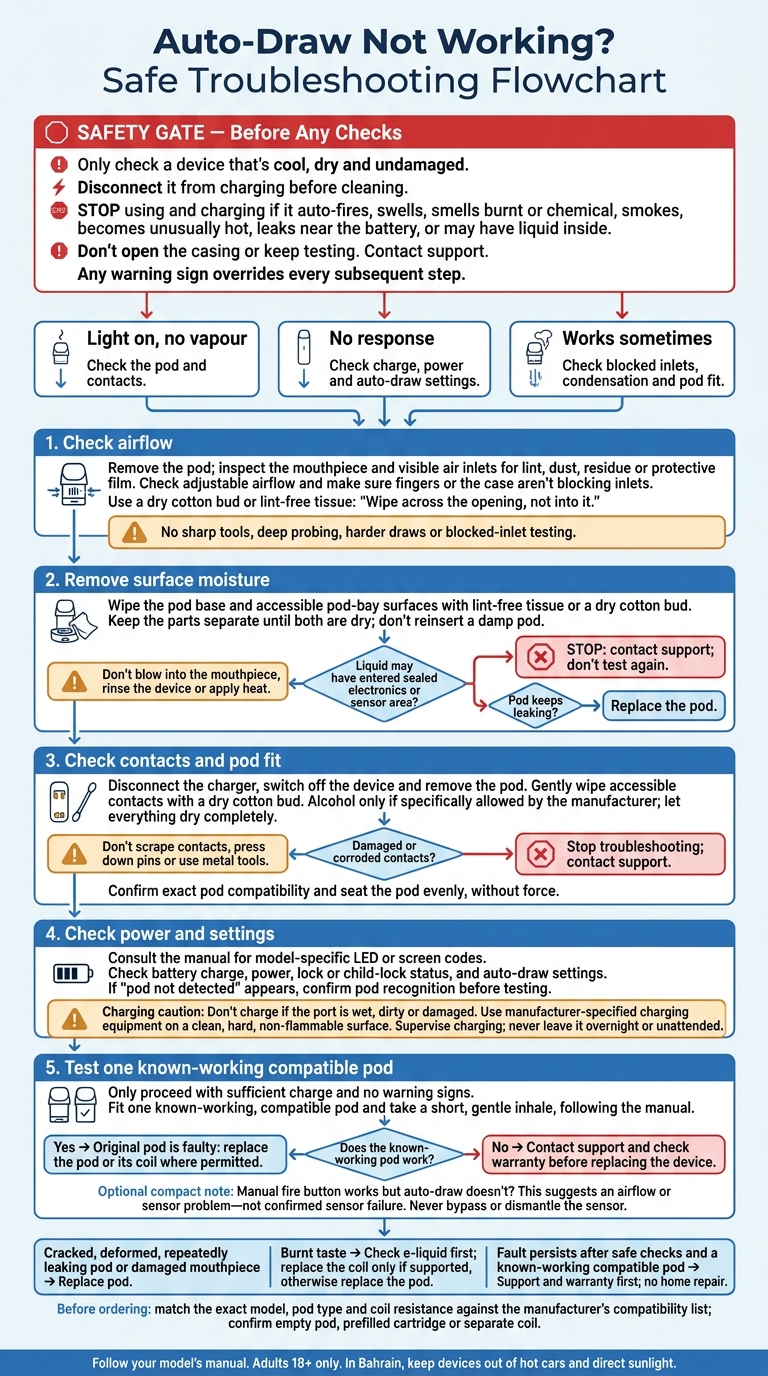
Auto-Draw Not Working? Safe Troubleshooting Flowchart
OXVA XLIM: 4 Easy Steps To Fix Auto Draw Not Working!
sbb-itb-837e7ad
Clear Airflow and Surface Moisture
Blocked air passages can stop the pressure change needed to activate the device. Moisture near the air path can also cause missed draws or unintended firing. Clean external surfaces only, following your model’s instructions.
Check the Mouthpiece and Air Inlets
Remove the pod, then check the mouthpiece and visible air inlets under good lighting. Look for pocket lint, dust, dried residue or protective film covering an inlet. Open any adjustable airflow control, and make sure your fingers or case aren’t blocking the inlets.
Gently wipe away debris with a dry cotton bud or lint-free tissue. Wipe across the opening, not into it. Don’t use pins or other sharp tools, or probe deeply into the mouthpiece or vent. Once everything is dry, refit the pod and take one gentle draw. Don’t draw harder or block an inlet to force activation.
Remove Condensation and E-Liquid
Droplets or a sticky film around the pod base can indicate condensation or leaked e-liquid. Gurgling usually points to one of these, too. Wipe the pod base and accessible pod-bay surfaces with lint-free tissue or a dry cotton bud. Keep the parts separate until both are dry; don’t reinsert a damp pod.
Don’t probe the opening, blow into the mouthpiece, rinse the device or apply heat. Stop using the device if liquid appears to have entered the sealed electronics or sensor area. Contact the manufacturer or retailer for support instead of testing it again. If a pod keeps leaking, replace it rather than repeatedly wiping and reinserting it.
If airflow is clear and the pod stays dry, move on to the contacts and battery.
Check Contacts, Power and Activation
Clean Contacts and Reseat the Pod
Disconnect the charger, switch off the device and remove the pod. Check the contacts, spring pins and pod base for residue, lint, corrosion, discolouration or stuck pins.
Gently wipe accessible contacts with a dry cotton bud. Use a slightly alcohol-dampened bud only if the manufacturer specifically allows it, then let everything dry completely. Don’t scrape contacts, press down pins or use metal tools. If you find damaged or corroded contacts, stop troubleshooting and contact the manufacturer or retailer.
Make sure the pod is the exact compatible type and its base has no cracks or damage. Align it with the guides and seat it evenly until it sits flush or the magnets engage. It shouldn’t rock or need force. If needed, remove and refit it once, without repeatedly pressing on the contacts.
Check Battery Charge and Settings
Check the manual for LED or screen codes, as blink codes differ between models. Check the battery charge, power status, lock or child-lock status, and any setting that turns off auto-draw. If you see “pod not detected”, make sure the device recognises the pod before testing.
Before charging, check the port for moisture, debris or damage. Don’t charge the device if the port is wet, dirty or damaged. Use the manufacturer-specified charging equipment on a clean, hard, non-flammable surface where you can supervise it. Never leave it charging overnight or unattended.
If the device becomes unusually hot, stop using or charging it. Disconnect it only if you can do so safely, and let it cool naturally away from flammable materials. Persistent heat, swelling or an unusual smell means stop testing and seek support.
Test with a Working Compatible Pod
If cleaning and charging checks don’t solve the problem, fit one compatible pod that you know works. With enough battery charge and no warning signs, take a short, gentle inhale. If that pod works, the original pod is faulty. If the problem remains, the device needs service.
If your model has a manual fire button, test it briefly, but only as the instructions allow. If the button works but auto-draw doesn’t, this suggests an airflow or sensor problem – not confirmed sensor failure. Never bypass or dismantle the sensor. Stop immediately if the device fires by itself or keeps firing.
When to Replace the Pod or Device
If airflow, moisture, contact and battery checks haven’t fixed auto-draw, use the symptoms below to decide whether to replace the pod or device.
Match Symptoms to Safe Next Steps
Replace any pod that’s cracked, deformed or keeps leaking. A damaged mouthpiece also needs replacing. If you notice a burnt taste, first check that the pod still contains e-liquid. Then replace the coil only if the pod supports replaceable coils. If the coil is built in, replace the whole pod.
| Likely cause | Replacement threshold | Recommended action |
|---|---|---|
| E-liquid or condensation | Leaking continues after surface moisture is removed | Replace the leaking pod |
| Damaged pod | Cracks, distortion, a damaged mouthpiece or burnt taste | Replace the pod, or its coil where permitted |
| Sensor fault | Auto-draw still fails after earlier checks and a test with a known-working compatible pod | Contact support and check warranty coverage before replacing the device |
Stop using and charging the device immediately if it auto-fires, swells, smells burnt or chemical, leaks near the battery, smokes or becomes unusually hot.
If sufficient charge and a known-compatible pod still don’t restore auto-draw, check the warranty terms before buying another device. Have your proof of purchase and exact model ready. Note any light patterns or display symbols, too. An internal fault needs support – not a home repair.
Once you’ve confirmed that the pod or device has failed, match the exact model before ordering its replacement.
Find Compatible Replacements in Bahrain
Check the exact model, pod type and coil resistance against the manufacturer’s compatibility list. Confirm whether you need an empty pod, a prefilled cartridge or a separate coil.
Once you’ve checked these details, you can order from VapeShop.bh, which offers same-day delivery across Bahrain and accepts orders through WhatsApp. Confirm compatibility, stock, price and delivery before paying.
Conclusion: Finish Safe Checks Before Replacing Parts
If the problem persists after the checks above and a test with a known-working, compatible pod, contact support before replacing parts. Don’t open the device.
Stop using and charging the device immediately if it auto-fires, swells, smells burnt, overheats or may have liquid inside.
For adults only: follow Bahrain’s 18+ sales rule and local restrictions on use in enclosed public places and on public transport.
FAQs
How can I tell condensation from a leaking pod?
A little moisture under your pod is normal and doesn’t always mean there’s a leak. Remove the pod, then use a dry tissue to wipe its base, the contact points and the inside of the device thoroughly.
Check it during use. If the liquid doesn’t return, it was likely condensation. If liquid soon pools again, that points to a leak, possibly caused by overfilling, a cracked pod or a loose coil seal.
How often should I clean my pod contacts?
Clean your pod contacts every few days to prevent build-up. A little condensation is normal. Use a dry cotton swab or tissue to wipe the pod base and device contacts.
If condensation appears daily, clean these areas every day or two. This helps maintain a steady connection and keeps the auto-draw sensors working correctly.
For advice or help with your device, contact VapeShop.bh via WhatsApp.
Can Bahrain’s heat affect my pod’s auto-draw?
Yes. Extreme heat, such as inside a hot car, can expand the air inside your device and trigger the auto-draw sensor by mistake. Heat also thins e-liquid, making leaks and internal flooding more likely. Both can interfere with the sensor. Moving between air-conditioned spaces and outdoor heat can also cause condensation inside the device.
If your device feels sluggish or won’t fire, let it cool at room temperature for 10 minutes before trying again.
Related Blog Posts
- Beginner’s Guide to Pod Systems
- Leaking Vape Pod? Causes, Fixes, and Support Steps
- How to Prime Pod Coils and Avoid Mistakes
- How to Set Up Pod Vape for First Use
{“@context”:”https://schema.org”,”@type”:”FAQPage”,”mainEntity”:[{“@type”:”Question”,”name”:”How can I tell condensation from a leaking pod?”,”acceptedAnswer”:{“@type”:”Answer”,”text”:”A little moisture under your pod is normal and doesn’t always mean there’s a leak. Remove the pod, then use a dry tissue to wipe its base, the contact points and the inside of the device thoroughly. Check it during use. If the liquid doesn’t return, it was likely condensation. If liquid soon pools again, that points to a leak, possibly caused by overfilling, a cracked pod or a loose coil seal.”}},{“@type”:”Question”,”name”:”How often should I clean my pod contacts?”,”acceptedAnswer”:{“@type”:”Answer”,”text”:”Clean your pod contacts every few days to prevent build-up. A little condensation is normal. Use a dry cotton swab or tissue to wipe the pod base and device contacts. If condensation appears daily, clean these areas every day or two. This helps maintain a steady connection and keeps the auto-draw sensors working correctly. For advice or help with your device, contact VapeShop.bh via WhatsApp.”}},{“@type”:”Question”,”name”:”Can Bahrain’s heat affect my pod’s auto-draw?”,”acceptedAnswer”:{“@type”:”Answer”,”text”:”Yes. Extreme heat, such as inside a hot car, can expand the air inside your device and trigger the auto-draw sensor by mistake. Heat also thins e-liquid, making leaks and internal flooding more likely. Both can interfere with the sensor. Moving between air-conditioned spaces and outdoor heat can also cause condensation inside the device. If your device feels sluggish or won’t fire, let it cool at room temperature for 10 minutes before trying again.”}}]}
Frequently Asked Questions
Check the pod, visible air inlets, mouthpiece, pod contacts and battery status first. The device should be cool, dry, undamaged and disconnected from charging before external cleaning. If there is still no response, follow the manual and contact support on WhatsApp at +973 66324432.
If the light turns on but no vapour appears, inspect the pod and contacts for moisture, residue, poor fit or visible damage. Check airflow openings under good lighting and clean only external surfaces according to the device instructions. Do not open the casing or continue testing if the device overheats or auto-fires.
Intermittent activation can be linked to blocked air inlets, condensation or an incorrectly fitted pod. Remove the pod, check the mouthpiece and visible airflow path, then ensure the pod is seated correctly after cleaning external moisture. If the problem continues, try one known-working compatible pod as directed by the manual.
Inspect the mouthpiece and visible air inlets for pocket lint, dust, dried residue or protective film. Blocked air passages can prevent the pressure change needed for auto-draw activation. Clean external areas only and do not insert objects into the device.
Yes, surface moisture near the air path can cause missed draws or unintended firing. Remove the pod and wipe accessible external surfaces only, following the model’s instructions, while keeping the device disconnected from charging. Do not use or charge it if liquid may be inside.
Before checking the pod contacts, make sure the device is cool, dry, undamaged and disconnected from charging. Inspect the contact area for visible moisture or residue and clean external surfaces only as instructed by the manual. Never open the casing or keep testing a device that overheats, swells or auto-fires.
Check the charge, power and auto-draw settings when the device gives no response. Stop using and charging the device if it auto-fires, overheats, swells or may contain liquid. In Bahrain, keep the device away from hot cars and direct sunlight.
Contact support if airflow, moisture, pod fit, contacts and battery checks do not restore operation. Before buying an exact-match replacement, try one known-working compatible pod according to the manual and check the warranty. VapeShop.bh support is available on WhatsApp at +973 66324432.