

How Fast-Charging Works in Vape Devices


Fast-charging in a vape is simple: the device only takes as much power as its battery and charge chip allow. In many cases, charge time drops from 60–90 minutes to around 20–30 minutes, but only if the device, cable, and wall adapter all match.
If I had to sum up the whole topic in a few lines, I’d put it like this:
- USB-C does not always mean fast charging
- Charging starts fast, then slows near full
- Heat is the main problem, especially in Bahrain
- A poor cable or weak adapter can slow everything down
- If a vape gets too hot, swells, smells odd, or stops holding charge, I’d follow essential vape safety tips and stop using it at once
That last point matters more here than in cooler places. In Bahrain, a parked car can reach about 70°C in 20 minutes. For a lithium-ion vape battery, that is far too hot for safe charging or storage.
Here’s the short version of what matters most:
| What to check | What I’d look for |
|---|---|
| Port | Clean the USB-C port so it is free of lint or e-liquid |
| Charger | A rated 5V/1A or 5V/2A wall adapter if that matches the device |
| Cable | Good cable in decent condition |
| Heat | Charge indoors, away from sun and hot cars |
| Battery signs | No swelling, burning smell, torn wrap, or sharp heat |
The core idea is easy: the port matters less than the charging system inside the vape. So when I want safer, shorter charge times, I focus on the device rating, a proper charger, and a cool place to charge.
How Fast-Charging Works Inside a Vape
Charging Chip, USB Input, and Power Flow
When you plug in your vape, the power doesn’t go straight into the battery. It first moves through an onboard charging chip, often called a BMS, which manages the charge process and helps protect the cell. This chip also limits how much current the battery can pull.
That’s what creates the charging pattern most people notice: fast at the start, slower near the end.
What Controls Charging Speed
Fast charging usually begins with a rapid bulk charge, then slows down as the battery fills, and ends with a short top-off phase.
A few things affect how fast that happens:
- battery capacity
- the device’s current limit (as seen in the Vaporesso Luxe Q2 Kit)
- cable quality
- adapter output
If the cable is poor quality, or the adapter can’t supply enough power, charging slows down even if the vape itself can accept faster input.
The C-rate matters too. It’s the ratio between charging current and battery capacity. For example, a 1C rate on a 500 mAh battery means charging at 500 mA. That’s generally seen as a good point for battery life. Push that to 2C, and charging may finish sooner, but the total number of charge cycles can drop by about half.
Port type matters less than many people think. In day-to-day use, the charger, the cable, and the vape’s own internal limit usually matter more.
USB-C, Higher-Current Charging, and Protocol Support
USB-C is useful because it’s reversible and tends to hold up better over time, but it does not automatically mean faster charging. USB-C is just the connector. The actual charging speed still depends on the device’s internal charging circuit.
Most USB-C vapes are built for a maximum input of around 10 W. A smaller group of more advanced devices supports USB Power Delivery, or USB-PD, which allows higher wattage transfer.
Still, plugging a vape into a higher-wattage charger won’t make it charge faster if the device doesn’t support that input. The vape will still cap the power it takes in. For most devices, a 5V/1A or 5V/2A adapter keeps temperatures lower and puts less strain on the battery over time.
That’s why two vapes with the same port can end up charging at very different speeds. Once you know what the circuit is doing behind the scenes, those differences make a lot more sense in daily use.
sbb-itb-837e7ad
How to charge your disposable vape 🔋Safe Charging 101
What Users Gain from Fast-Charging
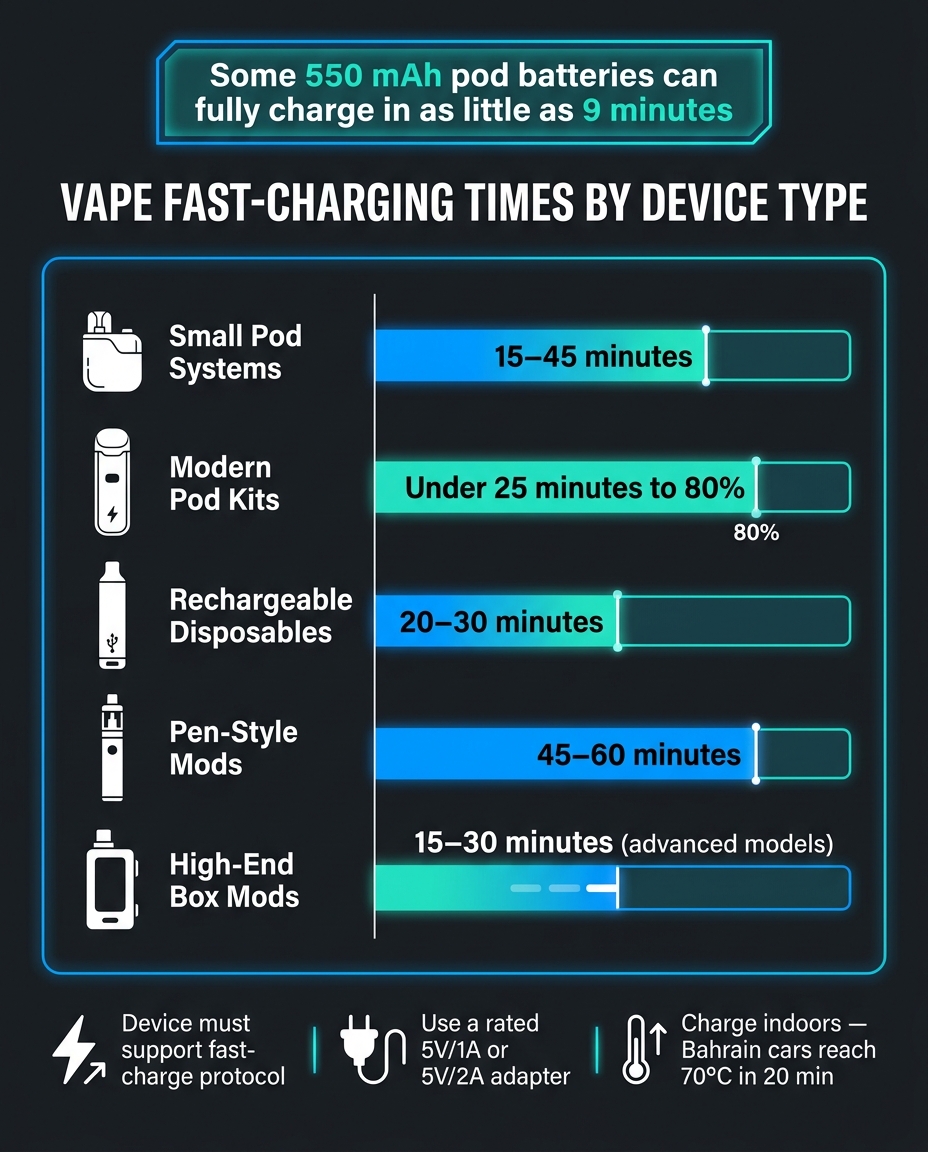
Vape Fast-Charging Times by Device Type
Typical Charging Times by Device Type
The biggest upside is simple: less downtime.
Some advanced 550 mAh pod batteries can hit a full charge in as little as 9 minutes. Modern pod systems can also reach 80% power in under 25 minutes.
Here’s what that looks like across common device types:
| Device Type | Typical Fast-Charging Result |
|---|---|
| Small Pod Systems | 15–45 minutes |
| Modern Pod Kits | Under 25 minutes to 80% |
| Rechargeable Disposables | 20–30 minutes |
| Pen-Style Mods | 45–60 minutes |
| High-End Box Mods | 15–30 minutes on advanced models |
For users in Bahrain, that makes a big difference. A short top-up before heading out, between errands, or during a quick coffee stop can be enough to keep your device going.
USB-C Convenience and Everyday Charging Habits
Speed is one part of the story. USB-C also makes day-to-day charging much easier.
The connector is reversible, so you’re not flipping the cable around trying to find the right side. It also means you can often use the same cable you already carry for your phone or laptop. That’s one less thing to pack, lose, or hunt for.
That said, these gains depend on using the right setup. The charger, cable, and device rating all need to match what the device can handle.
Where to Get Replacement Charging Essentials in Bahrain
If your cable starts to wear out, getting the right replacement matters just as much as picking the right charger.
For replacement cables or compatible charging accessories in Bahrain, VapeShop.bh offers same-day delivery and WhatsApp ordering.
How to Fast-Charge Vape Devices Safely
Safe Charging Steps for Everyday Use
Once the charging circuit is built into the device, safe charging comes down to using the right charger, cable, and setup around it. The vape itself controls how much power it takes in.
Before charging, check the USB-C port for dust or lint and clear it out. Then use the manufacturer’s cable, or a good replacement, and plug it into a wall adapter that matches the rating listed for the device. Set the vape on a hard, non-flammable surface so heat can escape properly. Soft spots like beds, sofas, or car seats hold heat in, and that’s where trouble can start.
Unplug the device when the indicator light shows a full charge, and don’t leave it charging unattended or overnight. Keeping a device at 100% for hours after it is fully charged puts extra stress on the cells.
In Bahrain’s summer heat, it’s smart to charge indoors in a cool room and keep the device out of parked cars. If it has been sitting in the sun, let it return to room temperature before plugging it in.
Charging Advice by Device Type
Different battery designs need different charging habits. Internal batteries and removable cells should not be treated the same way.
| Device Type | Safe Method | Typical Setup | Battery Care Note |
|---|---|---|---|
| Pod Systems | Integrated USB-C | 5V/1A wall adapter or PC USB port | Do not vape while charging |
| Internal Battery Mods | Manufacturer-approved USB-C | Quality 5V/2A adapter | Use the provided cable; avoid charging in hot conditions |
| Removable Cells (18650/21700) | Dedicated external charger | Independent bay charger | Inspect plastic wraps for tears; use matched pairs in dual-battery mods |
| Rechargeable Disposables | Low-voltage USB-C | 0.5A–1A source | Stop when the device shows full charge |
For removable cells, a dedicated external charger is the safest choice because it watches each cell on its own and charges at a controlled rate.
Warning Signs That Mean Stop Charging Immediately
Fast-charging only works if the battery stays within safe limits. Even when the setup looks right, things can still go wrong. If you notice heat, swelling, or damage, stop at once.
| Condition | Normal / Safe | Dangerous – Stop Immediately |
|---|---|---|
| Temperature | Slightly warm to the touch | Uncomfortably hot or painful to hold |
| Physical Shape | Firm, flat casing | Swelling or bulging |
| Odour | No scent or faint e-liquid smell | Sweet, chemical, or burning smell |
| Battery Wrap | Smooth, fully intact plastic | Tears or exposed metal |
| Visuals / Sound | Clean port and normal charging light | Dents, leaking, hissing, or venting |
| Charging Behaviour | Consistent with the device’s mAh rating | Rapid drain or will not hold charge |
If you spot any of those danger signs, unplug the device at once and move it away from anything that can catch fire. For removable batteries, even a 1 mm tear in the plastic wrap can cause a dangerous short circuit.
If these symptoms show up, the next step is to check the port, cable, or battery.
Troubleshooting and Final Takeaways
Why a Device Charges Slowly, Gets Hot, or Stops Charging
If a vape still charges slowly even after you’ve switched to the right cable and adapter, the next thing to check is the device itself. In many cases, the problem comes down to lint, dust, or e-liquid buildup inside the USB-C port. Even with the correct charger, the device’s charge-control circuit sets limits on how much power it can take. So if the port is blocked or worn out, charging will still drag.
The easiest way to tell whether the problem is the charger or the device is to look at the symptoms.
| Symptom | Likely Cause | Safe Action |
|---|---|---|
| Slow charging | Weak adapter, worn cable, or dirty port | Try a rated adapter and cable, then clean the port |
| Device gets very hot | Incompatible fast charger or heat exposure | Unplug immediately and let it cool at room temperature |
| Only charges when the cable is bent or twisted | Worn port or damaged cable pins | Try a new cable; if it persists, the port may need repair |
| Stops at 80–90% | Heat protection or ageing battery | Charge in an air-conditioned room; replace the battery if it drains fast |
| No light when plugged in | Debris in the port, battery fully drained, or a blown fuse | Try a known-good cable and wall adapter |
If the battery temperature goes above 40°C, the Battery Management System (BMS) may reduce the charge rate to protect the cells. In Bahrain’s summer, that can happen fast, especially inside a parked car. Interior temperatures can reach 70°C within 20 minutes. That’s why charging in an air-conditioned room often makes a noticeable difference.
Conclusion: Fast-Charging Works Best When the Device Is Built for It
Fast-charging comes down to three things: device design, charger output, and heat control. A USB-C port by itself does not mean higher charging speeds. The device and charger both need to support the same protocol for that to happen.
The safer approach is simple: use a moderate adapter, place the device on a hard, flat surface while charging, and unplug it once it’s full. Sticking to the manufacturer’s cable and adapter limits helps you charge at the right speed without adding extra wear to the battery.
FAQs
Can I use my phone charger for my vape?
You can use a phone charger if it has the same USB-C connector, but it’s smarter to skip high-wattage fast-charging bricks.
Why? Those chargers can push more power than your vape is built to handle. That extra power can create excess heat, put strain on the battery, and cut down its lifespan over time.
For safer, more efficient charging, stick with a low-output adapter. 5V/1A or 5V/2A is the best fit.
A few simple safety steps help too:
- Keep an eye on the device while it charges
- Place it on a hard, non-flammable surface
That small bit of caution can help you avoid heat build-up and battery wear.
Why does my vape charge fast at first, then slow down?
This is normal. Most vape devices charge fast at the start, then slow down as they get close to full. That happens because the battery management system follows a charging curve designed to protect the battery.
Early in the charge cycle, the device usually pulls the most power. Once it gets to about 85% to 90%, charging power drops and the device shifts into trickle charging. That helps prevent overheating, keeps the cells balanced, and puts less strain on the battery.
How hot is too hot for charging a vape?
Lithium-ion batteries work best at room temperature, ideally 15 °C to 25 °C. Once heat goes above 40 °C, battery life can get shorter and wear tends to happen faster.
A bit of warmth during charging is normal. But it should never feel hot.
If your vape gets unusually hot, smells odd, or shows swelling, disconnect it at once and let it cool in a safe, non-flammable area. And in Bahrain, this matters even more during the hotter months. Don’t charge it in extreme heat, like inside a car parked in the summer sun.
Related Blog Posts
- Guide to 18650 Batteries for Vapes
- Beginner vs. Advanced Vapes: Which Is Right for You?
- Why Build Quality Matters in Vaping
- How to Swap Vape Mod Panels Easily
Frequently Asked Questions
No, a USB-C port by itself does not guarantee fast charging. The vape only pulls as much power as its internal charging chip and battery are designed to handle, so two USB-C vapes can charge at very different speeds. For noticeably faster charge times, the device, cable, and wall adapter all need to support the same higher charging rate.
With a proper fast-charging setup, many vapes can go from around 60–90 minutes of charge time down to roughly 20–30 minutes. This only happens when the vape’s internal charging system, the USB cable, and the wall adapter are all compatible and working properly. If any one of those is limiting the power, charge times will be closer to normal.
Most vape batteries charge fast up to a certain level, then the charging system automatically slows down as they get close to full. This is a normal safety feature built into the charging chip to protect the lithium-ion cell and reduce stress on the battery. The last part of the charge is deliberately slower to help maintain battery health over time.
Heat is one of the biggest risks for lithium-ion batteries, especially in hot climates like Bahrain where a parked car can reach very high temperatures in minutes. Fast charging should always be done indoors, away from direct sun and never inside a hot car. If the vape gets unusually hot, swells, smells strange, or stops holding charge, it should not be used and basic battery safety steps should be followed.
The safest approach is to match your wall adapter to the device rating, typically something like 5V/1A or 5V/2A if that is what the vape specifies. A good-quality USB cable in decent condition is also essential, because a weak or damaged cable can slow charging even if the adapter and device are capable of more. Always make sure the USB-C port is clean from lint or e-liquid so the connection stays solid.
If charging slows down, start by inspecting the USB-C port and gently cleaning out any lint or e-liquid that might block a good connection. Then try a known good cable and a proper wall adapter that matches the device’s rated input, as a poor cable or weak adapter is a common cause of slow charging. If the vape still heats up sharply, smells odd, or shows swelling, it should be stopped immediately and not charged again.
Charge your vape in a cool, shaded place on a hard surface, never in a hot car or under direct sun, and avoid using it if the battery shows swelling, a burning smell, or unusual heat. Keeping the port clean, using a suitable 5V/1A or 5V/2A adapter, and not ignoring warning signs all help protect both battery life and safety. If you are unsure about safe charging, you can always reach support on WhatsApp: +973 66324432 for guidance from VapeShop.bh.