
Best Practices for WhatsApp Vape Orders


If I want a smooth WhatsApp vape order in Bahrain, I do 5 things first: check the seller, send exact item details, get the total in writing, confirm payment and delivery, and keep the chat for any issue later.
That’s the whole process in one line. I don’t send money until I see the item list, delivery fee, final total in BHD, and delivery window written clearly in the same chat. A simple check can stop the most common problems: wrong flavour, wrong nicotine strength, changed totals, or missed delivery.
Before ordering, I make sure:
- I’m 18+
- The website, store name, and WhatsApp number match
- The seller shows prices in د.ب
- The payment option is clear, such as BenefitPay, card, or cash on delivery
- The delivery time is written clearly, like 16:00–20:00
- I get a typed order summary before payment
A few local details matter. In Bahrain, I should ask for the full amount in BHD, such as BHD 3.500 + BHD 1.650 delivery = BHD 5.150 total. I should also send my address in one block with building or villa, road, block, area, and landmark. And if I need to report a problem, I should reply in the same thread with the date and time, such as 24/06/2026, 15:30.
Quick comparison
| Step | What I check | What I want in chat |
|---|---|---|
| Seller check | Number, site, payment name | Matching business details |
| Order details | Product, flavour, strength, quantity | One clean item list |
| Confirmation | Price and stock | Written summary in BHD |
| Payment and delivery | Fee, method, time slot | Paid status and delivery window |
| After delivery | Item match and any issue | Photos, update, or repeat order |
My rule is simple: if it is not written in the WhatsApp chat, I don’t treat it as confirmed.
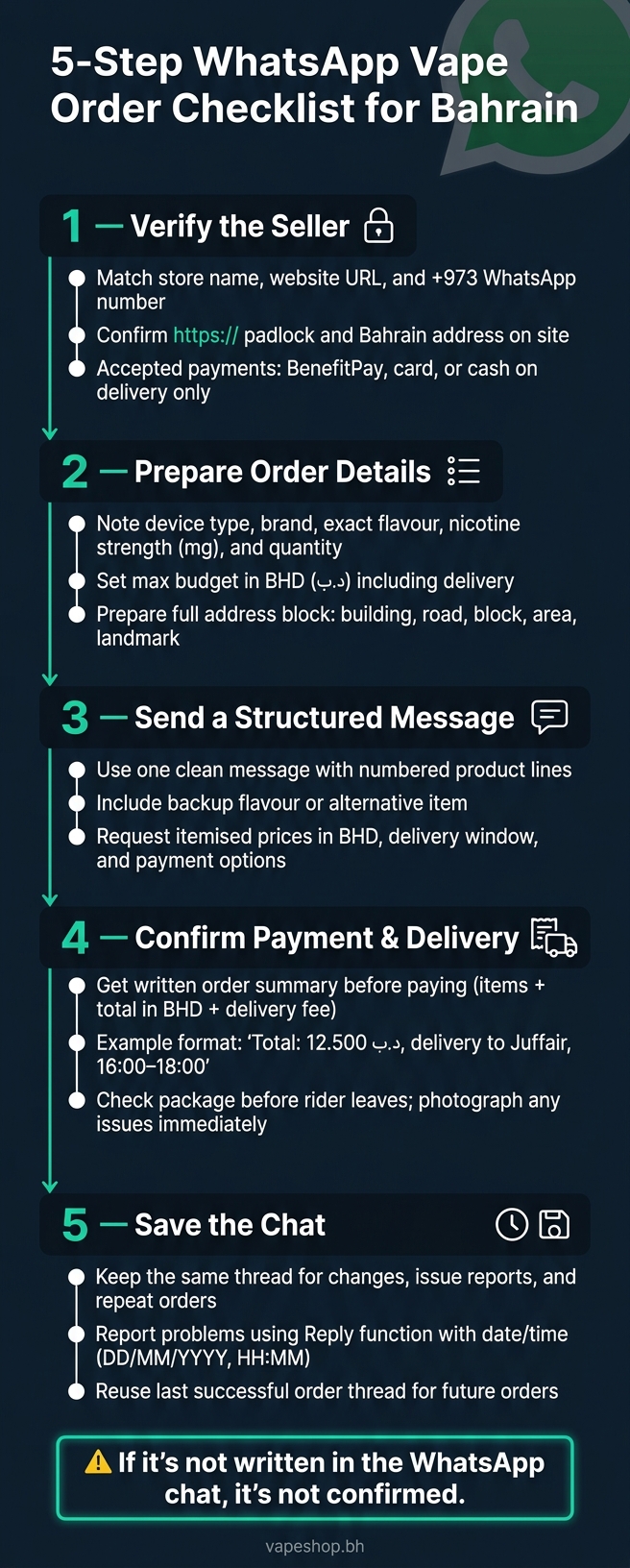
5-Step WhatsApp Vape Order Checklist for Bahrain
1. Check the seller and WhatsApp account before you order
Start by making sure the WhatsApp account is official.
Make sure the store name, website, and WhatsApp number match
Open the store’s website and find the official WhatsApp number on the Contact or About page. That number should match the same +973 number in the chat you’re about to open. The WhatsApp name, website name, and payment name should line up too. A tiny spacing difference is fine. A completely different name is not.
While you’re on the site, check that the URL uses https:// and shows a padlock icon in the browser bar. Also look for a Bahrain address and a delivery policy that clearly covers Bahrain. If the WhatsApp Business profile matches the website name, that’s another good sign you’re speaking to the right business.
Confirm payment options and delivery terms in Bahrain
Ask the seller directly: "What payment methods do you accept, and what is your delivery window to [your area] today?" A proper seller should answer in a clear, direct way.
In Bahrain, common payment methods include:
- BenefitPay
- Major cards through a secure payment gateway
- Cash on delivery
If the seller only wants a personal bank transfer, an unknown wallet, or some other personal transfer method, treat that as a red flag.
A real same-day service should give you a clear delivery window, not a vague “today” promise. Before you share your address, confirm the delivery fee in BHD.
Comparison table: trusted signals vs risk signals
| Trusted Signals | Risk Signals |
|---|---|
| Store name, website, and WhatsApp number all match | Different names or numbers across platforms |
| Bahrain address and delivery policy listed on website | No address; only a P.O. box or social media handle |
| BenefitPay, major cards, or cash on delivery accepted | Only personal bank transfers or untraceable methods |
| Clear pricing in BHD with delivery fee stated upfront | Vague pricing or totals that change mid-conversation |
| Clear delivery window with a cut-off time | Vague promises like "soon" with no confirmed time |
| WhatsApp Business profile matching the website name | No business profile; personal account only |
| Written order summary provided before payment | Refuses to send written totals; pushes voice notes only |
If the account clears these checks, move to the order details. Then list the exact products, flavours, and quantities before you send the order.
sbb-itb-837e7ad
2. Get your order details ready before messaging
After you’ve checked the seller, get your order details ready before you send a message. A clear order usually moves faster and helps you avoid getting the wrong item.
List the exact products, flavours, strengths, and quantities
For each item, write down the device type: disposable, pod, or mod, the brand and exact product name, the exact flavour name as written on the listing, and the nicotine strength – for example, “20 mg salt nicotine” or “3 mg freebase.”
If you’re ordering e-liquid, include the bottle size in ml, such as 30 ml or 60 ml. If you’re buying pod systems or mods, add the compatible coils or pods too – for example, “Caliburn G2 – 1.2Ω pods” or “GeekVape Aegis Boost 2 – B Series 0.4Ω mesh coils.” That small step can save you from wrong-fit coils or pods.
It also helps to start with one specific product request and one backup option. Add one backup flavour or an alternative item in case your first pick is out of stock.
Set your budget in BHD and prepare your delivery details
Set your maximum total spend in BHD (د.ب) before you open the chat – for example, “up to 15.000 د.ب including delivery.” Then ask the seller for an itemised breakdown:
- unit price for each item
- delivery fee
- final total in BHD
A flat delivery fee of about 1.650 د.ب is common for same-day delivery across Bahrain.
Prepare your delivery details in one block so you can paste them straight into WhatsApp:
- Name and mobile number
- Building name or villa number and flat number
- Road and block, plus area, such as Juffair, Seef, or Riffa
- Nearby landmark, like “next to XYZ Supermarket”
- Preferred delivery window in 24-hour format, such as 18:00–20:00
Use a reusable WhatsApp order template
Save this template in your notes app and paste it each time you order. For repeat orders, you’ll usually only need to change the product lines. The rest can stay as is.
1) Products: – Device/Type: ________ (disposable / pod / mod / e-liquid) – Brand/Model: ________ – Flavour: ________ – Nicotine: ________ mg (salt / freebase) – Size: ________ ml (if e-liquid) – Coils/Pods: ________ (model and ohms, if needed) – Quantity: ________ – Backup option: ________ 2) Budget: Max ________ د.ب (including delivery). Please confirm itemised prices. 3) Delivery address: Name: ________ Mobile: ________ Building/Villa & Flat: ________ Road & Block: ________ Area: ________ Landmark: ________ 4) Preferred delivery: ________ (DD/MM/YYYY), ________–________ (e.g. 18:00–20:00) 5) Payment: BenefitPay / Cash on Delivery / Card Contact preference: WhatsApp only Send one structured message so the seller can confirm stock, price, and delivery in a single reply.
Once your details are ready, send them in one message and ask for a written summary.
3. Send a clear order message and get written confirmation
Write the order in a clean, line-by-line format
Once you’ve got your details ready, send them in one clean message. Start with a short greeting, then add one simple line saying you’re placing a vape order for delivery in Bahrain.
After that, list each item on its own line with Arabic numerals. Include the exact product name, flavour, nicotine strength, quantity, and any size or variant details that matter.
1. [Best disposable vapes](https://vapeshop.bh/best-disposable-vapes-bahrain-2025-guide/) – [brand/model] – [flavour] – [nicotine strength] – Quantity: [number] 2. E-liquid – [brand/flavour] – [nicotine strength] – [30 ml] 3. Backup option: [alternative flavour or model] Use ml for e-liquid sizes. If you’re ordering pods or coils, include the device name and Ω (ohm) resistance so the seller can match the right item. It also helps to add your area and your preferred contact method in the same message.
Ask for price, timing, and payment details in one message
At the end of the product list, add a short request in the same message. Ask for:
- the itemised price in BHD (د.ب)
- the estimated delivery time
- the available payment options
A simple closing line can look like this: "Please confirm the itemised prices in BHD, delivery time today, and whether BenefitPay, card, or cash on delivery is available."
If you need delivery on a set date instead of the same day, write it in day–month–year format, such as 26/06/2026. That keeps things clear and cuts down mix-ups. If it’s a same-day order, give a direct time window like "within 3 hours today."
Request a written order summary and avoid voice notes for final details
Before you agree to pay, ask the seller for a written summary. It should repeat the final product list, the total in BHD, the agreed delivery window, and any delivery fee if one applies.
That typed summary is your reference if anything goes sideways after dispatch.
Skip voice notes for final order details. They’re harder to search, easy to mishear, and awkward to pass to warehouse staff or paste into an order system.
"Before you send payment or approve a delivery, get a clean confirmation that includes the exact items, the total price, and the delivery fee (if any)." – VapeShop.bh
Keep that written summary in the chat so you have a clear record for payment and delivery confirmation.
4. Confirm payment, delivery, and items on arrival
Confirm the total in BHD before sending payment
Once you have the written summary, confirm the payment and delivery details before the rider leaves the shop. Give it a proper check before you pay. The summary should show each item price, any delivery fee, and the final total in د.ب. For example: "Total: 12.500 د.ب, delivery to Juffair, 16:00–18:00." (Check our store locations for local delivery zones.)
Send a clear reply in the chat: "Confirming total: 12.500 د.ب including delivery." If you’re paying by BenefitPay or card, ask the seller to confirm receipt in the same chat. Save screenshots of your payment and the seller’s confirmation.
Once payment is confirmed, be ready for the delivery.
Stay available during the delivery window and check the package
Keep WhatsApp notifications on during the agreed delivery window. If the rider needs help finding you, send a short landmark in the chat. You can share your live location with the verified business chat if needed, then turn it off after delivery.
Before the rider leaves, check the package. Look at the packaging, make sure the items, such as e-liquids or salt nics, match your order, and check for any extras. If something is wrong, take a photo and report it in the same chat straight away.
Comparison table: cash on delivery vs digital payment
Choose the payment method that suits your order and how you want to keep records.
| Feature | Cash on Delivery (COD) | Digital Payment (BenefitPay / Card) |
|---|---|---|
| Convenience | Pay at the door; no advance payment needed | Pay ahead with no cash or change required |
| Proof | Rider receipt only | Instant transaction record plus screenshot |
| Risk | No online data shared | Use a verified wallet or payment gateway only |
| Refunds | Store credit or separate visit | Easier to track once the shop approves |
| Speed | Rider may need time to handle change | Upfront payment can make handover faster |
Make sure the payment method matches the verified business name.
5. Handle changes, issues, and repeat orders in the same chat
After delivery, keep the same chat open for corrections and later orders.
Send changes quickly and get revised totals in writing
Need to swap a flavour, change nicotine strength, adjust the quantity, or move the delivery time? Send one clear follow-up message in the same WhatsApp chat as soon as you can.
Use a simple format like this:
Order update - 24/06/2026, 15:30 Change: Lost Mary Blue Razz → Watermelon Ice Change nicotine: 20 mg → 30 mg New delivery window: after 18:00 Then ask: Please confirm the new total in BHD and the updated delivery window in writing.
That written reply matters. It gives you something concrete to check later if there’s any mix-up. For example, the seller might confirm a new total of 6.500 د.ب and a delivery window for today between 19:00–21:00.
Report problems with a clear order reference
If something goes wrong, use WhatsApp’s Reply function on the original order summary. Then send a short message with the order date and local time in day–month–year format, plus a brief note about the problem.
For example: Issue report – 24/06/2026, 14:45: One disposable is leaking; the other won’t fire. Both opened at delivery. If you are new to these devices, check out a beginner’s safety guide to ensure proper usage.
Attach photos of the item, the packaging, and the original order summary. If it matters, say how the product was stored.
If the order was correct and everything went fine, use that same thread again next time.
Conclusion: save the chat for smoother future orders
For repeat orders, copy the last order thread that went well and resend it in the same chat.
The five steps that make each order easier are verify the seller, prepare exact product details, send a structured message, confirm payment and delivery in writing, and save the chat. Verify, update, confirm, report, save.
FAQs
How do I know the WhatsApp seller is official?
Check whether the seller lists a physical business address and commercial registration number on their website. If you only see a mobile number and no business details you can verify, that’s a red flag.
The seller should also communicate in a clear, professional way and answer product questions properly. And they should use a proper age verification process, such as ID checks at delivery or secure digital validation.
What details should I send before placing my order?
For a fast and accurate WhatsApp order with VapeShop.bh, send your product details clearly. Include the brand, model, flavour, nicotine strength, quantity, and a backup option in case your first choice is out of stock.
It also helps to share your full delivery address, any access instructions, your preferred payment method, and your requested delivery time window.
Before you finalise the order, ask for confirmation of the full item list and the total price. That simple check can help you avoid mix-ups and save time.
What should I do if my order arrives wrong or damaged?
If your order arrives damaged or incorrect, contact VapeShop.bh straight away on WhatsApp at +973 66324432. Keep your order confirmation and payment receipt from the chat so the issue can be sorted out with less back-and-forth.
Before use, check that the tamper-proof seals and security stickers are intact. If the packaging looks compromised, get in touch immediately.
Related Blog Posts
- Where to Buy Disposable Vapes in Bahrain
- Customer Reviews of VapeShop.bh Delivery
- Ultimate Guide to Vape Delivery in Bahrain
- Top Payment Methods for Secure Vape Shopping
Frequently Asked Questions
Before sending any money, check that the website, store name, and WhatsApp number all match and that prices are clearly shown in د.ب. Then ask the seller to type a full order summary in the chat, including each product, flavour, nicotine strength, quantity, delivery fee, and total in BHD. Only confirm payment once this written summary and a clear delivery window are in the same WhatsApp thread.
Send a clean item list with exact product names, flavours, nicotine strengths (not above 20mg), and quantities so there is no confusion later. Add your full address in one block, including building or villa, road, block, area, and a clear landmark. This helps avoid wrong items, delivery delays, or the driver getting lost.
Ask the seller to type the prices in BHD line by line, for example BHD 3.500 for the vape plus BHD 1.650 delivery, followed by BHD 5.150 total in the same message. Having the item prices, delivery fee, and final total written clearly in د.ب inside the chat makes it easy to spot any changes or mistakes before paying.
Confirm the payment method in writing first, such as BenefitPay, card, or cash on delivery, so you know exactly how you will pay.This simple step reduces missed deliveries and confusion about charges.
A typed order confirmation in the chat gives you one place to check product, flavour, nicotine strength, quantity, prices, and delivery details before you pay. Keeping that summary and your payment confirmation in the same thread makes it easy to prove what was agreed if there is a wrong flavour, wrong strength, changed total, or delayed delivery.
Make sure you are 18+, the business details match, prices are in د.ب, payment method is clear, and the delivery window is written in the chat. Only then ask for a full typed order summary covering product names, flavours, nicotine strengths, quantities, fees, and the total in BHD. Saving this conversation gives you a simple record if you need to raise an issue later via WhatsApp: +973 66324432.
For disposables, send the exact brand name, flavour, and legal nicotine strength you want, then ask the seller to confirm stock and prices in one written message. Check that the delivery fee, time slot, and final BHD total are all visible in that same chat before you pay. If anything goes wrong, reply in the same thread with the date and time of the issue so customer support on WhatsApp: +973 66324432 can see the full history.