
OLED vs TFT Vape Screens: Readability Guide


I’d choose a vape screen by how easily you can read it – not by the OLED or TFT label. Check the wattage, battery level and warnings at your normal holding distance, then test the screen in Bahrain’s sun and shade.
OLED often suits dark menus indoors. A bright TFT LCD with low glare can work well outdoors. Neither guarantees sunlight readability or longer battery life.
Here’s what I’d check:
- Text and menus: Resolution, font size, spacing, clear labels and simple navigation.
- Light and angles: Brightness in nits, reflections and readability when tilted.
- Power and ageing: Brightness settings, screen timeout and OLED burn-in risk.
- Ease of use: Readable warnings, clear colour cues and few button presses.
- Battery runtime: Compare devices at similar battery capacities and wattages – not screen types alone – and follow tips to extend your vape device life for better performance.
Quick Comparison
| Check | OLED | TFT LCD |
|---|---|---|
| Text clarity | Strong contrast; font size and resolution still matter | Depends on fonts, resolution and panel quality |
| Indoor use | Often clear with dark menus | Clear with suitable brightness and contrast |
| Bahrain daylight | Brightness and glare control matter | Strong backlighting and low glare help |
| Viewing angles | Generally keeps contrast well | Varies by panel; IPS usually allows more angles |
| Menu design | Clear labels and spacing matter most | Same checks apply; colour should support labels |
| Display power | Dark menus can use less power | Backlight uses power even on dark menus |
| Screen ageing | Static labels can develop burn-in | Check backlight condition and uniformity |
| Controls and runtime | Check settings, timeout and matched runtime tests | Use the same checks |
My rule: <u>choose readable text over screen effects</u>, and keep brightness only as high as you need. There’s no fixed battery-saving percentage to expect from OLED.
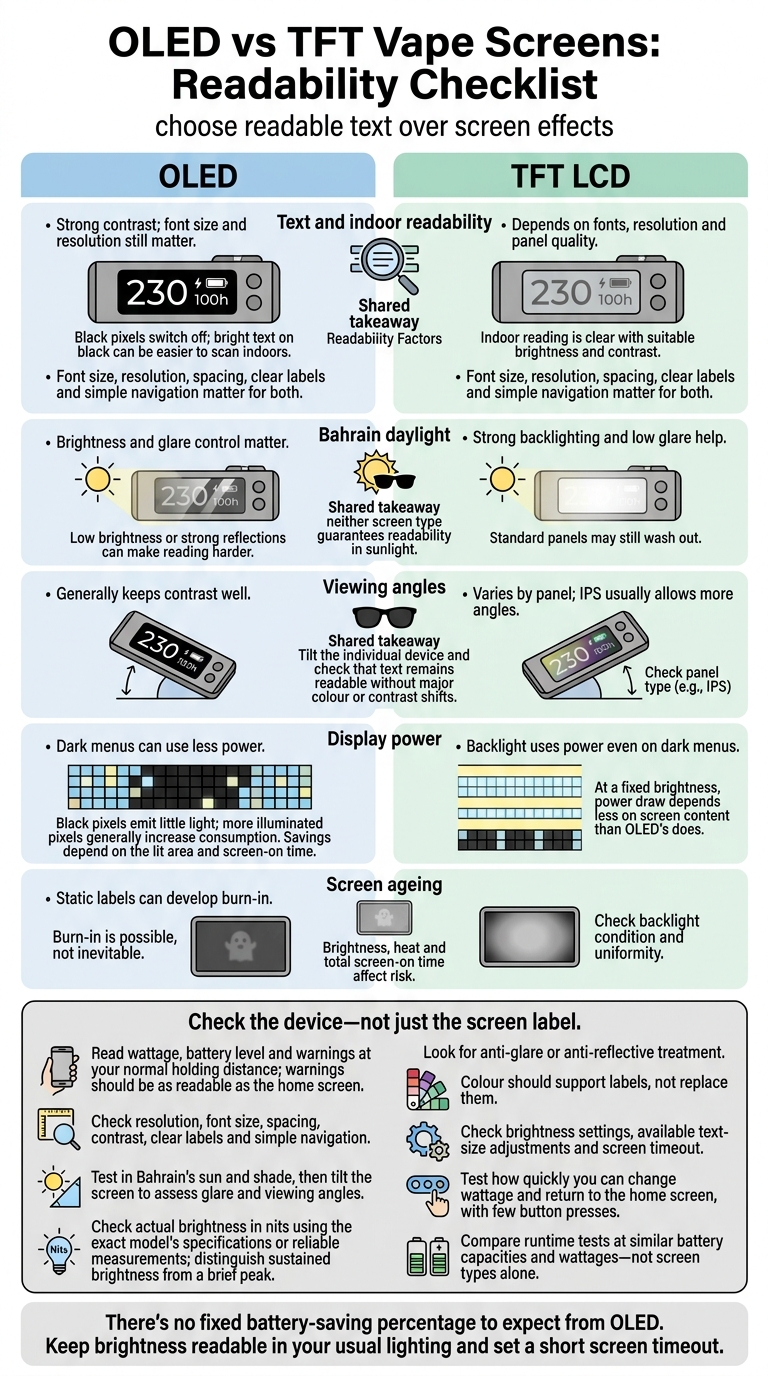
OLED vs TFT Vape Screens: Readability Checklist
Every Smartphone Display Types Explained | LCD, TFT, IPS, OLED, AMOLED, P-OLED, LTPS, LTPO
sbb-itb-837e7ad
OLED Screens: Contrast and Power Use
OLED pixels produce their own light. Black pixels switch off, creating deep contrast.
Text Clarity and Indoor Reading
Bright text on black makes wattage, resistance, voltage, puff count and battery percentage easier to scan indoors. Check that the font size works at your usual reading distance.
OLED generally maintains strong contrast when viewed from different angles. But small fonts, cramped spacing and low resolution can still make readings hard to read. The contrast advantage helps most when the menu stays simple.
Dark Menus and Display Power
Dark menus use less power because black pixels emit little light. The savings depend on how much of the screen is lit and how long it stays on – not a fixed increase in battery life.
Layout matters, too. A compact OLED can look clear or cluttered. If you’re new to the device, look for clear labels, readable icons and simple navigation. Lower power use helps, but readability still depends on brightness and screen ageing.
Brightness and Screen Ageing
In a dim room, lower the brightness to a level where labels remain comfortable to read. Under indoor lighting, check for reflections. In Bahrain’s direct sunlight, shade the screen or change its angle before turning up the brightness. If the specifications list nits, check whether the figure refers to sustained brightness or a brief peak.
Burn-in is possible, not inevitable. Brightness, heat and total screen-on time affect the risk. Uneven ageing can dull fixed icons and labels over time, making them harder to read. Use the lowest brightness that keeps text clear, and enable screen timeout so static menus don’t stay lit for long.
TFT LCD Screens: Colour and Backlighting
OLED relies on contrast, while TFT LCDs rely on backlighting and colour.
TFT LCDs use a backlit colour panel to display bright, colour-coded data. But the TFT label alone won’t tell you the screen size, resolution or menu layout. These depend on the panel and device firmware.
Text, Icons, and Menus
Colour should support labels, not replace them. This matters especially for users with colour-vision deficiencies.
A clear home screen should show wattage, battery level, coil resistance and mode at a glance. Fewer menu layers and button presses make basic changes faster.
Daylight Viewing and Screen Angles
In Bahrain’s bright daylight, backlight strength helps, but reflections and screen coatings determine readability. Check the screen in both sun and shade, then tilt it. Text should stay readable without major shifts in colour or contrast.
IPS-type TFT panels generally allow viewing from more angles, but check how to select the right vape device for your needs. Panel finish and viewing angle matter as much as brightness.
Backlight Power Use
A TFT screen keeps its backlight on even when displaying dark menus. At a fixed brightness, its power draw therefore depends less on screen content than OLED’s does. Higher brightness and longer screen-on time increase power consumption.
OLED vs TFT: Readability at a Glance
Treat this as a quick guide, not a ranking. Individual devices vary, and display power is only one part of total battery use.
Here’s how the two screen types compare.
| Factor | OLED | TFT LCD |
|---|---|---|
| Text sharpness | Strong contrast can make text look crisp; resolution and font size still matter | Clarity depends on resolution, font rendering, contrast and panel quality |
| Indoor readability | Often easy to read in low light | Clear when brightness and contrast are set well |
| Brightness | Varies by panel and settings | Depends on the backlight |
| Direct-sunlight visibility | Low brightness or strong reflections can make reading harder | Bright backlighting and glare control help, but standard panels may still wash out |
| Viewing angle | Generally wide, with stable colour and brightness | Panel design determines contrast and colour when viewed at an angle |
| Menu layout | Simple or graphic menus; readability depends on layout | Simple or graphic menus; readability depends on layout |
| Dark-interface power use | Unlit pixels reduce display power | The backlight continues drawing power |
| Bright-interface power use | More illuminated pixels generally increase consumption | Less dependent on content at a fixed brightness |
| Ease for new users | Large text, clear labels, spacing and simple navigation matter most | The same factors matter more than screen type |
Device Details to Check
Look beyond the screen type to resolution, font size, spacing and contrast, especially on warning messages and settings screens. Firmware controls how information appears and whether you can adjust brightness, text size or screen timeout.
For brightness ratings, use the exact model’s manufacturer specifications or reliable measurements, preferably in nits. Look for anti-glare or anti-reflective treatment, and check whether text stays clear when the screen is tilted. Review expert vape pen reviews and specifications and menu images before choosing.
Reading Screens in Bahrain’s Daylight
In Bahrain, outdoor readability depends more on brightness, glare control and viewing angle than on the screen label. A bright TFT LCD may be easier to read in direct daylight, but neither screen type guarantees readability in sunlight. Test the screen in shade and daylight at your normal holding distance.
Conclusion: Choose a Screen for Your Habits
Contrast, brightness and viewing angles all matter. Use those comparisons to choose a screen that suits your routine.
Match the Screen to Your Lighting and Menu Needs
For indoor or evening use, OLED’s deep blacks suit dark menus. But comfortable brightness matters more than maximum output. In Bahrain’s daylight, a bright TFT with low glare can stay readable.
A simple status screen works well for quick checks on battery, power or resistance. For more detail, look for clear labels and colour cues that are easy to scan.
Before buying, check that warning messages are as easy to read as the home screen. Font clarity, glare control, actual brightness and menu design matter more than the screen label.
Check Ease of Use and Battery Life
New users should look for plain settings labels, navigation that takes few button presses and an obvious battery indicator. This is especially important when choosing the best disposable vapes in Bahrain for on-the-go use. Test how quickly you can change wattage and return to the home screen, and whether the controls feel fast to use.
OLED can save screen power with dark menus, while TFT backlights draw power regardless of menu colour. Compare runtime tests at similar battery capacities and wattages: screen savings alone don’t guarantee longer battery life.
Keep brightness readable in your usual lighting and set a short screen timeout.
FAQs
How can I check sunlight readability before buying?
Check the manufacturer’s screen specifications – displays differ from model to model. If the marketing terms aren’t clear, contact the retailer on WhatsApp at +973 66324432 to ask about screen brightness and how it performs in bright conditions.
Compare these specifications with how you use your device outdoors. This is the most reliable way to judge whether the screen will be easy to read. Keep the device out of direct sunlight, which can degrade the battery and damage internal components.
How much does screen brightness affect battery runtime?
Higher screen brightness can shorten battery runtime, as both brightness and display activity use power. A bright display makes settings easier to check, but it also uses more energy.
Many modern devices offer an ECO mode that cuts screen and lighting power use without affecting vapour performance. Stealth mode saves battery by letting you vape with the screen off.
Which screen features help if I struggle with small text?
Prioritise larger, high-definition displays over small, basic screens. The XLIM 3 Ultra, for example, has a 2.2-inch full-touch display that makes battery percentage, wattage and puff counts easier to read at a glance. Choose a clear, easy-to-use interface rather than cluttered menus.
If readability is still a concern, consider a simpler device without screen-based menus or indicators.
Related Blog Posts
- Why Build Quality Matters in Vaping
- Product Descriptions vs. Reviews: What Helps More?
- Why Health Warnings Matter on Vape Products
- Top 5 Smart Vape Devices with App Control
Frequently Asked Questions
Check whether the wattage, battery level and warnings are readable from your normal holding distance. Text size, resolution, spacing and clear labels matter more than choosing OLED or TFT alone.
OLED can provide strong contrast and often works well with dark menus indoors. Readability still depends on font size, resolution, brightness, reflections and the panel’s viewing angle.
A bright TFT LCD with strong backlighting and low glare can work well outdoors. Bahrain daylight readability is not guaranteed by the TFT label, so brightness, reflections and tilted viewing should be checked.
View the screen at your normal holding distance in both direct light and shade. Check the wattage, battery level, warnings and menu labels while tilting the device to assess glare and readability.
Neither screen type guarantees longer battery life. Compare devices with similar battery capacities and wattages, and consider brightness settings and screen timeout because backlighting uses power while dark OLED menus may use less.
Viewing angle can change how clearly the display appears when the device is tilted. OLED generally keeps contrast well, while TFT panel performance varies and IPS panels usually allow more viewing angles.
Look for clear labels, sensible spacing, readable warnings and simple navigation with few button presses. Colour cues can help, but they should support clear text rather than replace it.