Power Curve Firmware for Vape Mods


Power curve firmware sets wattage over time – not coil temperature. On a supported vape mod, it controls the opening, middle and end of a puff. Start near the coil’s lower recommended wattage, avoid a strong opening boost and change 1 setting at a time.
Before using a curve:
- Check device support: Editable curves differ from fixed wattage, start presets and temperature control. Use the exact model’s manual and official firmware.
- Match power to the coil: Every step must stay within coil, mod and battery limits. Airflow, puff length and liquid supply also affect heat.
- Check the hardware: The coil must fit correctly, resistance readings must be stable and batteries must meet the manufacturer’s requirements.
- Stop for warning signs: Dry or burnt flavour, unusual heat or repeated faults call for checks – not more power.
For adults 18+ in Bahrain. Follow current local law and manufacturer instructions. Nicotine is addictive where present; non-smokers are not advised to use these products.
Power Curve Settings and Setup
Curve menus vary by chipset, model and firmware version. Check your exact manual before making changes. Even menus labelled ‘Power Curve’ or ‘VPC’ can work differently across mods. The main controls cover wattage, timing and limits.
Wattage, Timing and Output Limits
| Setting, where available | Effect | Cautious approach | Risk if set too high or too long |
|---|---|---|---|
| Segment wattage or percentage | Sets power for part of the puff | Start near the coil’s lower recommended wattage; check whether values mean watts or percentages | Excess heat, dry hits and increased battery demand |
| Duration or time-point position | Sets how long power applies or when it changes | Keep the default timing resolution at first; change one interval at a time | Prolonged high power can overheat the wick |
| Point count or curve length | Sets how many stages shape the puff | Keep the curve simple; add detail only when needed | Complex settings can make the curve harder to reproduce or troubleshoot |
| Preheat or boost | Increases power briefly at the start on some devices | Leave it off at first, or use the lowest effective level | A strong opening can scorch a wick that is not fully saturated |
| Maximum output limit | Caps the highest permitted power | Stay within coil, mod and battery safety limits | Excessive coil heat or battery current demand |
| Puff cut-off | Limits maximum firing duration | Keep the manufacturer’s default unless you prefer a shorter limit | Longer firing can allow overheating, especially with restricted airflow or poor wicking |
Curve mode may disable preheat, replace it or change how it works. Do not assume preheat adds separately to the opening step.
Start with a Conservative Curve
Check the best vape coils for their rated resistance and wattage range, then confirm that the mod reads its resistance correctly. Fill the tank and saturate the coil as its instructions specify.
Start near the lower end of the coil’s wattage range, without a strong opening boost. Keep later segments steady or slightly lower where the device allows it. Change only one wattage step or timing step at a time, checking warmth, flavour, vapour and liquid supply. Stop if the draw becomes unusually hot, dry or burnt.
Check what happens after the final point. The mod might hold the last value, return to base wattage or switch behaviour. Confirm that the puff cut-off still overrides the curve.
Use Firmware for Your Exact Model
Install only official firmware for your exact model and hardware revision. An update cannot add curve control without compatible hardware and software support.
Back up settings where supported. Follow the instructions for the cable, connection, power and installation, and leave the connection undisturbed during programming.
Next, match those steps to how the coil heats during the puff.
sbb-itb-837e7ad
How Wattage Steps Affect Coil Heat
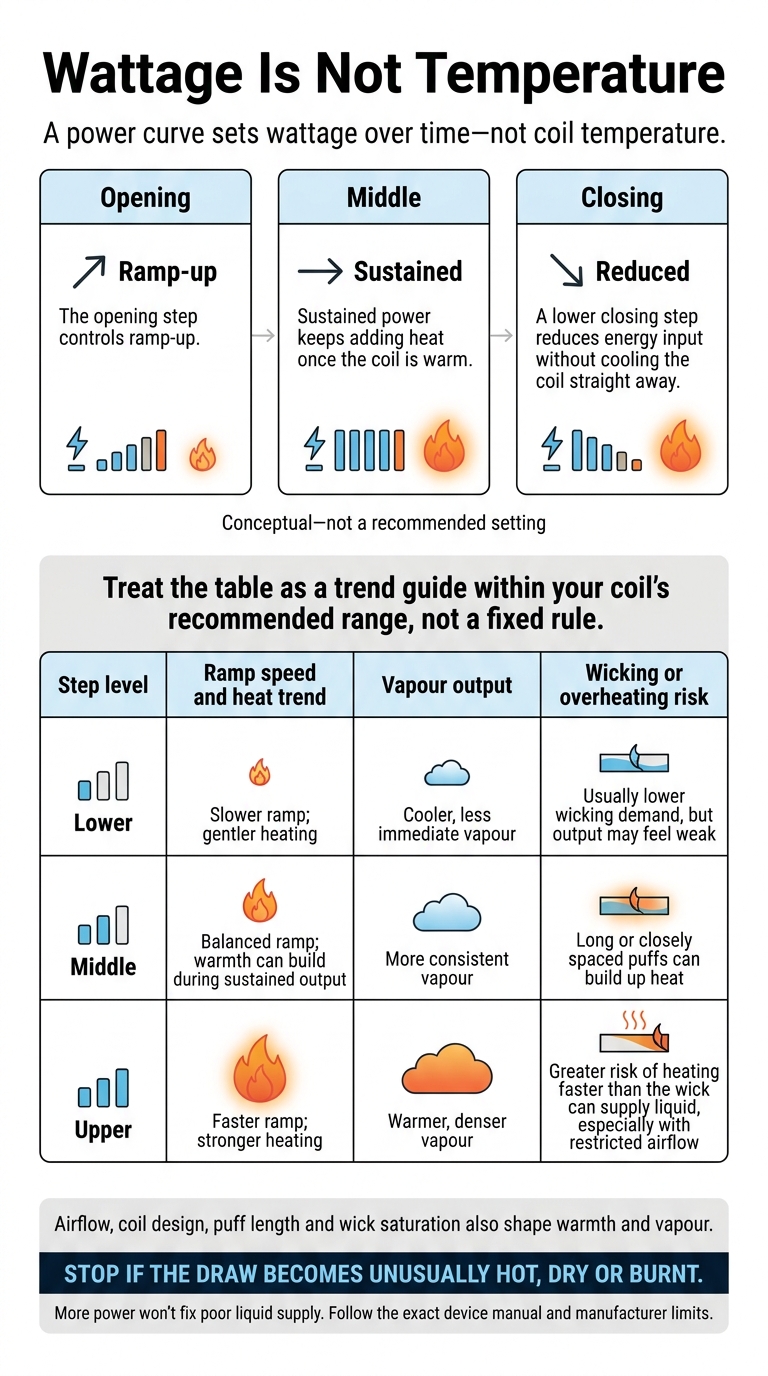
How Power Curves Affect Coil Heat
Once you’ve set the curve, each wattage step affects how the coil heats during a puff. The steps control heating speed, while airflow, coil design, puff length and wick saturation also shape warmth and vapour.
P = V²/R explains the electrical side of output, but it doesn’t define a safe setting on its own. Battery demand also depends on wattage, cell setup and chipset efficiency. Opening, middle and closing steps therefore feel different in use.
Opening, Middle and Closing Steps
The opening step controls ramp-up. Sustained power keeps adding heat once the coil is warm, while a lower closing step reduces energy input without cooling the coil straight away. Treat the table as a trend guide within your coil’s recommended range, not a fixed rule.
| Step level | Ramp speed and heat trend | Vapour output | Wicking or overheating risk |
|---|---|---|---|
| Lower | Slower ramp; gentler heating | Cooler, less immediate vapour | Usually lower wicking demand, but output may feel weak |
| Middle | Balanced ramp; warmth can build during sustained output | More consistent vapour | Long or closely spaced puffs can build up heat |
| Upper | Faster ramp; stronger heating | Warmer, denser vapour | Greater risk of heating faster than the wick can supply liquid, especially with restricted airflow |
Coil Design and Small Wattage Changes
Resistance, wire material, coil mass and mesh construction all affect how fast a coil responds. Within the manufacturer’s guidance, 1–3 W steps suit some mid- and high-power coils. Lower-power coils need smaller changes. Adjust one setting at a time, then let the wick resaturate between puffs before judging the result.
Fixing Weak Vapour, Harshness and Burnt Taste
- Weak vapour: Check wick saturation, liquid level and airflow before increasing power. If only ramp-up feels slow, try a modest increase to the opening step rather than the whole curve.
- Harsh draw: Lower the opening step if harshness starts immediately. If warmth builds during the puff, reduce sustained power or shorten the puff. Nicotine strength and e-liquid composition can also play a part.
- Burnt taste: Stop firing, let the device cool and check wick saturation. Replace a scorched or damaged coil instead of testing more settings. Stop using the device if it feels abnormally hot.
Once the curve feels right, check that your device supports it and passes safety checks.
Device Support and Safety Checks
Which Devices Support Power Curves?
Battery count does not tell you whether a device supports power curves. Check the exact model, board version and mode in the manual or software documentation. Look for ‘power curve’, ‘custom curve’, ‘wattage curve’, ‘preheat’, ‘boost’ or ‘custom firing profile’.
Preheat or boost alone does not confirm that you can edit a curve. If the manual lists only variable wattage, bypass or temperature control, do not assume curve editing is available.
| Device type | Curve availability | User adjustment | Main precaution |
|---|---|---|---|
| Regulated single-battery box mod | Available on some programmable chipsets | Wattage, timing steps and sometimes output limits | Stay within coil limits and the battery’s continuous discharge rating |
| Regulated dual-battery box mod | Available on some models; not guaranteed | Wattage and timing; some boards offer detailed profiles | Use correctly paired batteries as specified by the manufacturer |
| DNA-based regulated device | Depends on the Evolv board, profile and mode | May include detailed profiles or curve editing | Check that the exact board and mode allow curve editing |
| Firmware-enabled pod or pod-mod device | Some offer presets or boost; many lack editable curves | Often limited to power levels or fixed presets | Check the manual and compatible pod or coil |
Mechanical mods do not support power-curve firmware. Regulated devices can provide short-circuit, overheat and over-discharge cut-offs.
Menu labels vary, but the checks below apply to every device that supports curves. Supported hardware still needs a correctly fitted coil, stable resistance and matched batteries before you can use a curve safely.
What to Check Before Firing
Once you’ve confirmed curve support, check the atomiser, coil and battery. Make sure the tank or pod fits the device, and that the coil is compatible with that exact tank or pod family and fully installed.
Compare the displayed resistance with the coil’s stated value and the mod’s supported range. An unexpectedly high, very low, zero or unstable reading needs investigation – not repeated firing. Remove the atomiser, then inspect and reinstall the coil. Clean and dry the contacts as the manual permits. If the fault remains, replace suspect parts.
Prime the coil following the manufacturer’s instructions, including any soaking time. Check the liquid supply and airflow, then compare every saved curve step with the coil’s recommended wattage range. A curve cannot make an incompatible coil, poor fit or dry wick safe.
For removable batteries, use the specified cell type with a suitable continuous discharge rating. Check the wraps, top insulators, battery condition and polarity. Take damaged batteries out of service. Where paired batteries are required, use cells of the same model, age and condition, and keep the set together.
Follow the specified charging method, using an undamaged charger or cable. Never override protections. Stop using equipment if it has repeated faults, damaged wiring, liquid leaking into the electronics or unusual heat. Move hot equipment away from flammable materials only when safe.
Conclusion: Match the Curve to the Coil
A power curve sets wattage over time, not temperature. Coil design, airflow and liquid supply through the wick determine the result. Match the curve to the coil’s rated range and how you puff – not just its highest output.
Change one setting at a time, keeping each step within the coil’s recommended range. Take a few consistent puffs and note the results before adjusting again. If the flavour turns dry or burnt, stop and check the liquid level and wicking. More power won’t fix poor liquid supply. Test short puffs before increasing power further.
Use the manual for your exact model and official firmware. A customised curve does not replace battery safety instructions.
FAQs
Can I reuse my power curve after changing coils?
No – don’t reuse your previous power curve without checking the new coil. Each coil has its own resistance and wattage range. The same curve may work poorly or be unsafe.
Check the wattage range printed on the new coil. Even a brief spike above that range can scorch the wick and ruin the coil.
Start with a flat profile within the stated range. Then adjust in small 1–5 W increments to suit how the coil heats up.
What happens if my puff ends before the curve?
If your puff ends before the power curve finishes, the later points won’t take effect. Device behaviour varies, but most mods stop firing when you release the button. Each curve point covers a short interval, usually 0.5 or 1.0 second, so wattage output stops at whichever point you’ve reached when you end your puff.
Will a power curve drain my battery faster?
Yes, a power curve can drain your battery faster if it uses more power overall than your usual fixed-wattage setting. Programmed wattage spikes, such as a higher-power preheat at the start of a puff, draw more energy while they’re active.
Related Blog Posts
- How to Swap Vape Mod Panels Easily
- How to Update Vape Mod Firmware
- Power Curve Guide for Vape Mods
- Temperature Control Vaping: Starter Guide
{“@context”:”https://schema.org”,”@type”:”FAQPage”,”mainEntity”:[{“@type”:”Question”,”name”:”Can I reuse my power curve after changing coils?”,”acceptedAnswer”:{“@type”:”Answer”,”text”:”No – don’t reuse your previous power curve without checking the new coil. Each coil has its own resistance and wattage range. The same curve may work poorly or be unsafe. Check the wattage range printed on the new coil. Even a brief spike above that range can scorch the wick and ruin the coil. Start with a flat profile within the stated range. Then adjust in small 1–5 W increments to suit how the coil heats up.”}},{“@type”:”Question”,”name”:”What happens if my puff ends before the curve?”,”acceptedAnswer”:{“@type”:”Answer”,”text”:”If your puff ends before the power curve finishes, the later points won’t take effect. Device behaviour varies, but most mods stop firing when you release the button. Each curve point covers a short interval, usually 0.5 or 1.0 second, so wattage output stops at whichever point you’ve reached when you end your puff.”}},{“@type”:”Question”,”name”:”Will a power curve drain my battery faster?”,”acceptedAnswer”:{“@type”:”Answer”,”text”:”Yes, a power curve can drain your battery faster if it uses more power overall than your usual fixed-wattage setting. Programmed wattage spikes, such as a higher-power preheat at the start of a puff, draw more energy while they’re active.”}}]}
Frequently Asked Questions
Power curve firmware sets wattage over time rather than coil temperature. On a supported mod, it controls the opening, middle and end of a puff, but the exact menus vary by model and firmware version.
Check the exact mod manual and official firmware first, then start near the coil’s lower recommended wattage. Avoid a strong opening boost and change only one wattage or timing setting at a time.
No. Menus labelled Power Curve or VPC can work differently across chipsets, models and firmware versions. Confirm how the feature works in the exact device manual before changing settings.
Every curve segment must stay within the limits of the coil, mod and battery. Stable resistance, correct coil fit, suitable airflow and adequate liquid supply also matter; stop if the vape produces a dry or burnt flavour, unusual heat or repeated faults.
Power curve firmware controls wattage during different parts of a puff, so an opening segment may affect how power begins. It does not control coil temperature, and a strong opening boost should be avoided.
Make sure the batteries meet the manufacturer’s requirements and that the selected power stays within the mod and battery limits. Also check that the coil fits correctly and that resistance readings remain stable before using the curve.
Power Curve Firmware for Vape Mods is firmware information for supported devices, not a universal setting that applies to every mod. VapeShop.